


Keith McMillen BopPad Manual
PDF manual · 30 Pages
English



Quick check
Incorrect answer, please try again.
Chat with your Keith McMillen BopPad manual using AI
Get instant AI answers from your Keith McMillen BopPad manual
Ask anything about the Keith McMillen BopPad. Answers come from this manual, with the pages they are based on.
Ask a Question
Do you recommend BopPad?
Yes NoFrequently Asked Questions
No, you do not strictly need a computer. By using the optional MIDI Expander, you can send MIDI data to any device that accepts standard 5-pin MIDI connections. However, keep in mind that the BopPad has only one USB port, so you must choose between connecting to a computer or the MIDI Expander at any given time.
Is this answer helpful?
The BopPad is designed for versatility. You can play it with drumsticks, mallets, your bare hands, spoons, or almost any other object. The sensor technology is sensitive enough to detect nuances in how you strike the surface, allowing for a wide range of playing styles.
Is this answer helpful?
Probably not. During power-on calibration, ensure you are not touching the sensors, as pressure can cause stuck notes. Try a simple power cycle to reset the unit. If that fails, you can reinstall firmware via the Editor or send specific MIDI messages like CC 121 (Reset All Controllers) to recalibrate the device.
Is this answer helpful?
The BopPad is a MIDI controller and does not generate sound itself. It sends MIDI messages to control other sound-generating software or hardware. Ensure your DAW or synthesizer is set to receive MIDI input from the BopPad and that the correct patches or instruments are loaded.
Is this answer helpful?
Yes, you can use multiple BopPads simultaneously. To avoid confusion in your software, it is helpful to assign different presets to each device that send on different MIDI channels or trigger different notes and control messages.
Is this answer helpful?
For iOS devices, use an Apple Camera Connection Kit (USB to Lightning adapter). For Android devices, use a USB OTG cable. These accessories allow the BopPad to communicate directly with your tablet or smartphone for mobile music production.
Is this answer helpful?
Advantages and Disadvantages
Advantages

- Multi-dimensional sensing captures velocity, pressure, and strike position for highly expressive control
- Each of the four quadrants can output up to six separate MIDI notes plus additional control data
- Compatible with Mac, Windows, Linux, iOS, and Android via USB-C or optional MIDI Expander
- Includes powerful Desktop and Web Editors for deep customization of response curves and presets
- Supports multitouch for advanced finger drumming and simultaneous active note manipulation
Disadvantages

- Only one USB port limits connection to either a computer or MIDI Expander, not both at once
- Not all USB cables are created equal; poor quality cables can cause power or connectivity issues
- Requires basic understanding of MIDI concepts and terminology to fully utilize the device
- May require browser permission settings adjustments on Windows Chrome versions 58-59 for Web Editor
- Does not produce sound internally; requires external software or hardware to generate audio
Product Specification
Type
MIDI Controller
Keys
No
Pads
4, Aftertouch
Knobs
No
Faders
No
Connections
1x USB-A (USB to Device), 1x USB-B (USB to Host), MIDI In/Out
Dimensions
10.63 x 0.39 x 10.63 in (WxDxH)
Weight
2.20 lbs
Product Description
Discover the Keith McMillen BopPad: The Ultimate Percussive MIDI Controller
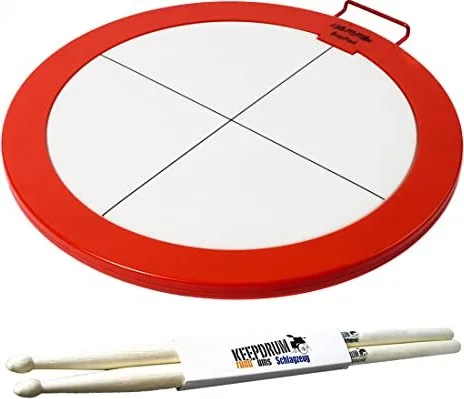
Welcome to a new era of musical expression with the Keith McMillen BopPad. This innovative instrument redefines how musicians interact with digital audio workstations and hardware synthesizers. Designed for drummers, electronic artists, and sound designers, the BopPad offers a unique playing surface divided into four distinct quadrants that respond to strikes from hands, sticks, mallets, or any object you can imagine.
The core of the BopPad experience lies in its multi-dimensional control capabilities. Unlike traditional drum pads that only register velocity, this device captures complex data including pressure, radius (where you hit), and initial strike location. This allows for nuanced performance where a single quadrant can send up to six different MIDI notes simultaneously, along with various control messages like pitch bend, channel pressure, and continuous controllers. Whether you are triggering drum samples, modulating synth filters, or sending dynamic automation data, the BopPad provides the precision needed for professional performances.
Connectivity is seamless thanks to its Class Compliant MIDI design. You can connect directly to Mac or Windows computers via USB-C, or link to tablets and mobile devices using appropriate adapters. For those working with legacy gear, the optional MIDI Expander allows connection to traditional 5-pin DIN MIDI hardware. The included software editor, available as both a desktop application and a web-based tool, lets you customize every aspect of your setup. You can adjust sensitivity, define velocity curves, map specific sensors to MIDI messages, and save your configurations to onboard presets for instant recall during live shows.
With factory presets tailored for different playing styles like stick drumming, hand percussion, or unison modes, the BopPad is ready to use right out of the box. It supports multitouch technology, enabling complex finger drumming techniques without losing track of active hits. Safety features include electromagnetic field warnings for users with pacemakers and guidelines against use in explosive atmospheres. Mastering the BopPad opens a world of sonic possibilities, making it an essential tool for modern music production and live performance.
Search for 67,706 Manuals online


Type-in Brand or Model