
KEF LSX II Manual
PDF manual · 104 Pages
English



Quick check
Incorrect answer, please try again.
LSX II Maintenance Schedule
Unplug the speakers and wipe surfaces with a lint-free cloth. Use alcohol-free cleaner for stubborn stains.
Use an antistatic cleaner and soft sponge on the speaker membrane. Apply light pressure to avoid damage.
Ask a Question
Do you recommend LSX II?
Yes NoFrequently Asked Questions
The KEF LSX II is a compact active wireless stereo speaker system. It combines built-in amplification, network streaming, app control, TV connectivity, computer audio, Bluetooth, and analog inputs in a two-speaker setup.
Is this answer helpful?
The system supports AirPlay 2, Chromecast, Spotify Connect, TIDAL Connect, QPlay, UPnP playback, and compatible Roon playback. Through KEF Connect, supported services include Amazon Music, Deezer, Qobuz, TIDAL, internet radio, and podcasts.
Is this answer helpful?
Yes. Connect the primary speaker to a TV's HDMI ARC port for TV audio. Enable ARC or CEC on the TV and set digital output to PCM. Optical input is also available for compatible TVs, consoles, and media devices.
Is this answer helpful?
Place them on stable, vibration-free surfaces, one to eight meters apart. Aim for a similar distance from each speaker to the listening position, creating an approximate equilateral triangle. The app can swap left and right channels if needed.
Is this answer helpful?
The speakers connect wirelessly by default at 48 kHz/24-bit. Using the supplied speaker cable enables up to 96 kHz/24-bit operation and is recommended if wireless interference causes sound interruptions.
Is this answer helpful?
Yes. KEF Connect offers normal and expert EQ modes. Settings can account for desk or wall placement, room size, room character, treble level, bass extension, stereo balance, and optional subwoofer crossover, gain, polarity, and delay.
Is this answer helpful?
Advantages and Disadvantages
Advantages

- Compact stereo system with natural, room-filling sound and KEF Uni-Q driver technology.
- Wide connectivity includes Wi-Fi, Bluetooth, HDMI ARC, optical, USB-C, AUX, Ethernet, and subwoofer output.
- Supports AirPlay 2, Chromecast, Spotify Connect, TIDAL Connect, QPlay, UPnP, and compatible Roon playback.
- KEF Connect app provides setup, source control, EQ profiles, streaming access, firmware updates, and network diagnostics.
- Wired speaker mode supports 96 kHz/24-bit playback and can reduce interference-related dropouts.
Disadvantages

- Initial setup requires connection to a local network before Bluetooth, HDMI, optical, USB, or AUX use.
- Wireless link between speakers is limited to 48 kHz/24-bit; higher resolution requires a cable.
- Reliable high-resolution streaming depends on router quality and a stable 5 GHz Wi-Fi environment.
- USB-C cannot provide computer audio when configured to power a KW-1 wireless subwoofer transmitter.
Product Specification
Power
200 W RMS
Tuner
Internet radio
Streaming Clients
Amazon Music, Apple AirPlay 2, Apple Music, Deezer, Google Cast, Pandora, Qobuz, Roon, Spotify, Tidal
Voice Assistants
Apple Siri, Google Assistant
Audio Connections
AUX In (3.5 mm jack), Digital Audio In (optical), Sub Out (RCA)
Additional Connections
USB-C, HDMI, RJ-45
Wireless
Bluetooth 4.2, Wi-Fi 5 (WLAN 802.11a/b/g/n/ac)
Power Supply
AC power
Special Features
MQA
Dimensions
6.1 x 9.45 x 7.09 in (W x H x D)
Weight
15.87 lb
Product Description
KEF LSX II - Read, Download & Print Free
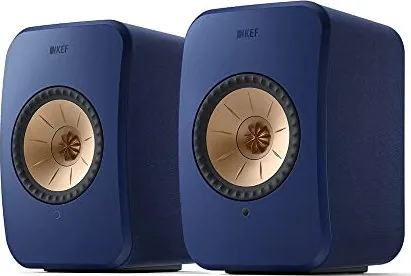
The KEF LSX II is a compact wireless Hi-Fi speaker system designed for listeners who want detailed, room-filling sound without building a large separates system. Building on the original LSX, this upgraded stereo pair combines KEF acoustic engineering with the W2 streaming platform, broad connectivity, and flexible control through the KEF Connect app. Its small footprint makes it a strong fit for desks, shelves, TV setups, and smaller living spaces.
At the center of the experience is KEF's Uni-Q driver technology, created to deliver a natural, focused stereo image. Place the speakers one to eight meters apart and form an approximate triangle with the listening position for the best results. The primary speaker is assigned to the right channel by default, though channel positions can be swapped in the app. The pair can connect wirelessly at 48 kHz/24-bit, or through the supplied cable for up to 96 kHz/24-bit playback and improved stability in areas with wireless interference.
Streaming and smart control
The LSX II supports a wide range of listening methods. Stream over Wi-Fi with AirPlay 2, Chromecast, Spotify Connect, TIDAL Connect, QPlay, Roon Ready compatibility, UPnP playback, and the KEF Connect app. The app also provides access to supported services including Amazon Music, Deezer, Qobuz, TIDAL, internet radio, and podcasts. Multi-room playback is available through AirPlay 2, Chromecast, and compatible Roon zone grouping.
Setup starts by connecting both speakers to power and adding them to a local Wi-Fi network through KEF Connect. A dual-band 2.4 GHz or 5 GHz router is supported, while 5 GHz is recommended for dependable high-resolution streaming. The app also handles source selection, playback, volume, firmware updates, network checks, speaker preferences, and personalized sound profiles.
Connections for music, computers, and TV
Beyond wireless playback, the KEF LSX II works as a versatile home entertainment hub. HDMI ARC lets the speakers receive TV audio and, with HDMI CEC enabled, allows volume changes from a compatible television remote. Optical input supports devices such as game consoles and media players, while USB-C connects a Mac or Windows computer for audio up to 192 kHz/24-bit. A 3.5 mm AUX input accommodates analog sources, and the subwoofer output makes it easy to add deeper low-frequency performance.
Bluetooth pairing offers a convenient option for nearby phones and computers. The included remote provides direct access to power, mute, volume, playback, and source switching, while LED colors indicate the active input and operating status.
Notes
- Use PCM output for TV connections through HDMI ARC or optical input.
- A wired speaker link is recommended when interference causes dropouts.
- EQ profiles can tailor bass, treble, placement, room response, balance, and subwoofer integration.
Search for 67,732 Manuals online


Type-in Brand or Model