

KEBA KeContact P30 PV Edition Manual
PDF manual · 22 Pages
English



Quick check
Incorrect answer, please try again.
Chat with your KEBA KeContact P30 PV Edition manual using AI
Get instant AI answers from your KEBA KeContact P30 PV Edition manual
Ask anything about the KEBA KeContact P30 PV Edition. Answers come from this manual, with the pages they are based on.
KeContact P30 PV Edition Maintenance Schedule
The owner must regularly check the charging socket, plug, and cable for defects, wear, or dirt. Also inspect the housing for damage.
Use a soft, damp cloth for cleaning. For stubborn dirt, use a mild, solvent-free, non-abrasive cleaner without anionic surfactants.
Ask a Question
Do you recommend KeContact P30 PV Edition?
Yes NoFrequently Asked Questions
First, reboot the station using the service button to enter teaching mode. Hold the master card against the reader until confirmed, then present the new client card within three seconds. Confirm again with the master card to complete the process.
Is this answer helpful?
Yes, by default the station allows charging without authorization. However, you can configure it to require RFID authentication by teaching in a master card and resetting the settings via the service button.
Is this answer helpful?
A flashing red light signifies a malfunction. You should unplug the cable, switch off the supply voltage, wait briefly, and restart the unit. If the issue persists, contact your service partner.
Is this answer helpful?
Absolutely. The KEBA KeContact P30 is designed for indoor and outdoor environments. It must be mounted vertically on a stable, flat surface like brick or concrete to ensure proper operation.
Is this answer helpful?
Regular visual inspections are recommended to check for damage or soiling. Clean with a soft damp cloth and mild solvent-free agent. Never use pressure washers or abrasive tools.
Is this answer helpful?
Certain variants with calibratable energy meters meet MID standards for accurate billing. These units display specific firmware and checksum data to ensure compliance with national regulations.
Is this answer helpful?
Advantages and Disadvantages
Advantages

- Integrates seamlessly with photovoltaic systems for cost-effective charging
- Offers flexible authorization options including RFID and external inputs
- Durable construction suitable for both indoor and outdoor vertical mounting
- Clear visual feedback system using multi-color LED bar indicators
- Minimal maintenance requirements with easy-to-clean surfaces
Disadvantages

- Requires professional installation by a qualified electrician
- No built-in mains disconnector; relies on external circuit breakers
- Cannot delete individual RFID cards once taught in
- Optional display and cable variants increase initial complexity
- Unauthorized modifications void the warranty immediately
Product Specification
Number of charging points
1
Charging mode
IEC 61851-1 (Mode 3)
Number of phases
3-phase
Voltage
400V (AC)
Connection type
Type 2
Installation
Wall-mounted
Authorization
App
Interfaces
Modbus TCP, RJ-45, UDP, OCPP, USB, Wi-Fi
Features
Display, energy meter
Protection class
IP54
Product Description
Unlocking Efficient EV Charging with the KEBA KeContact P30 PV Edition
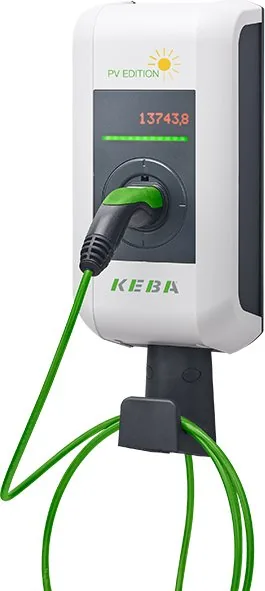
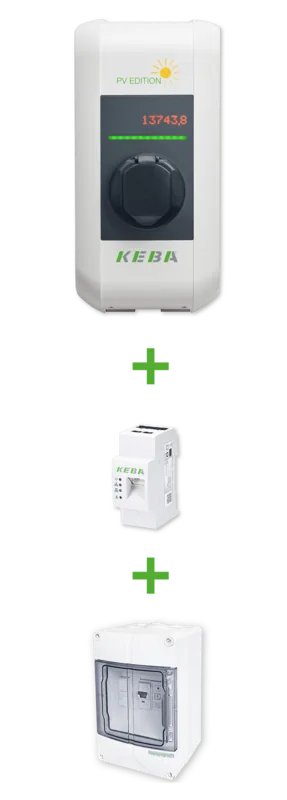
The KEBA KeContact P30 PV Edition stands as a pinnacle of innovation in electric vehicle charging infrastructure. Designed for both residential and commercial applications, this robust unit seamlessly integrates solar energy management to optimize charging costs and efficiency. Whether installed indoors or outdoors, the station offers versatility through its durable housing, capable of withstanding various environmental conditions while maintaining a sleek aesthetic.
At the heart of the P30 lies its intelligent operation system. The device features a dynamic LED bar that provides real-time status updates through distinct color codes. From flashing green indicators signaling readiness to blue lights awaiting authorization, users receive clear visual feedback at every step. For those requiring detailed data, optional dot matrix displays offer insights into total energy transmitted, firmware versions, and MID-compliant billing information.
Security and access control are paramount, and the P30 delivers through advanced RFID technology. Users can teach up to twenty unique cards to the system, ensuring that only authorized personnel can initiate charging sessions. The process is straightforward: a master card configures the station, allowing for the enrollment of individual client cards. This flexibility supports complex environments where multiple drivers share a single charging point without compromising safety or accountability.
Safety remains a core principle throughout the design. The unit includes comprehensive error diagnosis capabilities, guiding users through troubleshooting steps via the LED interface. Regular maintenance is minimal, involving simple visual inspections and gentle cleaning with non-abrasive materials. The manual emphasizes strict adherence to installation regulations, requiring qualified electricians for setup to prevent electrical hazards. With options ranging from integrated cables to socket configurations, the KEBA KeContact P30 PV Edition adapts to diverse needs while promising reliability and performance.
Important Notes
- Always ensure the power supply is disconnected before accessing internal components.
- Do not use aggressive solvents or water jets when cleaning the exterior.
- Verify local regulations regarding calibratable energy meters before deployment.
Search for 67,706 Manuals online


Type-in Brand or Model