
Karcher WRE 18-55 Battery Manual
PDF manual · 192 Pages
English



Quick check
Incorrect answer, please try again.
Chat with your Karcher WRE 18-55 Battery manual using AI
Get instant AI answers from your Karcher WRE 18-55 Battery manual
Ask anything about the Karcher WRE 18-55 Battery. Answers come from this manual, with the pages they are based on.
WRE 18-55 Battery Maintenance Schedule
Regularly check the device for visible damage. Do not operate the device if you discover any damage.
Replace the bristle strip when the bristles show signs of wear to ensure effective cleaning results.
Replace the protective cover if it shows signs of wear such as cracks or fractures to prevent injury from flying particles.
Check the battery mount and contacts for soiling before inserting the battery and clean them as necessary.
Remove plant residue with a brush and clean the device with a moist cloth. Do not use high-pressure water or aggressive detergents.
Ask a Question
Do you recommend WRE 18-55 Battery?
Yes NoDo you recommend WRE 18-55 Battery?
Yes NoFrequently Asked Questions
It is designed for surface removal of moss and weeds from joints and hard outdoor surfaces, including block paving, washed concrete slabs, and tiles.
Is this answer helpful?
No. The rotating nylon bristles remove visible weeds and moss at the surface, but they do not remove roots. Regrowth may occur and stubborn growth may need repeated passes.
Is this answer helpful?
The tool uses the Karcher 18 V Battery Power system. Check the selected product version to confirm whether a battery and charger are included.
Is this answer helpful?
Guide it slowly over the surface in a horizontal, slightly angled position without pressure. Do not hold it flat against the ground, scrub aggressively, or use the guard as a scraper.
Is this answer helpful?
The tool is intended for outdoor use, but it should be protected from rain and spray water. Follow the battery safety instructions and avoid unsafe working conditions.
Is this answer helpful?
Remove the battery first. Brush away plant residue and wipe the unit with a damp cloth. Do not use a hose, pressure washer, aggressive cleaner, or strike the brush on the ground.
Is this answer helpful?
Advantages and Disadvantages
Advantages

- Cordless 18 V Battery Power design supports flexible outdoor cleaning.
- Telescopic handle and pivoting head help suit different heights and awkward areas.
- Rotating nylon bristles remove surface moss and weeds from joints and hard surfaces.
- Replaceable bristle strip supports continued use when bristles wear down.
- Protective hood and trigger lockout add practical safety features.
Disadvantages

- Removes weeds at the surface only and does not remove roots.
- Cleaning results can vary with weather, moisture, and surface conditions.
- Vertical use may wear the bristle strip more quickly.
- Loose joint material can be removed while cleaning paving joints.
- Battery and charger inclusion depends on the selected version.
Product Specification
No-load speed
2,300-2,800/min
Features
Additional handle, telescopic, speed control
Weight
6.39 lb
Product Description
Karcher WRE 18-55 Battery Cordless Joint Brush - Read, Download & Print Free
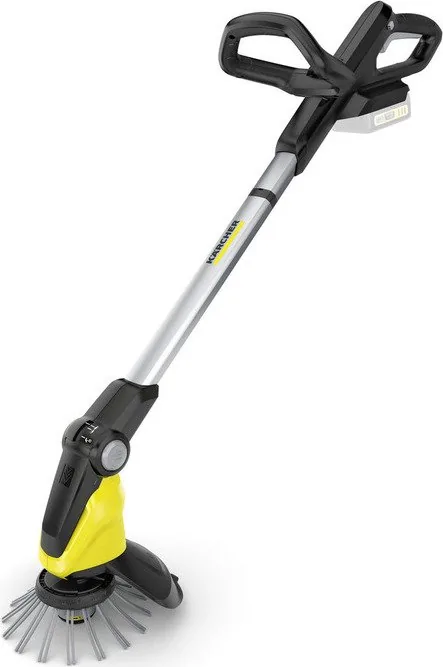
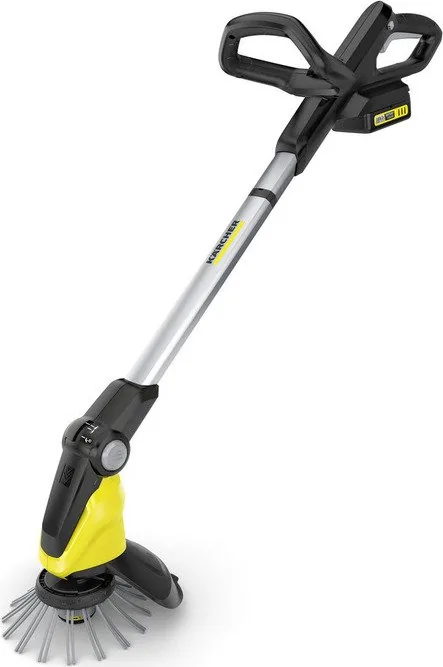
Keeping patios, paths, and paved areas neat can be a time-consuming task, especially when moss and weeds settle into joints. The Karcher WRE 18-55 Battery Cordless Joint Brush is designed to make this regular outdoor maintenance simpler. Its rotating nylon bristle strip removes surface growth from joints and hard surfaces such as block paving, washed concrete slabs, and tiles without relying on harsh weed killers.
Cordless cleaning for outdoor spaces
Powered by the Karcher 18 V Battery Power system, this cordless joint brush offers freedom of movement around gardens, driveways, terraces, and paths. The rotating brush operates at 2,300 to 2,800 rpm and has a 180 mm brush diameter, providing targeted cleaning performance along paving joints. It is intended for private household use and should be used outdoors only.
The nylon bristles are designed for gentle, surface-level weed and moss removal. This makes the tool a practical option for refreshing hard landscaping where a conventional scraper would be slow and tiring. For stubborn growth, several slow passes may be needed. Results can vary with moisture, temperature, and the condition of the surface.
Adjustable design for comfortable handling
The Karcher WRE 18-55 Battery Cordless Joint Brush includes a telescopic handle and a pivoting cleaning head. These adjustments help users set a more comfortable working position and reach awkward areas, including beneath benches or other low outdoor furniture. A second handle supports controlled guidance while working along joints.
For best results, guide the brush slowly across the surface at a slight angle without applying excessive pressure. The tool is not intended for aggressive scrubbing or scraping, and it removes weeds at the surface rather than pulling out their roots. Loose joint material may also be displaced during cleaning, so care is advisable on older or lightly filled paving.
Safety and maintenance essentials
A protective hood helps reduce the risk of particles being thrown toward the user or bystanders. Wear safety glasses and suitable hearing protection, keep people and animals away from the work area, and inspect the surface for stones, sand, or loose debris before starting. Remove the battery during breaks, cleaning, and maintenance.
The bristle strip is replaceable when worn, helping maintain cleaning performance over time. Plant residue can be brushed away, while the main unit should be wiped with a damp cloth. Avoid hoses, pressure washers, and aggressive cleaners. Store the brush hanging from its handle or resting on the edge of its protective cover, never directly on the bristles.
Notes
- Use only with an intact protective hood.
- Check battery compatibility and included items before purchase.
- Replace worn bristles when cleaning results become less effective.
Search for 67,732 Manuals online


Type-in Brand or Model