
Jura ENA 8 Manual
PDF manual · 33 Pages
English


Quick check
Incorrect answer, please try again.
Chat with your Jura ENA 8 manual using AI
Get instant AI answers from your Jura ENA 8 manual
Ask anything about the Jura ENA 8. Answers come from this manual, with the pages they are based on.
ENA 8 Maintenance Schedule
Remove the water tank and rinse it with cold water. Fill it with fresh, cold water and reinsert it to ensure hygiene.
Pull out the drip tray, empty the coffee grounds container and drip tray, and rinse both with warm water while the machine is on.
Run the automatic milk system cleaning programme using JURA cleaner and the supplied container if milk was prepared.
Remove the milk pipe, cover, and milk system from the dual spout. Rinse all parts under running water or soak in cleaner solution.
For hygiene reasons, change the milk pipe and interchangeable milk spout approximately every 3 months.
The machine prompts for cleaning after approximately 160 preparations or 80 switch-on rinses. Use a JURA cleaning tablet.
Perform descaling when the machine prompts you due to limescale buildup. This depends on water hardness settings.
Replace the CLARIS Smart/Smart mini filter when the machine indicates the filter is no longer working (symbol turns red).
Fill the tank with water and dissolve 3 JURA descaling tablets. Leave for several hours, then rinse thoroughly.
Switch off the machine, remove the aroma cover, and clean the inside of the bean container with a soft, dry cloth.
Free maintenance reminders
Timed to your purchase date. Always free, unsubscribe anytime.
Ask a Question
Do you recommend ENA 8?
Yes NoFrequently Asked Questions
The ENA 8 prepares espresso, coffee, two espressos, two coffees, Caffe Barista, espresso doppio, hot water, cappuccino, latte macchiato, flat white, and cortado. It can also prepare many coffee drinks using pre-ground coffee.
Is this answer helpful?
Yes. Select the ground-coffee option, add no more than one level measuring spoon through the funnel, then choose the drink. This is useful for decaffeinated coffee or a different blend. Avoid overly fine grounds, which may restrict flow.
Is this answer helpful?
Connect the milk tube to the combination spout and place its other end in a milk container or cooler. Cold milk at about 4-8 C is recommended for better foam. The machine automatically or manually rinses the milk system after use, depending on settings.
Is this answer helpful?
Clean the milk system daily whenever milk has been prepared. Rinse the milk tube regularly and disassemble the combination spout if foam becomes weak or milk splatters. Regular cleaning supports hygiene and consistent milk texture.
Is this answer helpful?
Without a filter, the machine will request descaling based on water hardness and use. When a CLARIS Smart filter is installed and replaced as prompted, the machine does not request its normal descaling program. The water tank may still need occasional descaling.
Is this answer helpful?
Coffee strength and beverage volume can be changed during preparation or saved in product settings. Grind size is adjusted with the grinder ring only while the grinder is operating. A coarser setting can help if coffee flows too slowly.
Is this answer helpful?
Advantages and Disadvantages
Advantages

- Compact automatic machine with a 1.1-liter tank, 125 g bean hopper, and adjustable combination spout.
- Makes espresso, coffee, double drinks, hot water, and several milk specialties at the touch of a screen.
- Speciality Selection offers Extra Shot intensity and a ground-coffee option for decaf or alternative beans.
- Jura Cockpit provides maintenance prompts, customizable settings, and optional app connectivity with WiFi Connect.
- CLARIS Smart filtration can reduce the need for machine descaling when used correctly.
Disadvantages

- Milk system requires daily cleaning after milk drinks, plus regular rinsing and occasional disassembly.
- WiFi control requires the separately available JURA WiFi Connect accessory.
- The 1.1-liter water tank and 125 g bean hopper may need frequent refilling in busy households.
- Only untreated roasted beans should be used; flavored or caramelized beans can damage the grinder.
- Original JURA cleaning, milk-system, filter, and descaling products are recommended for care programs.
Product Specification
Power
1,450 W
Pump pressure
217.56 psi
Coffee system
Coffee beans, ground coffee
Grinder
Adjustable grinder
Water amount
Adjustable
Water tank capacity
37.2 fl oz
Bean hopper capacity
4.41 oz
Coffee grounds container capacity
10 servings
Product Description
Jura ENA 8 Manual: Compact Coffee Convenience at Home
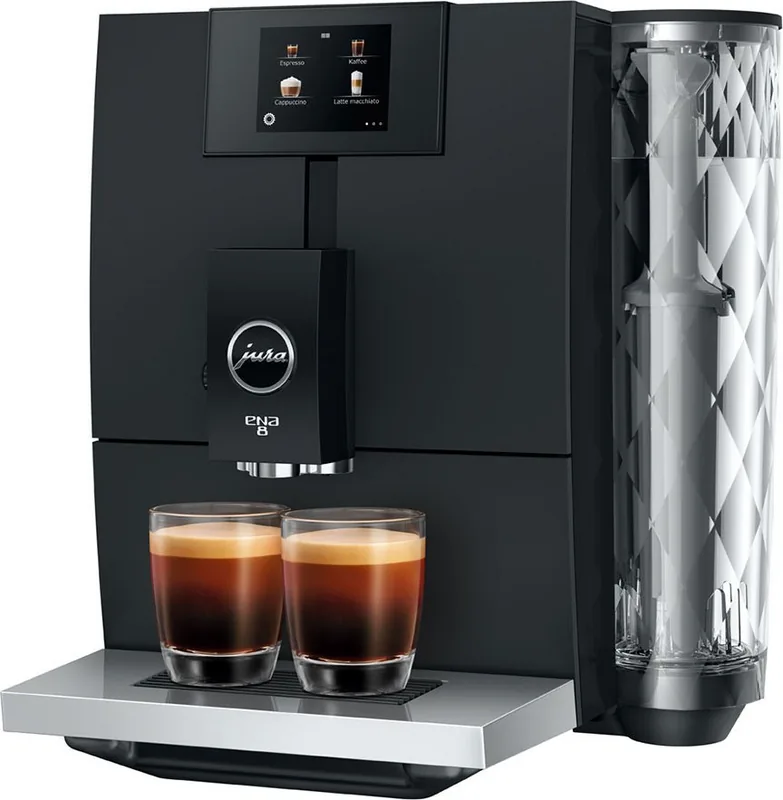
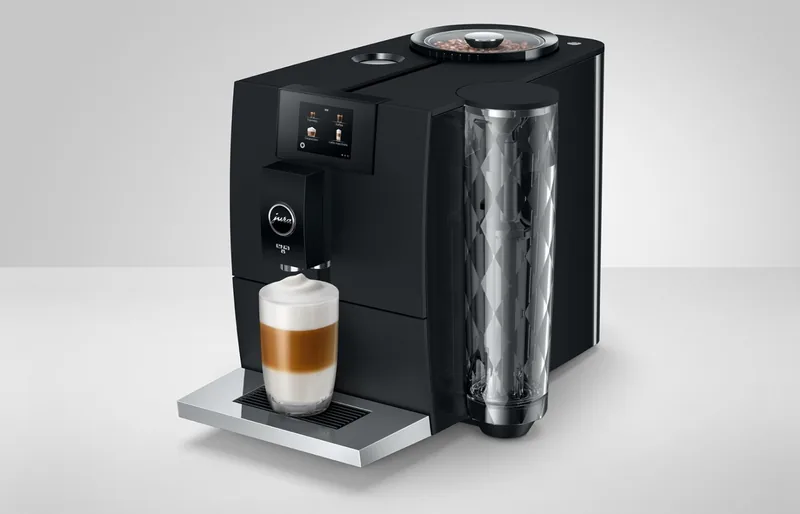
The Jura ENA 8 is a compact automatic coffee machine designed for people who want cafe-style drinks without giving up valuable kitchen space. The Jura ENA 8 Manual highlights its intuitive touch display, adjustable combination spout, aroma-preserving bean container, and integrated grinder. With a 1.1-liter water tank and 125 g bean capacity, it is well suited to everyday home coffee routines.
Coffee specialties at the touch of a button
This machine prepares espresso, coffee, double espresso, double coffee, Caffe Barista, and espresso doppio. It also creates popular milk-based favorites including cappuccino, latte macchiato, flat white, and cortado. The height-adjustable combination spout helps accommodate different cup and glass sizes, while the HP1 milk system is designed to produce smooth, fine-pored milk foam.
For a stronger result, the Speciality Selection menu includes an Extra Shot option for selected milk drinks. This prepares the beverage through two brewing cycles for a fuller coffee character. A ground-coffee funnel also gives users the flexibility to prepare a decaffeinated or alternative coffee without emptying the bean hopper.
Personalized settings and simple operation
The touchscreen makes daily use straightforward. Users can change coffee strength and beverage volume during preparation, or open product settings to adjust grinding, strength, volume, and temperature more permanently. The grinder can be adjusted while it is running, allowing the grind to be matched to the roast and preferred flow rate.
The Jura Cockpit centralizes care alerts and machine settings. It supports options such as language selection, water hardness, volume units, automatic shutoff timing, milk-system rinse behavior, and factory reset. With an optional JURA WiFi Connect accessory, the ENA 8 can also work with the J.O.E. mobile app.
Maintenance for dependable flavor
Consistent maintenance is essential for clean operation and reliable coffee quality. The machine prompts users when cleaning, descaling, filter replacement, or milk-system cleaning is needed. A CLARIS Smart filter can reduce the need for machine descaling, while the automatic milk-system rinse helps after milk preparation. Daily cleaning of milk-contact parts remains important for hygiene and foam performance.
Note: Use fresh, cold, still water and untreated roasted coffee beans. Avoid flavored, caramelized, or sugar-coated beans, as they may damage the grinder.
Note: Empty the drip tray and coffee grounds container while the machine is switched on so the grounds counter resets correctly.
Search for 67,706 Manuals online


Type-in Brand or Model