
Jupio LUC0060 Manual
PDF manual · 1 Pages
English


Quick check
Incorrect answer, please try again.
Chat with your Jupio LUC0060 manual using AI
Get instant AI answers from your Jupio LUC0060 manual
Ask anything about the Jupio LUC0060. Answers come from this manual, with the pages they are based on.
Ask a Question
Do you recommend LUC0060?
Yes NoFrequently Asked Questions
Yes, two batteries must be inserted into the AA/AAA slot. The device will charge both simultaneously once the power is connected.
Is this answer helpful?
Yes, the charger includes automatic voltage change from 100V to 240V. This allows you to use it globally without a converter.
Is this answer helpful?
Unplug when not in use and avoid exposing the device to rain. Do not disassemble the charger or operate it if damaged.
Is this answer helpful?
Slide the door open, insert the battery, close it, and adjust the orange sliders to match the contacts. The LCD shows the progress.
Is this answer helpful?
Yes, the USB output port allows charging for tablets, smartphones, and mp3 players directly from the charger.
Is this answer helpful?
No, Lithium Battery packs and AA or AAA batteries cannot be charged together for safety reasons.
Is this answer helpful?
Advantages and Disadvantages
Advantages

- LCD screen shows charging percentage in real time.
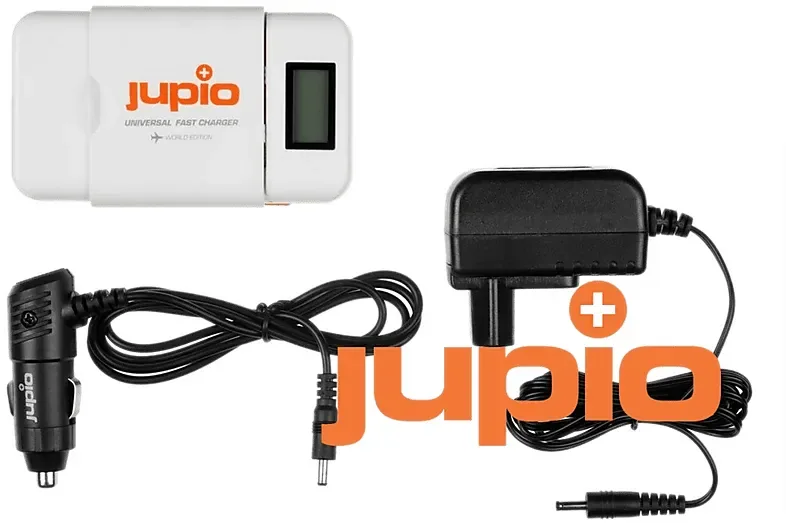
- Includes 12V car charger for travel convenience.
- Charges AA/AAA batteries and Li-ion packs.
- Automatic voltage change works globally.
Disadvantages

- Requires orange slider adjustment for Li-ion connection.
- Cannot charge mixed battery types at same time.
- Risk of damage if used with data pins.
- Indoor use only due to moisture restrictions.
Product Specification
Compatibility
AA, AAA
Charging Slots
2x Cylindrical Cells (2x AA, 2x AAA)
Charging Current
750-850 mA
Features
Display
Dimensions
4.33 x 2.56 x 1.20 inches (L x W x H)
Weight
0.22 lbs
Product Description
Jupio Universal Fast Charger Overview
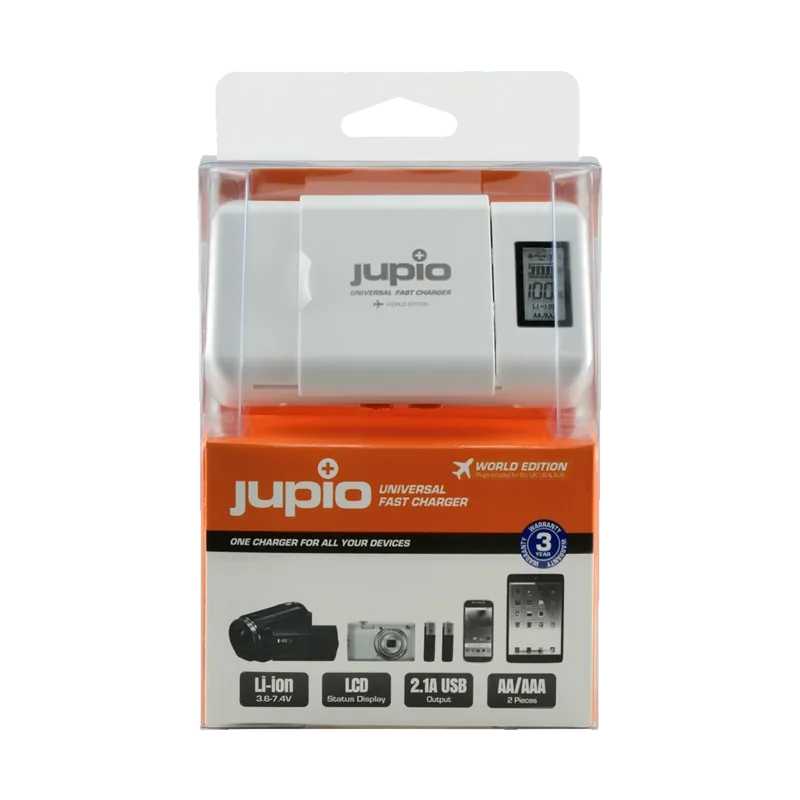
Welcome to the world of reliable electronic power solutions today. The Jupio Universal Fast Charger - World Edition Manual highlights the features of this versatile device you own now. You have secured an outstanding fast charger designed for modern digital needs effectively. It specifically targets Lithium-ion rechargeable battery packs for cameras securely. Compatibility extends to digital cameras and camcorders easily. It handles 3.6V or 3.7V battery packs efficiently worldwide. It also supports higher voltage 7.2V and 7.4V packs without issues. Mobile phone Li-ion batteries work well too with this unit.
Key Features and Benefits
The device includes a clear LCD screen for monitoring. This screen displays the current charging mode instantly. A 100 percent indicator shows completion clearly and simply. Automatic maximum battery voltage cut off prevents overcharging risks. A 12 volt car charger is included for travel convenience globally. Reverse polarity protection works for lithium packs safely. Automatic voltage change covers 100 to 240V everywhere you go. You can charge two AA or AAA batteries simultaneously easily. A USB output port charges tablets and phones efficiently.
Operating Instructions and Usage
Plug the adaptor into a wall outlet safely. Connect it securely to the charger unit for power. Slide the door to the left for battery insertion. Insert the AA or AAA batteries correctly into slots. Ensure two batteries are always inserted for charging. For Li-ion packs slide the door open too. Insert the pack and close the door securely. Move the orange sliders on the side of case. Adjust contact needles to match plus and minus signs. The LCD indicator shows the percentage complete for you. USB charging works for compatible external devices easily. Unplug the adaptor after charging finishes completely.
Safety Procedures and Care
Read instructions carefully before starting operation. Only use Li-ion rechargeable batteries in the main slot. Other types cause injury and damage to charger. Do not expose the charger to rain or moisture ever. Designed for indoor use only and environment. Unplug when not in use frequently for safety. Do not operate if subjected to shock or damage. Do not disassemble the charger internally for repair. Cleaning uses a soft cloth without chemicals safely. Lithium Battery packs and AA batteries charge cannot mix. Pay attention during usage for longevity of device.
Status Indicator Status
AA or AAA mode lights the dedicated icon clearly. Li-ion charging shows real time percentage display. The USB symbol lights during external charging sessions. This device ensures your power is ready anytime. It supports global travel with voltage change capabilities. Protect your investment with proper maintenance habits.
Notes
Check compatibility before purchase. This list is a summary.
Search for 67,706 Manuals online


Type-in Brand or Model