
Joy-iT JT-DMSO2D72 Manual
PDF manual · 28 Pages
English



Quick check
Incorrect answer, please try again.
Chat with your Joy-iT JT-DMSO2D72 manual using AI
Get instant AI answers from your Joy-iT JT-DMSO2D72 manual
Ask anything about the Joy-iT JT-DMSO2D72. Answers come from this manual, with the pages they are based on.
JT-DMSO2D72 Maintenance Schedule
If unused for more than 6 months, charge batteries to 50%-70%, remove them from the instrument, and store them in a dry, cool environment.
Run Self Cal through the Utility menu whenever ambient temperature changes by more than 5C. Use no input signal and warm up for 20 minutes for better accuracy.
Examine the oscilloscope and probes as often as conditions require. Remove dust with a lint-free cloth; clean with a soft water-dampened cloth or 75% isopropyl alcohol.
Free maintenance reminders
Timed to your purchase date. Always free, unsubscribe anytime.
Ask a Question
Do you recommend JT-DMSO2D72?
Yes NoFrequently Asked Questions
The device supports a maximum real-time sampling rate of 250 MSa/s when using a single channel. When both channels are active, the rate drops to 125 MSa/s per channel.
Is this answer helpful?
Yes, you can create and upload arbitrary waveforms by connecting the device to a computer via USB and using the provided software to draw and transfer custom shapes.
Is this answer helpful?
Connect the probe to the Gen Out terminal set to 2V at 1kHz square wave. Adjust the variable capacitor on the probe until the displayed waveform matches the flat top standard shape.
Is this answer helpful?
The oscilloscope input is rated for 150V max, while the multimeter section handles up to 600V AC/DC. Always use appropriate probes and follow safety guidelines for high-voltage measurements.
Is this answer helpful?
Equipped with two 2600 mAh batteries, runtime varies based on usage intensity and backlight settings, but typically offers several hours of continuous operation under normal conditions.
Is this answer helpful?
Advantages and Disadvantages
Advantages

- Combines oscilloscope, signal generator, and multimeter in one portable unit
- High sampling rate of 250 MSa/s for accurate waveform capture
- Includes rechargeable batteries for extended off-grid usage
- Supports USB updates and data storage for modern workflow
- Bright color LCD display with adjustable brightness
Disadvantages

- Limited bandwidth of 70 MHz may not suit high-frequency RF work
- Single-channel operation limits simultaneous multi-signal comparison
- Battery life depends heavily on backlight usage and load
- Requires external PC software for arbitrary waveform creation
- No built-in WiFi or Bluetooth connectivity for remote access
Product Specification
Display
Japanese
Features
2-channel, 70 MHz bandwidth
Product Description
Joy-iT DMSO2D72: The Ultimate Portable 3-in-1 Electronics Lab
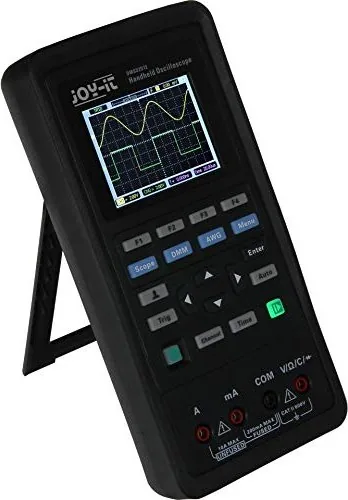
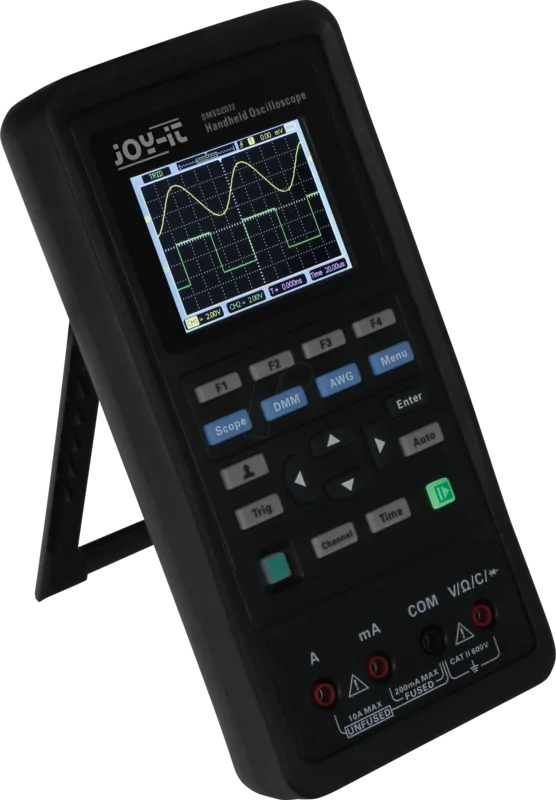
The Joy-iT DMSO2D72 stands as a versatile powerhouse for electronics enthusiasts and professionals alike. This compact device seamlessly integrates three essential tools into one lightweight unit: a digital oscilloscope, a signal generator, and a digital multimeter. Designed with portability in mind, it features a rugged chassis and a bright 2.6-inch TFT-LCD color display that ensures clear visibility even in challenging lighting conditions.
At the heart of its performance is a sampling rate of up to 250 MSa/s on a single channel, allowing users to capture fast transient events with precision. The device supports USB connectivity for easy firmware updates and data storage, making maintenance and workflow management effortless. Whether you are troubleshooting complex circuits or generating test signals, the intuitive interface simplifies operations with dedicated buttons for Scope, DMM, and AWG modes.
The built-in signal generator offers a wide range of waveforms including sine, square, triangle, and trapezoidal waves, along with support for arbitrary waveforms via software integration. For voltage and current analysis, the digital multimeter provides high-resolution measurements across multiple parameters like resistance, capacitance, and diode testing. With its edge-trigger capabilities and auto-set functions, capturing stable waveforms becomes an immediate task rather than a struggle.
Powering this all-in-one solution are two rechargeable 2600 mAh lithium batteries, ensuring long operational hours away from mains power. The device includes safety features such as overvoltage protection and automatic shutdown warnings when battery levels are critical. Its robust design meets industrial standards for vibration and shock resistance, making it ideal for fieldwork and laboratory environments.
Key Highlights
- Compact 3-in-1 design saves space and reduces equipment clutter.
- High-speed sampling captures detailed signal characteristics accurately.
- Customizable settings allow users to tailor the device to specific needs.
Important Notes
Always ensure proper grounding before connecting to live circuits to prevent electrical hazards. Regular calibration is recommended if the operating temperature changes significantly to maintain measurement accuracy.
Search for 67,706 Manuals online


Type-in Brand or Model