
JBL Quantum TWS Manual
PDF manual · 25 Pages
English


Quick check
Incorrect answer, please try again.
Chat with your JBL Quantum TWS manual using AI
Get instant AI answers from your JBL Quantum TWS manual
Ask anything about the JBL Quantum TWS. Answers come from this manual, with the pages they are based on.
Ask a Question
Do you recommend Quantum TWS?
Yes No
Sarah_Lopez
6 months ago
How is the microphone quality for gaming voice chat compared to regular phone calls?

TechFan_Joe
5 months ago
Can I adjust the bass levels and noise cancellation modes using the app?

Manual.ly
5 months ago
Yes, the companion app allows you to fully customize your audio experience. You can use the built-in equalizer to adjust bass, mids, and treble to your preference. Additionally, the app lets you toggle between different Active Noise Cancellation (ANC) modes, including full ANC, Ambient Aware, and TalkThru, ensuring you stay connected to your surroundings when needed.
eligendi_et
7 months ago
Does the JBL Quantum TWS include a USB-A to USB-C adapter for connecting the 2.4GHz dongle, and is it compatible with consoles like PS5?
Manual.ly
6 months ago
The JBL Quantum TWS includes a USB-C dongle for low-latency gaming on devices like the PS5. However, a USB-A to USB-C adapter is not included in the box; you may need to purchase one separately if your device only has USB-A ports or if the dongle protrudes too much. The headset connects seamlessly via the dongle for gaming and via Bluetooth for music, offering excellent sound quality and active noise cancellation.
gkeeling36
6 months ago
I am worried about the microphone quality for voice chat during gaming. Is it clear enough for Discord calls?
QuoPerspiciatis48
6 months ago
Are these earbuds suitable for low-latency gaming on PS5, PC, or Switch, and can I stay connected to my phone at the same time?
Manual.ly
6 months ago
Yes. The included USB-C 2.4 GHz dongle is designed for low-latency gaming and is reported to work well with devices such as PS5, PC, and Switch. You can also maintain a Bluetooth connection to your phone while using the dongle, which is useful for calls. Please note that devices with only USB-A ports may require a separate USB-A to USB-C adapter.
Mikael Sørensen
5 months ago
Can I control the volume directly on the earbuds, or do I need to use my phone, console, or computer?
Luca Moretti
4 months ago
Are these earbuds suitable for low-latency gaming on PS5 and PC, while also connecting to a phone?
Manual.ly
4 months ago
Yes. The included USB-C 2.4 GHz dongle is designed for low-latency gaming and is reported to work well with devices such as PS5 and PCs. You can also use Bluetooth with a phone, including switching or using the phone connection alongside the dongle connection where supported. For computers with only USB-A ports, a USB-C to USB-A adapter may be required and is not always included.
Frequently Asked Questions
The USB-C dongle is intended for compatible PCs, Macs, laptops, PlayStation 5, and Nintendo Switch systems. A separate USB-C-to-USB-A adapter may be used with supported USB-A ports, including some desktop and console setups. Compatibility with every USB port is not guaranteed.
Is this answer helpful?
Yes. The earbuds can connect to a phone through Bluetooth while also using the 2.4 GHz dongle for gaming audio. You can switch between game sound and phone music, and incoming calls can interrupt game audio for convenient call handling.
Is this answer helpful?
Bluetooth music playback is rated for up to 8 hours with ANC off or up to 6 hours with ANC on. With 2.4 GHz, both earbuds provide up to 4 hours without ANC or 3.5 hours with ANC. A 15-minute quick charge offers up to 3 hours of music playback.
Is this answer helpful?
Yes. JBL Quantum TWS includes Active Noise Cancelling to reduce distractions. It also offers Ambient Aware for hearing more of your surroundings and TalkThru for easier conversations without removing the earbuds.
Is this answer helpful?
Use the JBL Headphones app on a mobile phone for personalization, calibration, enhanced controls, voice assistant assignment, and sidetone settings. On supported Windows PCs, JBL QuantumENGINE provides further sound configuration and access to JBL QuantumSURROUND.
Is this answer helpful?
Yes. Dual Connect + Sync supports stereo listening with both earbuds or mono listening with either the left or right earbud independently. This can be useful for calls, awareness of surroundings, or conserving battery.
Is this answer helpful?
Advantages and Disadvantages
Advantages

- 2.4 GHz USB-C dongle supports low-latency gaming on compatible PCs, Macs, PS5, and Nintendo Switch.
- Bluetooth 5.2 and 2.4 GHz connections can be used together for quick switching between game audio, calls, and music.
- ANC, Ambient Aware, and TalkThru offer adaptable listening for focused play, awareness, or conversation.
- Lightweight earbuds, multiple silicone tip sizes, app customization, and fast charging improve everyday usability.
Disadvantages

- 2.4 GHz battery life is rated at only up to 4 hours without ANC and 3.5 hours with ANC.
- JBL QuantumSURROUND requires compatible Windows software and is not listed for other platforms.
- Some console USB ports may not be compatible, and USB 3.0 devices can interfere with wireless audio.
- A USB-C-to-USB-A adapter is needed for USB-A connections and is not included.
Product Specification
Type
In-ear headphones
Design
True Wireless, without ear hooks
Principle
Closed
Microphone
Integrated
Connection
USB-C (adapter)
Wireless
Bluetooth 5.2, digital wireless, Google Fast Pair
Controls
Touch control, auto-pause/play
Battery life
6 hr (with ANC), 8 hr (without ANC), 24 hr (with charging case)
Battery
USB-C charging port, charging case (340 mAh), 2 hr charging time
Frequency range
20 Hz-20 kHz
Impedance
16 ohms
Sensitivity
106 dB
Driver
0.39 in
Certified for
Nintendo Switch, PS4, PS5
Device features
Adaptive active noise cancellation (ANC), ambient mode, water-resistant (IPX4)
Software features
Voice assistant, virtual surround
Special features
Includes USB-C wireless adapter
Color
Black
Weight
0.19 oz (per earbud), 1.48 oz (charging case)
Product Description
JBL Quantum TWS - Read, Download & Print Free
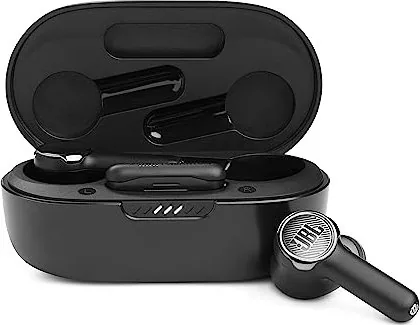
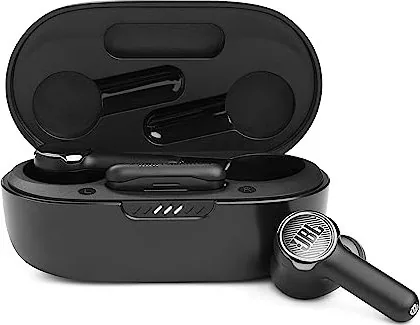
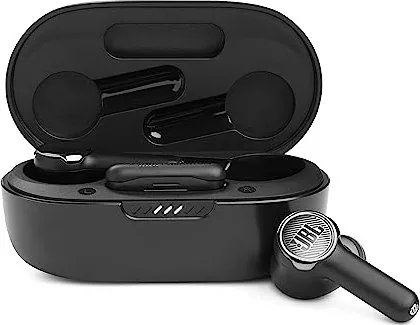
The JBL Quantum TWS gaming earbuds combine compact true wireless convenience with features designed for mobile, PC, and console play. Built around 10 mm dynamic drivers, they deliver detailed sound across a 20 Hz to 20 kHz frequency range while keeping the design light enough for extended sessions. Each earbud weighs just 5.5 g, and interchangeable silicone ear tips help users find a secure, comfortable seal.
Low-Latency Gaming and Flexible Connections
A USB-C 2.4 GHz wireless dongle gives the JBL Quantum TWS a fast connection for compatible PCs, Macs, laptops, PlayStation 5, and Nintendo Switch systems. A USB-C-to-USB-A adapter can extend compatibility with other supported setups. The earbuds also use Bluetooth 5.2 for phones and everyday listening, with Google Fast Pair support on eligible Android devices.
One standout feature is the ability to stay connected to a gaming source over 2.4 GHz and a phone over Bluetooth. This makes it easy to move between game audio, calls, and music without removing the earbuds. Dual Connect + Sync also supports using both earbuds in stereo or either individual earbud in mono mode.
Sound Modes and Everyday Controls
Active Noise Cancelling helps reduce unwanted background distractions, while Ambient Aware lets outside sound back in when awareness matters. TalkThru can make conversations easier without taking the earbuds out. Touch controls provide access to playback, calls, microphone mute, sound modes, and a compatible phone voice assistant.
The JBL Headphones app adds mobile personalization, including earbud calibration, enhanced controls, and sidetone adjustment for calls. PC users can install JBL QuantumENGINE on supported Windows 10 64-bit and Windows 11 systems for additional configuration. JBL QuantumSURROUND is available on Windows with the required software.
Battery, Charging, and Care
With Bluetooth and ANC disabled, the earbuds provide up to 8 hours of music playback. Bluetooth playback with ANC enabled is rated for up to 6 hours. In 2.4 GHz mode, playback is rated for up to 4 hours without ANC or 3.5 hours with ANC when using both earbuds. A full charge takes about two hours, while a 15-minute quick charge can provide up to three hours of music playback.
The charging case stores the earbuds and the dongle, making the kit practical for travel. Regular cleaning of the ear tips, charging contacts, and case grooves helps maintain charging reliability and hygiene.
Notes
- Choose the correct ear-tip size and rotate the earbuds into place for the best fit and sound.
- Keep the 2.4 GHz dongle away from USB 3.0 interference when possible.
- Update the companion app and PC software for the latest available features.
Search for 67,706 Manuals online


Type-in Brand or Model
GamerMike92
4 months ago
Does the included USB-C dongle work with PS5 and PC, or do I need a separate adapter for older ports?
Manual.ly
4 months ago
The JBL Quantum TWS includes a USB-C dongle that works seamlessly with PS5, modern PCs, and laptops. However, if your device only has a USB-A port, you will need to purchase a USB-A to USB-C adapter separately, as it is not included in the box. Please ensure your port can accommodate the dongle's size if space is limited.