● If you are using a high-powered USB device please attach the power adapter that
came with it or purchase a DC 5V power cord 3.5mm OD, 1.35mm ID to ensure
maximum performance. ( Sold seperately )
● Si utiliza un dispositivo USB de alta potencia adjunte el adaptador de corriente
suministrado con ella o comprar un DC 5V OD 3.5mm cable, 1.35mm ID para
garantizar el máximo rendimiento. (Se vende por separado)
● Wenn Sie einen High-Power-USB-Gerät werden fügen Sie bitte das Netzteil, die mit
ihm oder Kauf einer DC 5V Netzkabel 3,5 mm Außendurchmesser, 1,35 mm ID, um
eine maximale Leistung zu gewährleisten. (Separat erhältlich)
Do NOT plug the j5create USB
Multi Adapter into the computer
until the driver is completely
installed.
NO enchufe el adaptador de pantalla
j5create USB en la computadora hasta
que el conductor esté completamente
instalado.
Installez entièrement le pilote avant
d'insérer le câble USB de l'Adaptateur
d’affichage USB dans votre ordinateur
Installieren Sie zuerst den Treiber
erst vollständig, bevor Sie das
USB-Kabel des USB Monitoradapt-
ers an den Computer anschließen.
TECHNICKÁ PODPORA
Zákaznická linka: 888-988-0488
Technická podpora: 888-689-4088
E-mail: service@j5create.com
Online Chat: www.j5create.com/livechat
Žádost o pomoc: tickets.j5create.com
JUH470
JCH471
USB 3.0 Gigabit Ethernet & HUB
Multi Adapter
USB Type-C Gigabit Ethernet & HUB
Multi Adapter
クイックインストールガイド
日本語:
快速安裝
繁中文:
CZ :
QuickInstallationGuide
E
N
:
Guía De Instalación Rápida
E
S
:
Guide D'installation Rapide
F
R
:
Kurzanleitung Für Installation
D
E
:
Rychlý Průvodce Instalací
HU : Gyors Telepítési Útmutató
JCH471
JUH470
/2
%
Quick check
I'm not a robot
Incorrect answer, please try again.
Chat with your j5create JCH471 manual using AI
Get instant AI answers from your j5create JCH471 manual
Ask anything about the j5create JCH471. Answers come from this manual, with the pages they are based on.
Ask a Question
0/1000
Do you recommend JCH471?
YesNo
Frequently Asked
Questions
A
It adds a wired RJ-45 Gigabit Ethernet connection through USB-C, helping devices gain faster and more stable internet access than Wi-Fi in many situations.
Is this answer helpful?
A
It depends on the operating system. Some versions install automatically, while others may require downloading the latest driver from j5create’s support area.
Is this answer helpful?
A
Yes. The adapter is designed for broad compatibility with Windows and Mac systems, and some documentation also references Linux support.
Is this answer helpful?
A
Ethernet often provides lower latency, steadier speeds, and fewer dropouts. That can help with meetings, gaming, streaming, and large file transfers.
Is this answer helpful?
A
It is better to install the driver first when required. The manual warns not to connect the adapter to the computer until installation is complete.
Is this answer helpful?
A
Use the included power adapter or an appropriate external power solution if needed. This helps maintain performance for demanding peripherals.
Is this answer helpful?
M: OA-GPT-54-NAN
Advantagesand
Disadvantages
Advantages
Adds Gigabit Ethernet for a more stable wired network connection.
Compact USB-C design suits modern laptops and travel-friendly setups.
Power supply also via connection, mains connection (1x barrel connector 5V), external power supply possible but not included
Chipset
Asix AX88179 (LAN adapter, RJ-45)
Dimensions
1.73x0.75x3.58in (WxHxD)
Weight
0.13 lb
Housing color
silver
Compatibility
universal
Special features
VLAN, Wake on LAN
USB notation
Link
M: OA-GPT-54-NAN
Product
Description
j5create JCH471: A Practical USB-C Networking Upgrade
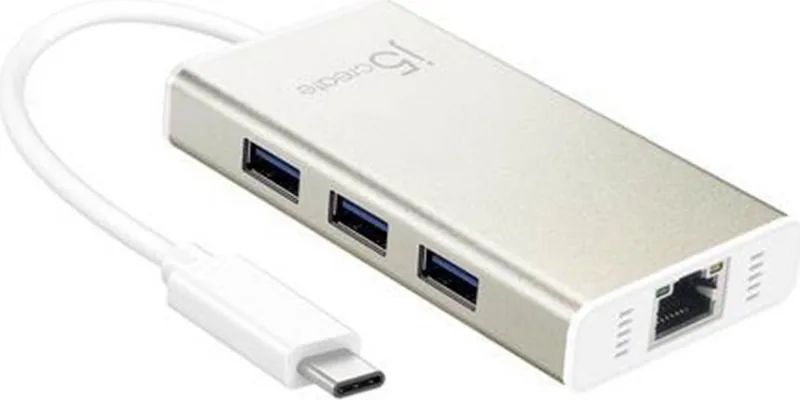
The j5create JCH471, RJ-45, USB-C 3.0 Plug Manual centers on a compact adapter built for people who want a fast, dependable wired connection without replacing their laptop or desktop setup. At its core, the JCH471 brings Gigabit Ethernet to devices with USB-C, giving users a simple way to move from unstable Wi-Fi to a more consistent network experience. For work, streaming, online meetings, or transferring large files, that kind of upgrade can make a noticeable difference.
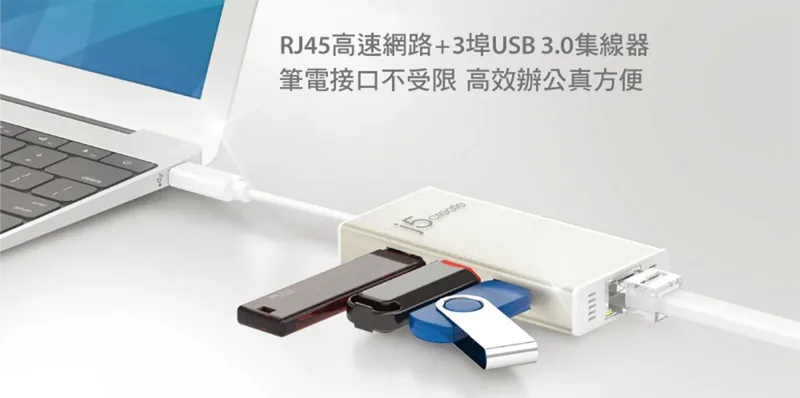
One of the biggest strengths of this adapter is its straightforward approach. It is designed to add an RJ-45 Ethernet port through a USB-C connection, and in many setups it can also expand everyday connectivity with extra USB ports. That makes it especially useful for modern ultrabooks and slim laptops that often sacrifice built-in ports to stay thin and portable. Instead of carrying multiple dongles, users get a more versatile single accessory.
The installation process is mostly simple, but the manual highlights an important detail: driver support may vary by operating system. Some systems can install drivers automatically, while others may need a download from j5create’s support site or a driver CD. This makes it a product that rewards careful setup. Once installed, the adapter is meant to run quietly in the background and provide a steady wired connection with minimal fuss.
Compatibility is another appealing point. The JCH471 is presented as a cross-platform accessory with support across Windows, Mac, and even selected Linux environments. That broad compatibility makes it attractive for mixed-device households, students, and professionals who move between office and home systems. It also reflects the adapter’s practical design: rather than chasing flashy features, it focuses on reliability and usefulness.
Why it stands out
The JCH471 fits a very common need: modern laptops often have fewer ports, but users still need Ethernet for speed and stability. This adapter bridges that gap with a clean USB-C connection and a wired LAN port that is easy to use once configured. It is a small tool, yet it can have a big impact on productivity.
For anyone building a more efficient desk setup, the JCH471 offers a smart balance of portability and function. It is not just about adding a port; it is about restoring the convenience that many newer devices have left behind.
Notes
Check your operating system before installation.
Download the latest driver when possible.
Avoid plugging in the adapter before the driver is ready.
Use a powered setup if attaching high-demand USB devices.