USB-C and USB are trademarks of USB Implementers Forum, Inc., its aliates or its respective owners,
registered or used in many jurisdictions worldwide. Other trademarks and trade names may be used in this
document to refer to either the entities claiming the marks and/or names or their products and are the
property of their respective owners. All company, product and service names used are for identication
purposes only. Use of these names, logos, and brands does not imply endorsement.We disclaim any
interest in the marks of others.
(JCH345EW/ER/EC)
(JCH341EW/ER/EC)
(JCH342EW/ER/EC)
Caratteristiche
● Hub USB™ tipo A a 10 Gbps a 4 porte su un collegamento USB-C®
(JCH341EW/ER/EC)
● Le 4 porte USB™ tipo A 3.2 supportano una velocità di trasferimento di 10
Gbps, retrocompatibile con le specifiche USB™ 2.0 / USB™ 1.0
(JCH341EW/ER/EC)
● Un hub con 2 porte USB™ tipo A e 2 porte USB-C® su un collegamento
USB-C® di 10 Gbps (JCH342EW/ER/EC)
● Le 2 porte USB™ tipo A 3.2 supportano una velocità di trasferimento di 10
Gbps e sono retrocompatibili con le specifiche USB™ 2.0 / USB™ 1.0
(JCH342EW/ER/EC)
● Hub USB-C® a 10 Gbps a 4 porte su un collegamento USB-C®
(JCH345EW/ER/EC)
● Le 4 porte USB-C® 3.2 supportano una velocità di trasferimento di 10
Gbps, retrocompatibile con le specifiche USB™ 2.0 / USB™ 1.0
(JCH345EW/ER/EC)
● Compatibile con vari laptop e desktop
● Ecologico, realizzato con materiale riciclato con certificazione UL
● Nessun driver necessario
Requisiti di sistema
● Porta USB-C® disponibile
Note
● Questo hub USB™ alimentato da bus riceve alimentazione solo dalla porta
USB™ del computer. Se si collegano dispositivi ad alta potenza come dischi
rigidi a stato solido (SSD), limitare il numero di dispositivi USB™ collegati a
un punto in cui l'assorbimento di corrente totale di tutti i dispositivi
collegati sia inferiore a 3 A. Il consumo energetico della maggior parte
degli SSD è di circa 1~1,2 A, quindi si consiglia di collegare non più di 2 o 3
SSD per volta a seconda dell'utilizzo energetico dell'SSD.
Eigenschaften
● USB™ Typ A-Hub mit 4 Anschlüssen und 10 Gb/s über eine
USB-C®-Verbindung (JCH341EW/ER/EC)
● Die 4 USB™ Type-A 3.2-Anschlüsse unterstützen eine Übertragungsrate von
10 Gb/s und sind abwärtskompatibel mit USB™ 2.0-/ USB™
1.0-Spezifikationen (JCH341EW/ER/EC)
● Ein Hub mit 2 USB™-Anschlüssen Typ A und 2 USB-C®-Anschlüssen über
eine USB-C®-Verbindung mit 10 Gb/s (JCH342EW/ER/EC)
● Die 2 USB™ 3.2-Anschlüsse Typ A unterstützen eine Übertragungsrate von
10 Gb/s und sind abwärtskompatibel mit USB™ 2.0-/ USB™
1.0-Spezifikationen (JCH342EW/ER/EC)
● USB C®-Hub mit 4 Anschlüssen und 10 Gb/s über eine
USB-C®-Verbindung (JCH345EW/ER/EC)
● Die 4 USB-C® 3.2-Anschlüsse unterstützen eine Übertragungsrate von 10
Gb/s und sind abwärtskompatibel mit USB™ 2.0-/ USB™
1.0-Spezifikationen (JCH345EW/ER/EC)
● Kompatibel mit verschiedenartigen Laptops und Desktops
● Umweltfreundlich, aus UL-zertifizierten Recyclingmaterialien gefertigt
● Keine Treiber erforderlich
Systemanforderung
● Verfügbarer USB-C®-Anschluss
Hinweise
● Dieser bus-betriebene USB™-Hub bezieht den Strom nur vom
USB™-Anschluss des Computers. Wenn Sie Hochleistungsgeräte
anschließen, z. B. Solid-State-Festplatten (SSD), begrenzen Sie bitte die
Anzahl der USB™-Geräte auf eine Leistung, bei der weniger als 3 A an
Gesamtleistung von allen angeschlossenen Geräten bezogen wird. Der
Leistungsverbrauch der meisten SSDs liegt bei etwa 1 bis 1,2 A, sodass wir
den gleichzeitigen Anschluss von nicht mehr als 2 oder 3 SSDs, je nach
Leistungsnutzung der SSD, empfehlen.
Caractéristiques
● Hub 4ports USB™ Type-A 10Gbit/s via une connexion USB-C®
(JCH341EW/ER/EC)
● Les 4 ports USB™ Type-A 3.2 prennent en charge un taux de transfert de 10
Gbit/s, rétro-compatible avec les spécifications USB™ 2.0 / USB™ 1.0
(JCH341EW/ER/EC)
● Un hub avec 2ports USB™ Type-A et 2ports USB-C® via une connexion
USB-C® 10 Gbps (JCH342ECO)
● Les 2 ports USB™ Type-A 3.2 prennent en charge un taux de transfert de 10
Gbps, et sont rétro-compatibles avec les spécifications USB™ 2.0 / USB™
1.0 (JCH342ECO)
● Hub 4 ports USB-C® 10 Gbps via une connexion USB-C®
(JCH345EW/ER/EC)
● Les 4 ports USB-C® 3.2 prennent en charge un taux de transfert de 10
Gbps, rétro-compatible avec les spécifications USB™ 2.0 / USB™ 1.0
(JCH345EW/ER/EC)
● Compatible avec divers ordinateurs portables et de bureau
● Écologique, fabriqué à partir de matériaux recyclés certifiés UL
● Aucun pilote requis
Configuration Recommandée
● Port USB-C® disponible
Remarques
● Ce hub USB™ alimenté par bus ne tire son alimentation que du port USB™
de l’ordinateur. Si vous connectez des appareils de forte élevée comme des
SSD (Solid State Drive), veuillez limiter le nombre d'appareils USB™
connectés tel que la puissance totale de tous les appareils connectés soit
inférieure à 3A. La plupart des SSD consomment aux alentours de 1 à 1,2A.
Nous recommandons donc de ne pas connecter plus de 2 ou 3 SSD à la
fois, selon la puissance consommée par le SSD.
PortugueseSwedish
Dutch
EnglishFrançaisDeutschItaliano
Kenmerken
● 4-poorts USB™ Type-A 10Gbps-hub via een USB-C®-verbinding
(JCH341EW/ER/EC)
● De 4 USB™ Type-A 3.2-poorts ondersteunt een overdrachtsnelheid van 10
Gbps, achterwaarts compatibel met de USB™ 2.0/USB™ 1.0 specificaties
(JCH341EW/ER/EC)
● Een hub met 2 USB™ Type-A- en 2 USB-C®-poorten via een 10 Gbps
USB-C®-verbinding (JCH342EW/ER/EC)
● De 2 USB™ Type-A 3.2 poorten ondersteunen de overdrachtsnelheid van 10
Gbps en zijn achterwaarts compatibel met de specificaties van USB™ 2.0 /
USB™ 1.0 (JCH342EW/ER/EC)
● 4-poorts USB-C® 10Gbps Hub via een USB-C®-verbinding
(JCH345EW/ER/EC)
● De 4 USB-C® 3.2-poorten ondersteunen overdrachtsnelheid van 10 Gbps,
achterwaarts compatibel met de specificaties van USB™ 2.0 / USB™ 1.0
(JCH345EW/ER/EC)
● Compatibel met uiteenlopende laptops en desktops
● Milieuvriendelijk, gemaakt van Ul-gecertificeerd gerecycled materiaal
● Geen stuurprogramma's vereist
Systeemvereisten
● Beschikbare USB-C®-poort
Opmerkingen
● Deze USB™-hub met busvoeding trekt alleen stroom van de USB™-poort
van uw computer. Als u apparaten met een groot vermogen zoals
SSD-schijven (Solid State Hard Drives) aansluit, beperk dan het aantal
aangesloten USB™-apparaten, zodat het totale stroomverbruik van alle
aangesloten apparaten minder dan 3 A bedraagt. Het energieverbruik van
de meeste SSD's ligt rond de 1 tot 1,2 A, dus we raden aan niet meer dan 2
of 3 SSD's tegelijk aan te sluiten, afhankelijk van het energieverbruik van de
SSD.
Características
● 4-Puertos USB™ de Tipo A de 10 Gbps y un concentrador a través de
conexión USB-C® (JCH34EW/ER/EC)
● Los 4 puertos USB™ de Tipo A 3.2 admiten una transferencia de datos de
10 Gbps, compatible con la versión anterior de USB™ 2.0 / USB™ 1.0
(JCH341EW/ER/EC)
● Un concentrador con 2 puertos USB™ de Tipo A y 2 puertos USB-C® a
través de conexión USB-C® de 10 Gbps (JCH342EW/ER/EC)
● Los 2 puertos USB™ de Tipo A 3.2 admiten una velocidad de transferencia
de 10 Gbps y son compatibles con la versión anterior con especificaciones
USB™ 2.0 / USB™ 1.0 (JCH342EW/ER/EC)
● 4-Puertos USB-C® de 10Gbps y un concentrador a través de una conexión
USB-C® (JCH345EW/ER/EC)
● Los 4 puertos USB-C® 3.2 admiten una velocidad de transferencia de 10
Gbps, compatible con la versión anterior con especificaciones USB™ 2.0 /
USB™ 1.0 (JCH345EW/ER/EC)
● Compatible con diferentes equipos portátiles y de escritorio
● Ecológico, hecho con material reciclado certificado por UL
● No se necesitan controladores
Requisitos del Sistema
● Puerto USB-C® disponible
Notas:
● Este concentrador USB™ alimentado por bus solo consume energía desde
el puerto USB™ del equipo. Si está conectado a dispositivos de alta
potencia, como unidades de estado sólido (SSD), debe limitar el número de
dispositivos USB™ conectados cuando el consumo de energía total de
todos los dispositivos conectados es inferior a 3 A. La mayoría del consumo
de suministro de energía de las unidades de estado sólido (SSD) es
aproximadamente de 1~1,2 A, por lo que recomendamos no conectar más
de 2 o 3 unidades de estado sólido (SSD) al mismo tiempo, dependiendo
del consumo de energía de estas unidades de estado sólido (SSD).
Características
● Hub de 4 portas USB™ Tipo A de 10 Gbps através de ligação USB-C®
(JCH341EW/ER/EC)
● As 4 portas USB™ Tipo A 3.2 suportam uma velocidade de transferência de
10 Gbps, são compatíveis com as especificações USB™ 2.0 / USB™ 1.0
(JCH341EW/ER/EC)
● Um hub com 2 portas USB™ Tipo A e 2 portas USB-C® através de ligação
USB-C® de 10 Gbps (JCH342EW/ER/EC)
● As 2 portas USB™ Tipo A 3.2 suportam uma velocidade de transferência de
10 Gbps, e são compatíveis com as especificações USB™ 2.0 / USB™ 1.0
(JCH342EW/ER/EC)
● Hub de 4 portas USB-C® de 10 Gbps através de ligação USB-C®
(JCH345EW/ER/EC)
● As 4 portas USB-C® 3.2 suportam velocidade de transferência de 10 Gbps,
são compatíveis com as especificações USB™ 2.0 / USB™ 1.0
(JCH345EW/ER/EC)
● Compatível com vários computadores portáteis e de secretária
● Ecológico, fabricado com material reciclado certificado pela UL
● Sem necessidade de controladores
Requisitos do sistema
● Porta USB-C® disponível
Notas
● Este hub USB™ alimentado por barramento consome energia apenas da
porta USB™ do computador. Se ligar dispositivos de consumo elevado,
como discos rígidos de estado sólido (SSD), limite o número de
dispositivos USB™ ligados para que o consumo de energia total de todos
os dispositivos ligados seja inferior a 3A. A maioria dos SSD consome cerca
de 1 a 1,2A, pelo que recomendamos que não ligue mais de 2 ou 3 SSD em
simultâneo, dependendo do consumo de energia do SSD.
Funktioner
● USB™ Type-A 10Gbps hubb med 4 portar via en USB-C®-anslutning
(JCH341EW/ER/EC)
● De 4 USB™ Type-A 3.2-portarna stöder överföringshastigheter på 10
Gbps och är bakåtkompatibla med USB™ 2.0 / USB™ 1.0
(JCH341EW/ER/EC)
● En hubb med 2 USB™-A-portar och 2 USB-C®-portar via en 10 Gbps
USB-C®-anslutning (JCH342EW/ER/EC)
● De 2 USB™ Type-A 3.2-portarna stöder 10 Gbps överföringshastighet och
är bakåtkompatibla med USB™ 2.0 / USB™ 1.0-specifikationerna
(JCH342EW/ER/EC)
● USB-C® 10Gbps hubb med 4 portar via en USB-C®-anslutning
(JCH345EW/ER/EC)
● De 4 USB-C® 3.2-portarna stöder överföringshastigheter på 10 Gbps och
är bakåtkompatibla med USB™ 2.0 / USB™ 1.0-specifikationerna
(JCH345EW/ER/EC)
● Kompatibel med flertalet bärbara och stationära datorer
● Miljövänlig, tillverkad av UL-certifierat återvunnet material
● Inga drivrutiner krävs
Systemkrav
● Tillgänglig USB-C®-port
Observera
● Den här bussdrivna USB™-hubben tar endast ström från datorns
USB™-port. Om du ansluter enheter med hög effekt, t.ex. SSD-hårddiskar
(Solid State Drive), bör du begränsa antalet anslutna USB™-enheter så att
den totala strömförbrukningen för alla anslutna enheter är mindre än 3 A.
De flesta SSD-enheter har en strömförbrukning på cirka 1~1,2 A, så vi
rekommenderar att du inte ansluter mer än 2 eller 3 SSD-enheter åt
gången, beroende på SSD-enhetens strömförbrukning.
/2
%
Quick check
I'm not a robot
Incorrect answer, please try again.
Chat with your j5create Eco-Friendly 4-in-1 USB-C Hub manual using AI
Get instant AI answers from your j5create Eco-Friendly 4-in-1 USB-C Hub manual
Ask anything about the j5create Eco-Friendly 4-in-1 USB-C Hub. Answers come from this manual, with the pages they are based on.
Ask a Question
0/1000
Do you recommend Eco-Friendly 4-in-1 USB-C Hub?
YesNo
Frequently Asked
Questions
A
The hub supports USB 3.2 Gen 2 with transfer speeds up to 10Gbps for efficient data movement.
Is this answer helpful?
A
Yes, it is made with UL certified recycled materials to support environmental sustainability efforts globally.
Is this answer helpful?
A
No, this hub is plug and play and works immediately without installing any specific drivers on your system.
Is this answer helpful?
A
Yes, but keep total power draw under 3A to avoid instability since most SSDs use 1-1.2A.
Is this answer helpful?
A
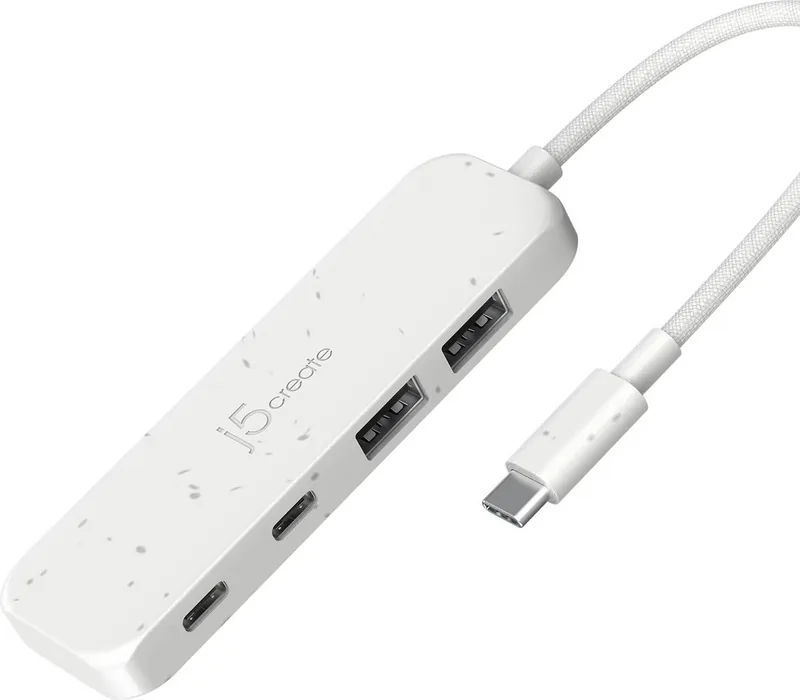
Options include four Type-A ports, mixed Type-A and Type-C, or four Type-C ports depending on needs.
Is this answer helpful?
A
The product comes with a limited two-year warranty covering manufacturing defects and eligible repairs.
Is this answer helpful?
A
You need a computer with an available USB-C port that supports data transfer protocols.
Is this answer helpful?
M: QW-35-FL
Advantagesand
Disadvantages
Advantages
High speed 10Gbps data transfer rates for efficient workflows
Eco-friendly build uses UL certified recycled materials for sustainability
Plug and play functionality requires no additional driver installations
Backwards compatible with USB 2.0 and USB 1.0 legacy devices
Three model variations cater to different port layout preferences
VS
Disadvantages
Bus powered design limits total wattage available to connected devices
Connecting multiple SSDs risks exceeding 3 Amps total power draw
User responsible for one-way return freight cost on warranty claims
Requires a host USB-C port which some older computers lack
Warranty does not cover cosmetic damage or misuse by the user
M: QW-35-FL
Product
Specification
Type
USB Hub
Form Factor
1x External Cable-connected (Connection cable not detachable)
Connection
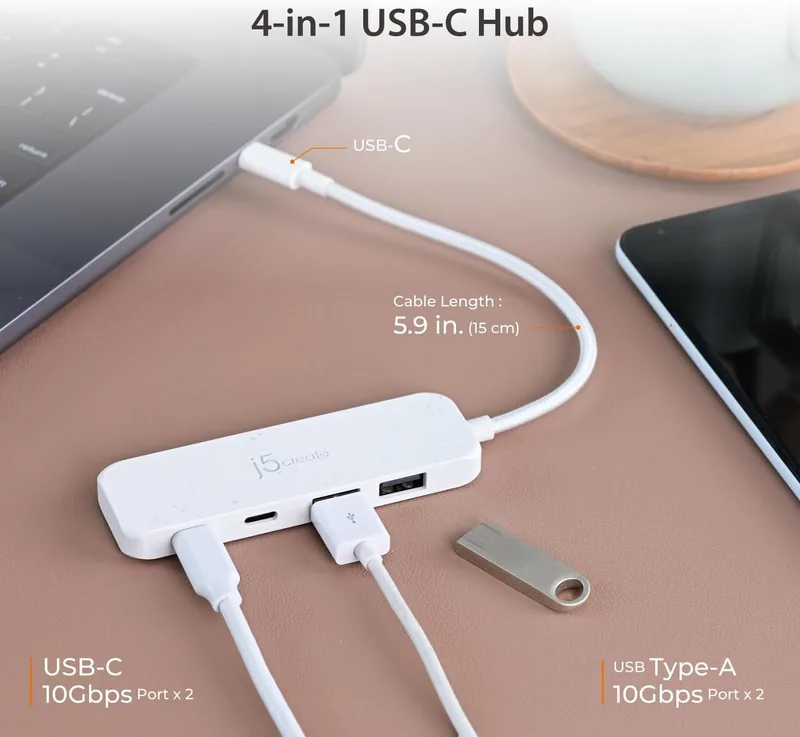
1x USB-C 3.1 (Connector via cable, 10Gb/s, 5.91 in cable length)
Power Supply
Power Supply Only via Connection (max. 500mA)
Dimensions
3.94 x 0.75 x 1.06 in (W x H x D)
Weight
0.08 lb
Compatibility
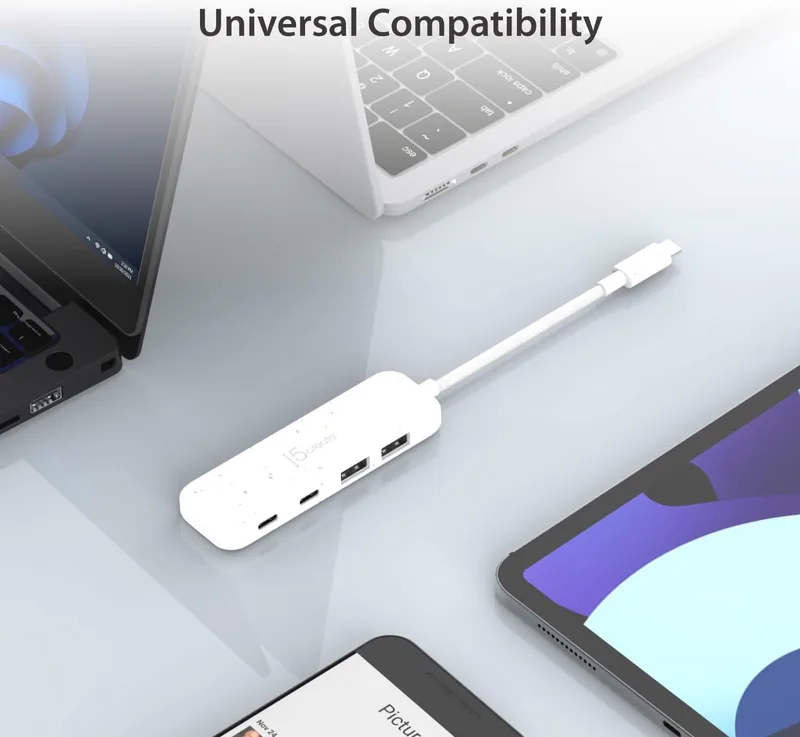
universal
Manufacturer Warranty
2 years
USB Naming
Link
M: QW-35-FL
Product
Description
Revolutionize Your Connectivity
Welcome to the future of peripheral expansion with the j5create Eco-Friendly 4-in-1 USB-C Hub. Whether you are working remotely or setting up a professional home office, expanding your device capabilities is essential for maintaining high productivity standards. This comprehensive guide serves as the primary reference when consulting the j5create Eco-Friendly 4-in-1 USB-C Hub Manual to ensure optimal performance in your daily digital tasks without confusion.
Superior Performance Standards
The hub delivers blazing fast speeds up to 10Gbps via advanced USB 3.2 Gen 2 technology. It ensures your large data transfers happen almost instantly without bottlenecks. Compatibility extends fully to older standards like USB 2.0 and 1.0, making it incredibly versatile for any legacy devices you might still own in your collection. You can choose between three distinct configurations tailored specifically to your unique workflow needs and port availability.
Sustainable Manufacturing Choices
Sustainability truly matters in today's market. This product is manufactured using UL certified recycled materials to reduce environmental footprint. Choosing this hub means actively supporting environmental responsibility without ever having to sacrifice raw performance or speed. It fits seamlessly into modern workspaces while reducing electronic waste impact through rigorous responsible manufacturing practices established by industry leaders.
Seamless Installation Process
One of the standout features is the absolute lack of driver installation required. Simply plug it into your computer and start working immediately without delays. It relies entirely on bus power, drawing energy directly from your laptop or desktop USB port. However, users should remain aware of power distribution limits when connecting high-draw devices like external solid-state drives during extended sessions.
Important Usage Guidelines
To ensure stable operation under heavy loads, limit connected devices to a total power draw strictly under 3A maximum capacity. Most standard SSDs consume between 1 and 1.2 Amps typically. Therefore, we strongly recommend connecting no more than two or three SSDs simultaneously to avoid power issues. Always keep the USB-C connection secure during active file transfers to prevent accidental interruptions or data loss.
Support and Warranty Coverage
Customer satisfaction is a priority for the brand. They offer a limited two-year warranty covering manufacturing defects. For assistance, customers can contact the technical support team via their dedicated email or toll-free hotline during business hours. This assurance provides peace of mind knowing help is available if unexpected issues arise during regular usage cycles or troubleshooting phases.
Combining all these factors creates an excellent solution for anyone needing extra ports on a modern machine quickly. The robust design supports various laptops and desktops universally across different operating systems. With no complex software needed, getting started is effortless for users of all technical skill levels looking to upgrade their current setup efficiently today while staying organized.