
iRobot Roomba Combo j7 Manual
PDF manual · 109 Pages
English



Quick check
Incorrect answer, please try again.
Chat with your iRobot Roomba Combo j7 manual using AI
Get instant AI answers from your iRobot Roomba Combo j7 manual
Ask anything about the iRobot Roomba Combo j7. Answers come from this manual, with the pages they are based on.
Roomba Combo j7 Maintenance Schedule
Pull firmly to remove the wheel module, clear debris from the cavity, and reinstall until it clicks into place.
Remove hair and debris from the brushes and caps; replace every 12 months if visible wear appears.
Wipe sensors, camera window, and charging contacts with a clean, dry cloth. Inspect for cracks.
Inspect and wipe the visual docking target and charging contacts to ensure they are clear of debris.
Inspect blower cover for lint or debris build-up and wipe with a clean dry cloth.
Wipe the inner sensors and bin door with a clean, dry cloth to ensure proper detection.
Remove debris by tapping the filter against a rubbish bin; replace every two months or more often if you have a pet.
Free maintenance reminders
Timed to your purchase date. Always free, unsubscribe anytime.
Ask a Question
Do you recommend Roomba Combo j7?
Yes NoFrequently Asked Questions
The Roomba Combo j7 is intended for dry floors and works on hard floors and compatible carpets. It is not designed to pick up liquids or clean wet spills. Check carpet manufacturer guidance before use on high-pile or specialty rugs.
Is this answer helpful?
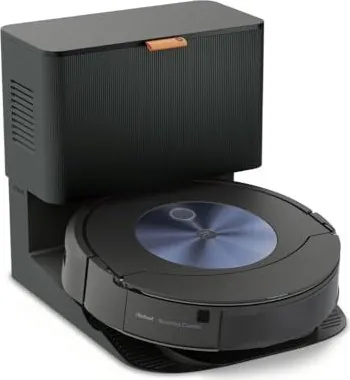
The Clean Base receives the robot, evacuates debris from the bin into a replaceable bag, and indicates when a bag is full or when a clog or leak is detected. If manual placement prevents auto-emptying, you can trigger emptying via the app or by holding the robot’s clean button.
Is this answer helpful?
Filters should be cleaned weekly (twice weekly for pet owners) and replaced about every 2 months. Multi-surface and edge brushes should be cleaned monthly (twice monthly with pets) and typically replaced about every 12 months or when visibly worn.
Is this answer helpful?
Use only the supplied iRobot lithium-ion battery or authorized replacements. Turn the battery off before shipping by removing the robot from the charger and holding the clean button for 3 seconds with a wheel raised. Follow service or carrier guidance for shipping devices with batteries.
Is this answer helpful?
Do not use the robot on wet surfaces, near exposed floor outlets, or to pick up sharp or burning objects. Supervise children and pets, avoid sitting or standing on the robot, keep charging contacts clean, and use only approved power supplies and chargers.
Is this answer helpful?
A solid red LED indicates a full or missing bag; replace or reseat the bag and clear debris. A blinking red LED signals a leak or clog—check canister sealing, remove debris from the evacuation port and tube, unplug and inspect the evacuation tube and blower path.
Is this answer helpful?
Place the robot in Reduced Power Standby Mode by removing the dust bin and tapping the clean button five times. Exit the mode by placing the robot on the charging station and tapping clean. For long-term storage, remove from the dock and hold the clean button for 3 seconds with a wheel off the ground.
Is this answer helpful?
Advantages and Disadvantages
Advantages

- Precision Vision Navigation avoids obstacles and enables neat row cleaning and smart maps.
- Clean Base™ Automatic Dirt Disposal empties the bin automatically, reducing hands-on maintenance.
- App and Wi‑Fi support for scheduling, remote control, and setup of Precision Vision Navigation.
- Dirt Detect™ focuses cleaning on especially dirty areas for better spot performance.
- Clear maintenance schedule and replaceable parts keep long-term performance predictable.
Disadvantages

- Designed for dry-floor use only — cannot pick up liquids or clean spills.
- Requires regular maintenance (filters, brushes, sensors) to sustain peak performance.
- Uses region-specific power supplies and batteries; unauthorized chargers void warranty.
- May need physical barriers for balconies or stairs and removal of clutter to avoid accidents.
- Automatic emptying can clog; requires occasional user intervention to clear evacuation path.
Product Specification
Cleaning robot
Battery
Li-Ion
Capacity
10.14 fl oz
Navigation
Cliff sensor, Dirt sensor, Wall tracking sensor, Camera (Mapping, Room recognition), Zones, Obstacle detection, Virtual Wall (Software)
Filtering
yes
Display
no
Special features
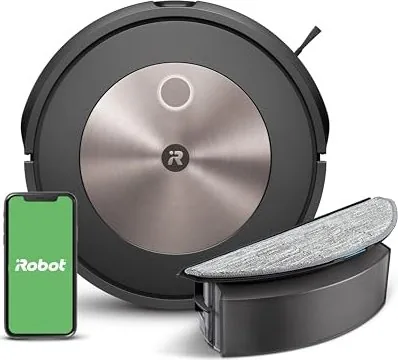
2x Floor brush, 1x Side brush, 1x Mopping attachment, Programmable cleaning times
Smart Home
App control (iRobot-HOME), Voice assistant (Amazon Alexa, Google Assistant)
Operating time
75 min
Charging time
90 min
Charging system
automatic
Dimensions
13.31x3.43 in (DxH)
Weight
7.50 lb
Station
Station color
black
Station display
no
Product Description
iRobot Roomba Combo j7 — Smart, Precise Cleaning
The iRobot Roomba Combo j7 blends intelligent vacuuming and mopping with thoughtful safety and maintenance guidance. Designed for everyday homes, the j7 uses front-facing Precision Vision Navigation to map rooms, avoid obstacles, and clean in neat rows. It returns automatically to its Clean Base™ Automatic Dirt Disposal to empty the bin and recharge, reducing hands-on maintenance. The robot recognizes and avoids common household hazards, and the Clean Base signals when bags need replacement or if clogs occur.
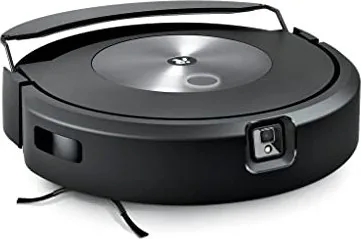
The Combo j7 is built for dry-floor vacuuming and includes a robust lithium-ion battery with shipping and disposal precautions. It supports scheduled cleanings, smart mapping, and reduced-power standby modes through the iRobot Home app and Wi‑Fi connectivity. Battery and postage instructions emphasize turning the robot off and following proper packing steps for transport. Multiple sensors (cliff, floor-tracking, camera window) and brushes (edge-sweeping and multi-surface) work together to detect dirt, engage Dirt Detect™ for heavy-soil spots, and maintain cleaning performance across surfaces.
Maintenance is straightforward: empty and wash the bin, clean or replace the filter per guidance, remove hair and debris from brushes, and wipe sensors, camera window, and charging contacts regularly. The guide lists care frequencies and expected replacement intervals for parts such as filters, brushes, wheels, and sensors. The Clean Base features bag installation rails, a debris evacuation tube and blower cover that also require occasional inspection and cleaning.
Safety features are emphasized throughout: warnings against using the robot on wet surfaces, picking up sharp or burning objects, exposing the robot or Clean Base to liquids, and operating near exposed floor outlets. The product warns about supervising children, avoiding sitting or standing on the robot, and using only approved power supplies and batteries to prevent fire or battery hazards. Recycling and disposal instructions for batteries and end-of-life products are provided in compliance with regional regulations.
Overall, the Roomba Combo j7 is a capable autonomous cleaner for modern households that need reliable vacuuming with optional mopping, smart navigation, and low-maintenance operation when paired with the Clean Base automatic emptying system.
Notes
- Use only the supplied or authorized iRobot lithium-ion battery and power cord. Follow shipping instructions for battery transport.
- Clean sensors, camera window, brushes, and charging contacts regularly to maintain performance.
- Do not use on wet floors or to pick up liquids, sharp objects, or burning materials.
- Replace bags, filters, and worn brushes per the indicators and maintenance schedule.
Search for 67,732 Manuals online


Type-in Brand or Model