
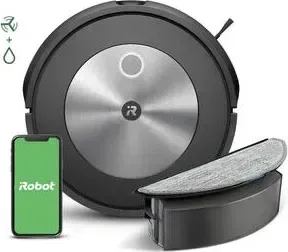
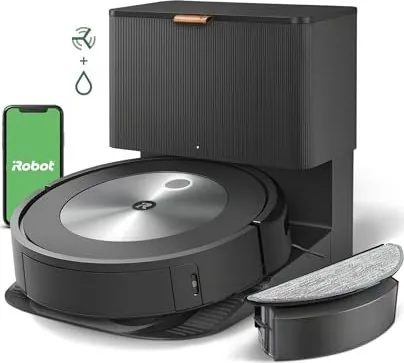
iRobot Roomba Combo j5 Manual
PDF manual · 109 Pages
English



Quick check
Incorrect answer, please try again.
Chat with your iRobot Roomba Combo j5 manual using AI
Get instant AI answers from your iRobot Roomba Combo j5 manual
Ask anything about the iRobot Roomba Combo j5. Answers come from this manual, with the pages they are based on.
Roomba Combo j5 Maintenance Schedule
Remove debris by tapping the filter against trash. Do not wash. Replace every 2 months.
Wipe inner sensors with a clean, dry cloth to remove buildup.
Remove wheel module, clear hair and debris from cavity, and reinstall until it clicks.
Remove brushes and caps, clear hair and debris, then reinstall. Twice monthly if you have pets.
Wipe robot sensors and charging contacts with a clean, dry cloth. Do not spray water or solution.
Wipe camera window with a clean, dry cloth. Replace after 30 washes of the mopping pad.
Hand wash with warm water or machine wash on warm cycle and air dry. Replace after 30 washes.
Rinse bin with warm water and wipe door with dry cloth. Ensure completely dry before reinserting.
Pull side rubber tab to remove old cap. Press new cap firmly to create tight seal preventing leaks.
Discard used bag when LED indicator turns solid red or app notifies. Insert new bag into guide rails.
Inspect visual docking target and charging contacts for debris. Wipe with a clean, dry cloth.
Remove blower cover inside canister. Inspect for lint or debris build-up and wipe with dry cloth.
Ask a Question
Do you recommend Roomba Combo j5?
Yes NoFrequently Asked Questions
Clean the filter once a week. Replace it every two months to ensure the robot functions properly. If you have a pet, clean it twice a week. Keep the ridged grips facing out when reinstalling.
Is this answer helpful?
Yes, children aged eight years and above can use it if supervised and instructed on safe operation hazards involved with the appliance. Children shall not play with the appliance.
Is this answer helpful?
Place the charging station at least four feet or 1.2 metres away from stairs to prevent the robot from falling down. Ensure the area is free of clutter to improve docking performance.
Is this answer helpful?
Hand wash with warm water or machine wash on warm cycle. Air dry only. Do not tumble dry or wash with delicates. Replace after thirty washes or if it shows wear.
Is this answer helpful?
No, only use authorized cleaning solutions found on answers irobot.com slash roomba combo cleanser to avoid damage risks. Household products should be safe when used according to label instructions.
Is this answer helpful?
The battery must be turned off and removed before shipping. Contact Customer Care for postage instructions to comply with lithium ion regulations. Do not crush or puncture the battery pack.
Is this answer helpful?
Remove the dust bin and hold the clean button for seven seconds. A sound will confirm the factory reset is completed successfully. Press the clean button once more to confirm the process.
Is this answer helpful?
Advantages and Disadvantages
Advantages

- PrecisionVision Navigation allows real time obstacle avoidance ensuring safe cleaning paths.
- Combo Bin system swaps easily between vacuuming dust and mopping floors efficiently.
- Compatible with iRobot Home App for smart scheduling and deep custom map creation.
- Dirt Detect mode identifies extra dirty areas for thorough cleaning coverage.
- Reduced power standby mode saves energy when the robot is not in active use.
Disadvantages

- Filter requires replacement every two months which adds recurring maintenance costs over time.
- Floors can become slippery immediately after mopping so users must watch for accidents.
- Battery must be removed before shipping due to strict lithium ion transportation regulations.
- Unauthorized chargers can cause battery overheating or fire risks voiding warranty coverage.
- Combo Bin water tank needs manual filling and cleaning after each mopping job.
Product Specification
Robot Vacuum
Battery
1x Battery (2.2Ah, Li-Ion)
Color
black, silver
Capacity
13.15 fl oz Dust, 7.10 fl oz Fresh Water
Cleaning Modes
Sweep & Mop
Navigation
Obstacle Sensor, Cliff Sensor, Dirt Sensor, Wall Tracking Sensor, Camera (Mapping, Room Recognition), Zones, No-Go Zones, Obstacle Detection, Stair Detection
Filtration
Yes
Display
No
Features
2x Floor Brushes (Rubber Brushes), 1x Side Brush, 1x Mop Attachment, Programmable Cleaning Times, Learning Function
Smart Home
App Control Optional (Wi-Fi (WLAN), iRobot HOME), Voice Assistant (Amazon Alexa, Apple Siri, Google Assistant)
Runtime
75min
Charge Time
3h
Charging System
Automatic
Dimensions
13.35 x 3.43 in (D x H)
Weight
7.50 lbs
Package Contents
Station (Home Base), Charging Cable, Filter, Side Brush, Removable Dustbin (Roomba Combo), Drip Tray, Mop Pad
Station
Station Color
black
Station Display
No
Product Description
Discover the ultimate cleaning solution for your home with the iRobot Roomba Combo j5. This advanced robot combines powerful vacuuming and mopping capabilities into one sleek device. Managing your floors has never been simpler thanks to PrecisionVision Navigation. It allows the robot to recognize and avoid obstacles in real time. The iRobot Roomba Combo j5 Manual outlines essential setup steps to ensure optimal performance from day one. You will want to register your product in the iRobot Home App to activate smart mapping features. This allows you to create custom maps and tell your robot exactly where and when to clean. The system creates smart maps to tell the robot where and when to clean specific zones efficiently. The innovative Combo Bin system is a standout feature for home users. It lets you swap between dust and water bins to handle vacuuming and mopping tasks extremely efficiently. When you fill the Combo Bin with water, the system starts wicking automatically upon activation. Proper setup involves positioning your Home Base at least four feet from stairs to prevent dangerous falls. The battery safety section advises removing the battery before shipping or long-term storage to maintain safety. Maintenance is straightforward but requires consistent attention to keep the machine running smoothly. You should clean the filter every two months and empty the bin regularly to prevent clogs. Noise from the robot is minimal, allowing you to clean while working or resting at home comfortably. The Light Ring indicator provides visual feedback on battery status and cleaning modes through colored spirals. Dirt Detect technology engages in busy cleaning areas to ensure a thorough scrub of particularly dirty patches. However, users must be careful with wet cleaning as floors may become slippery immediately after the job. The iRobot Roomba Combo j5 Manual provides detailed safety warnings to keep your home safe from accidents. It highlights that children over eight can operate the device under supervision. Always use authorized cleaning solutions listed on the official website for best results and compatibility. Regulatory models RVE-Y1 and RVE-Y2 comply with global radio equipment directives. These specific models utilize dual band WLAN radio modules for reliable connectivity. By following the instructions in the iRobot Roomba Combo j5 Manual, you extend the life of your appliance significantly. This ensures you do not void warranties by neglecting the recommended care procedures outlined thoroughly. The device supports Wi-Fi connectivity for remote control via smartphones with good coverage signals. Reduced power standby mode saves energy when the unit is not in use by turning off the battery. Regular cleaning of sensors and charging contacts ensures reliable docking performance every single time. Whether you have pet hair or daily dust, this robot handles it all with its multi-surface rubber brushes. The wick cap must be replaced if dirty or shows wear marks over time. Cleaning the filters is crucial as the robot will not run if the filter is not installed correctly. Use warm water to wash the bin but do not wash the filter itself to preserve the material quality. If you live in an area prone to electrical storms, use surge protection for the charging station. Enjoy a cleaner home with minimal effort using this versatile smart home gadget today. Proper disposal of the lithium ion battery is critical for environmental safety standards. You must return the battery to distributors or designated collection points instead of general waste bins. Shipping requires specific regulations due to lithium ion content inside the product package. Always package the robot securely for transport if you need to send it for service repairs. The warranty is void if you use unauthorized chargers that could cause fire risks or damage. This comprehensive guide ensures safety and longevity for your investment in smart home technology.
Search for 67,732 Manuals online


Type-in Brand or Model