
iRobot Roomba Combo 111 Manual
PDF manual · 19 Pages
English



Quick check
Incorrect answer, please try again.
Chat with your iRobot Roomba Combo 111 manual using AI
Get instant AI answers from your iRobot Roomba Combo 111 manual
Ask anything about the iRobot Roomba Combo 111. Answers come from this manual, with the pages they are based on.
Roomba Combo 111 Maintenance Schedule
Remove filters from bin/tank. Tap high performance filter against trash to remove debris. Do not wash it. Twice weekly if you have pets.
Remove the main brush frame and brush. Use the tool to cut off and remove tangled hair or debris from the brush.
Check these components for debris. Wipe charging contacts with a dry cloth. Clean cliff sensors and bumper with the provided tool.
Remove the edge-sweeping brushes. Cut off and remove any hair or debris tangled around them using the multi-function tool.
Replace the edge-sweeping brushes every 3 to 6 months to ensure effective corner cleaning and debris agitation.
Replace the sponge filter and high performance filter every 4 to 6 months to maintain suction and air flow efficiency.
Replace the main brush assembly every 6 to 12 months depending on usage and wear observed during cleaning.
Remove the dust bin, open it, and empty debris. Clean the water tank and cleaning pad plate after every mopping session.
Remove the cleaning pad from the plate, wash it, and lay flat to dry. Replace every 50 washes.
Free maintenance reminders
Timed to your purchase date. Always free, unsubscribe anytime.
Ask a Question
Do you recommend Roomba Combo 111?
Yes NoFrequently Asked Questions
No, the appliance is designed for indoor household use only. Do not use it in outdoor, commercial, or industrial environments.
Is this answer helpful?
Turn the robot power ON. Place it on the charging station. Press and hold the CLEAN button for 20 seconds until it beeps three times.
Is this answer helpful?
No, do not wash the high performance filter. Remove the sponge filter and tap the high performance filter to remove debris instead.
Is this answer helpful?
Place it on a level floor against a wall. Keep 1.5 m (5 ft) in front and 0.5 m clear on both sides.
Is this answer helpful?
Clean and dry it immediately. If water got inside the robot, it must be repaired by iRobot to avoid a hazard.
Is this answer helpful?
Advantages and Disadvantages
Advantages

- Washable microfiber cleaning pad prevents bacterial growth and odors during use.
- Advanced sensors prevent falls and avoid collisions with household furniture effectively.
- Customize suction power and water output directly through the mobile application.
- Straight-line and reactive navigation modes suit different floor types well.
Disadvantages

- Not compatible with 5.0 GHz Wi-Fi networks which limits internet speed options.
- Battery replacement requires contacting customer care or skilled persons only.
- Maintenance requires removing brushes manually to clear tangled hair debris.
- Indoor use only, do not use on wet surfaces or outside environments.
Product Specification
Cleaning Robot
Battery
1x Battery (3.0Ah, NiMH)
Color
gray
Capacity
15.22 fl oz Dust, 10.14 fl oz Fresh Water
Recommended Room Size
up to 861.11 sq ft
Cleaning Modes
3 cleaning modes, Vacuum, Vacuum & Mop
Navigation
Obstacle Sensor, Drop Sensor, Gyroscope Sensor
Filtration
HEPA Filter
Display
no
Special Features
1x Main Brush, 2x Side Brushes, 1x Mop Attachment (Microfiber Pad), programmable cleaning times, learning function
Smart Home
App Control (Wi-Fi, iRobot HOME), Voice Assistant (Amazon Alexa, Google Assistant)
Runtime
1h
Charge Time
3h
Charging System
automatic
Noise Level
58dB
Dimensions
14.02x3.23 in (Dia x H)
Weight
7.08 lbs
Package Contents
Station, 2x Mop Cloths, Replacement Filter, 4x Side Brushes
Station
Station Color
black
Station Display
no
Station Features
automatic charging function
Product Description
Discover the iRobot Roomba Combo 111 Vacuum/Mop Robot Manual
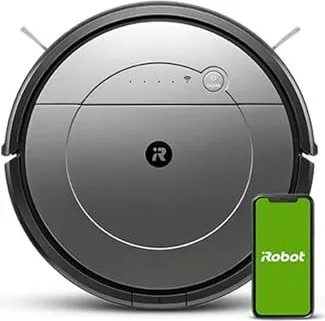
Welcome to the world of automated cleaning with the iRobot Roomba Combo 111 Vacuum/Mop Robot. This innovative device combines powerful suction with wet mopping capabilities to handle your household floors efficiently and thoroughly. Understanding the operation guidelines contained within the guide is crucial for optimal performance and long-term safety. The information provided helps users navigate setup and daily care with significant ease. Many users rely on this reference to ensure their machine runs without issues.
The robot features advanced sensors to prevent falls and avoid collisions with furniture. It uses cliff sensors to detect ledges and stop before dropping off stairs or steps. The cleaning process involves selecting between straight-line navigation for hard floors and reactive navigation for carpeted areas. This flexibility ensures that every surface type is treated appropriately based on the material. You can customize suction power and water output directly through the dedicated mobile application interface on your phone or tablet.
Maintenance is straightforward but requires regular attention to keep the machine in peak condition. The washable microfiber cleaning pad should be removed and washed after every use to prevent bacterial growth and odors. The dust bin must be emptied frequently to maintain strong airflow and suction power. Filters need replacement every few months depending on specific household usage and pets. Brush removal allows for clearing tangled hair and debris that might cause blockages. Always power off the unit properly before performing any cleaning tasks or maintenance steps.
Safety is paramount when operating electrical appliances near children and pets. The device is designed exclusively for indoor household use only in standard environments. Keep it away from extreme temperatures and wet surfaces that could cause short circuits or damage. The charging station provides a dedicated safe spot for the battery to recharge automatically. Ensure the environment is clear of obstacles like power cords and small toys.
Proper setup involves connecting the robot to a standard Wi-Fi network securely. Note that 5.0 GHz networks are not compatible with this specific model configuration. Follow the app instructions to pair the device correctly with your home system. Once connected successfully, you can schedule cleanings and track progress remotely without hassle.
Important Notes
- Store the unit fully charged if not used for a long time.
- Do not incinerate the appliance or batteries ever under any conditions.
- Contact customer care for battery replacement assistance if needed.
Search for 67,732 Manuals online


Type-in Brand or Model