
InWin Sirius Loop ASL120 Manual
PDF manual · 8 Pages
English



Quick check
Incorrect answer, please try again.
Chat with your InWin Sirius Loop ASL120 manual using AI
Get instant AI answers from your InWin Sirius Loop ASL120 manual
Ask anything about the InWin Sirius Loop ASL120. Answers come from this manual, with the pages they are based on.
Ask a Question
Do you recommend Sirius Loop ASL120?
Yes NoFrequently Asked Questions
Yes. The Sirius Loop ASL120 uses an addressable RGB Y-cable setup for connecting to a motherboard 3-pin addressable RGB header. When your board supports the header type, you can run synced lighting across multiple fans.
Is this answer helpful?
If your board lacks a compatible addressable header, use the included Fan RGB One-Click Controller. Power the controller from your PSU SATA cable, then connect the fan's Addressable RGB Y-cable to the controller to access the available lighting modes.
Is this answer helpful?
Use the controller button. Hold the button to turn the lights on or off. Tap the button to cycle through the lighting modes. Note that lighting mode behavior may vary depending on motherboard support.
Is this answer helpful?
The ASL120 Triple Pack is rated for PWM operation up to 1800 RPM, with airflow up to 50 CFM and air pressure up to 1.67 mm/H2O. This is intended to support strong internal temperature control across typical PC workloads.
Is this answer helpful?
The specifications list a maximum noise level of 27 dB(A). Because speed is PWM-controlled, you can generally keep noise lower at reduced RPM settings, depending on your fan curve and system temperature.
Is this answer helpful?
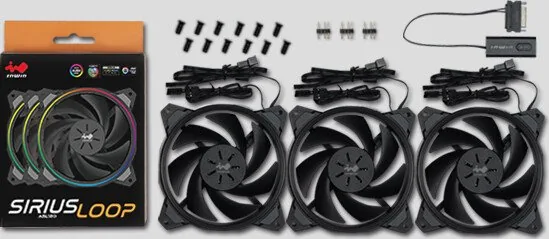
You get three Sirius Loop ASL120 fans, the Fan RGB One-Click Controller, screws for mounting, and the required 3-pin headers for installation. The kit is intended for straightforward multi-fan setup.
Is this answer helpful?
The rated lifespan is listed as more than 30,000 hours, using sleeve bearing construction. The package includes a 2-year warranty for additional coverage.
Is this answer helpful?
Advantages and Disadvantages
Advantages

- Addressable RGB lighting with 11 effects for strong visual customization
- PWM control from 500-1800 RPM helps balance cooling and noise
- Triple-pack setup is ideal for front, top, or radiator installations
- Compatible with motherboard 3-pin addressable RGB headers and includes a fallback controller
- Long rated lifespan (over 30,000 hours) with 2-year warranty
Disadvantages

- Motherboard support is required for direct control; otherwise you must use the included one-click controller
- Sleeve bearing design, while rated for long life, is typically less robust than some premium bearing types
- Installation and lighting depend on correct Y-cable and connector routing to avoid issues
Product Specification
Fan connector
4-Pin PWM with daisy chain connector + 3-Pin ARGB (+5V/DATA/GND) with daisy chain connector
Dimensions
4.72x4.72x0.98in (WxHxD)
Speed
500-1800rpm
Airflow
49.99 CFM
Air pressure
0.07 inH2O
Noise level
27dB(A)
Fan bearing
Sleeve bearing
Voltage range
12V
Power consumption
1.2W
Lighting
RGB
Color
black (frame), black (rotor)
LED controller/adapter
Synchronization connector via 3-Pin ARGB (+5V/DATA/GND), Fan/LED connectors: 1x 3-Pin ARGB (+5V/DATA/GND), external control: buttons, Power supply: 15-Pin SATA
Features
Vibration dampeners
Manufacturer warranty
2 years
Product Description
In Win Sirius Loop ASL120 LED-Control Triple Pack
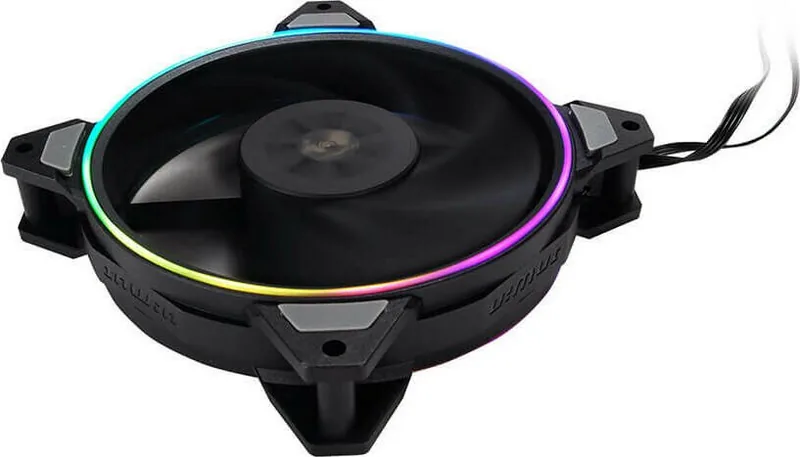
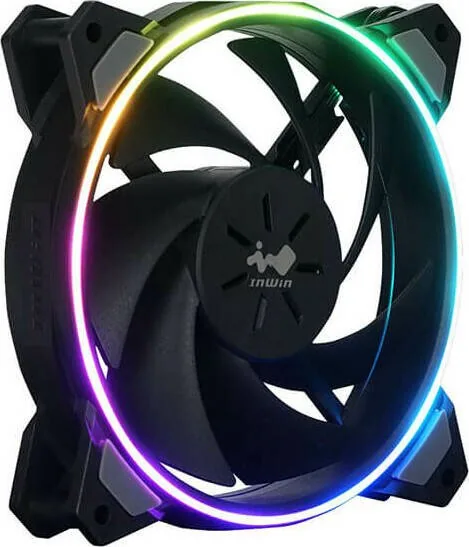
The In Win Sirius Loop ASL120 fans bring addressable RGB lighting to your PC with a clean, modern ring-and-blade look and a focus on everyday cooling performance. This triple pack is designed for builds that want both airflow and visual effects without complicated setups. With 120 mm blades and PWM control, the ASL120 series targets stable temperatures while letting you tailor the look of your system.
What you get in the ASL120 triple pack
Inside the box, you receive three Sirius Loop ASL120 fans, a Fan RGB One-Click Controller, screws for mounting, and the headers needed to connect and power the lighting. The kit is built around convenient cabling, including an addressable RGB Y-cable approach so you can run multiple fans from a single motherboard RGB header when supported.
LED control and lighting modes
The Sirius Loop ASL120 supports addressable RGB and offers 11 distinct lighting effects. If your motherboard has a compatible addressable RGB header, connect the Y-cables to the motherboard for synced control. If not, the included one-click controller lets you power the lighting using your PSU SATA connection and still cycle through the available effects.
On the controller, hold the button to turn the lights on or off, and tap to switch modes. Lighting behavior can vary based on motherboard and firmware support.
Cooling performance in everyday terms
At up to 1800 RPM under PWM control, the ASL120 fans can move up to 50 CFM of airflow and generate up to 1.67 mm/H2O of air pressure. The rated noise level is listed at a maximum of 27 dB(A), supporting quieter operation across typical chassis temps. The fans use sleeve bearing construction with a long rated lifespan of more than 30,000 hours, and the package includes a 2-year warranty.
Key results
- Addressable RGB with 11 lighting effects for a customizable, modern look
- PWM speed range (500-1800 RPM) for quieter control when you need it
- Up to 50 CFM airflow and 1.67 mm/H2O pressure to support stable temps
- Easy multi-fan wiring via addressable Y-cables or the included one-click controller
- Long rated lifespan (over 30,000 hours) with a 2-year warranty
Notes for best results
Keep the fans away from liquids and extreme heat, do not modify the supplied wiring, and avoid contact with the blades while the fan is operating. For best compatibility, confirm your motherboard has a 3-pin addressable RGB header or plan to use the included controller.
Search for 67,706 Manuals online


Type-in Brand or Model