
InWin 915 Manual
PDF manual · 21 Pages
English



Quick check
Incorrect answer, please try again.
Chat with your InWin 915 manual using AI
Get instant AI answers from your InWin 915 manual
Ask anything about the InWin 915. Answers come from this manual, with the pages they are based on.
Ask a Question
Do you recommend 915?
Yes NoFrequently Asked Questions
It is best for premium, high-performance builds that need space for large hardware, strong cooling, and a refined showcase appearance.
Is this answer helpful?
Yes. It supports multiple radiator placements, including front, top, rear, and bottom options, making it suitable for custom or AIO liquid cooling.
Is this answer helpful?
Yes. The chassis supports long and wide GPUs, and it can also be configured for vertical graphics card display with optional riser hardware.
Is this answer helpful?
It supports E-ATX, ATX, Micro-ATX, and Mini-ITX motherboards, giving builders a lot of flexibility.
Is this answer helpful?
Yes. The front panel includes USB 3.1 Gen 2 Type-C, USB 3.0 ports, and HD audio connections.
Is this answer helpful?
Yes, if the motherboard supports addressable RGB headers. Otherwise, it can use the built-in InWin LED lighting mode.
Is this answer helpful?
Advantages and Disadvantages
Advantages

- Elegant aluminium and tempered-glass design creates a premium visual impact.
- Strong cooling support with multiple fan and radiator mounting locations.
- Wide motherboard and GPU compatibility for flexible high-end builds.
- Modern front I/O, including USB Type-C and lighting control.
Disadvantages

- Large full-tower size may be excessive for compact setups.
- Some vertical GPU and riser parts are optional rather than included.
- Advanced features can require careful assembly and cable routing.
- Heavy chassis weight may make transport and installation harder.
Product Specification
External
N/A
Internal
4x 2.5"/3.5" (transverse, drive rails), 9x 2.5"
Connections
1x USB-C 3.1 (10Gb/s, 20-Pin Key-A Header), 2x USB-A 3.0 (5Gb/s), 1x 3.5mm jack (Line-Out), 1x 3.5mm jack (Line-In)
PCI slots
10 (2x Riser Card)
Fan (front)
3x 5.51 in (optional)
Fan (rear)
1x 4.72 in (optional)
Fan (left)
N/A
Fan (right)
N/A
Fan (top)
3x 5.51 in (optional)
Fan (bottom)
2x 5.51 in (optional)
Fan (other)
N/A
Radiator sizes
4.72/5.51/9.45/11.02/14.17 in front, 4.72/5.51/9.45/11.02/14.17 in top, 4.72/5.51/9.45/11.02 in bottom
Motherboard
up to E-ATX
Supported motherboards
E-ATX
Power supply
ATX
Power supply position
bottom
CPU cooler
max. 6.46 in height
Graphics cards
max. 16.14 in
Lighting
RGB-Header 3-Pin ARGB (+5V/DATA/GND), integrated LED control, integrated LED lighting
Dimensions (WxHxD)
9.06x22.44x25.39 in
Volume
22.34 gal
Weight
36.16 lb
Case type
Big-Tower
Front
closed
Top
closed, glass
Bottom
partially closed, rear fan grille, dust filter
Left
closed, glass
Right
closed, glass
Rear
partially closed, top right fan grille, PCI slots behind cover (8x horizontal, 2x vertical)
Front I/O Position
Case side: top, Height: Front, Position: middle
Special features
Aluminum case, graphics card vertically mountable, graphics card holder, concealed PCI slots, glass window
USB notation
Link
Product Description
In Win 915 Manual: Premium Style with Serious Cooling Potential
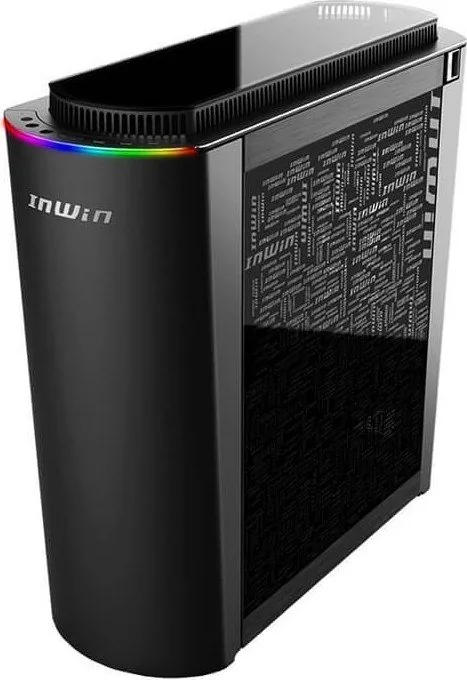
The In Win 915 brings a distinctive personality to the full-tower market, blending sculpted aluminium, tempered glass, and a refined 9-series design language into one striking chassis. It is built for users who want more than a standard workstation or gaming case. From the curved front and rear panels to the clean glass side panels, the 915 feels like a statement piece as much as a PC enclosure.
A Case Built Around Flexibility
Inside, the layout supports a wide range of motherboard formats, including E-ATX, ATX, Micro-ATX, and Mini-ITX. That makes it suitable for everything from a minimalist high-end build to a fully loaded performance rig. There is also generous expansion support, including multiple PCI-E slots and optional vertical GPU placement for builders who want to showcase their graphics card.
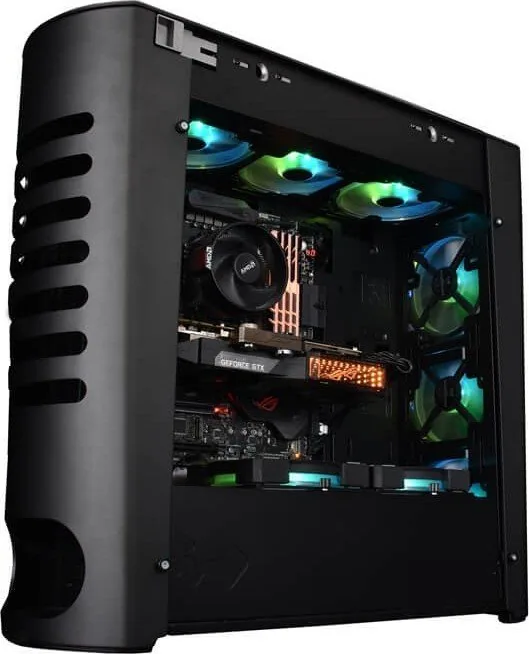
Cooling is one of the biggest strengths here. The chassis supports front, top, rear, and bottom fan or radiator mounting options, making it attractive for air-cooled systems and custom liquid loops alike. Large radiators can fit in key positions, while the removable brackets and panel design make assembly easier than expected for a case of this size.
Storage, Power, and Everyday Usability
The In Win 915 offers broad drive flexibility, with room for multiple 2.5-inch and 3.5-inch drives depending on how the internal brackets are configured. Builders can prioritize storage capacity or maximize airflow by adjusting the internal layout. The bottom-mounted power supply position also helps keep the build organized and efficient.
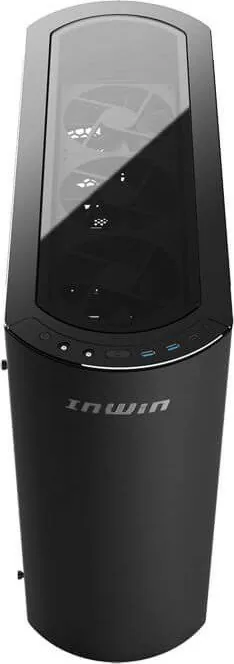
Front I/O is modern and practical, featuring USB 3.1 Gen 2 Type-C, USB 3.0 ports, and audio connections. The top cover ventilation and integrated lighting controls add a premium touch, while the lighting system can operate in either InWin LED mode or addressable RGB mode depending on motherboard support. This gives users room to personalize the look without sacrificing the case’s elegant design.
Why It Stands Out
The 915 is especially appealing to builders who want an enclosure that looks refined on the outside but remains highly capable on the inside. It supports long graphics cards, tall CPU coolers, multiple cooling setups, and a wide range of storage combinations. The result is a chassis that balances visual drama with serious hardware compatibility.
Notes
- Best suited for large, high-performance builds.
- Vertical GPU support is available with optional accessories.
- Lighting behavior depends on motherboard capabilities.
Search for 67,706 Manuals online


Type-in Brand or Model