
Imperial Streamy 1 Manual
PDF manual · 56 Pages
English



Quick check
Incorrect answer, please try again.
Chat with your Imperial Streamy 1 manual using AI
Get instant AI answers from your Imperial Streamy 1 manual
Ask anything about the Imperial Streamy 1. Answers come from this manual, with the pages they are based on.
Ask a Question
Do you recommend Streamy 1?
Yes NoVideo Manual
超爽修仙动漫来咯!傻小子意外觉醒无名宝塔,塔内万年外界一秒,塔内苦修万年出来,实力吓哭仙界众人#修仙 #动漫
Frequently Asked Questions
The Streamy 1 offers a 3.5 mm analog LINE OUT for stereo connection and an optical S/PDIF (TOSLINK) digital output for connection to AV receivers or digital inputs.
Is this answer helpful?
The unit supports AirPlay, DLNA and UPnP and handles common codecs including MP3, AAC, Vorbis/OGG, PCM/WAV, WMA, AC3, FLAC, APE and ALAC for broad compatibility.
Is this answer helpful?
Use the STREAMY Configuration app (iOS, Android, Windows) to select the device, choose 'Network settings', enter your Wi‑Fi SSID and password, and wait for the LED to change to steady blue indicating successful network enrollment.
Is this answer helpful?
If blinking persists, power‑cycle the device and retry. If the Wi‑Fi password was entered incorrectly, perform a factory reset (hold reset ~5–6 seconds) and reconfigure with the correct network credentials.
Is this answer helpful?
Yes—Multi‑Play lets several Streamy units play simultaneously, but it requires all devices to be networked, a player app that supports multiroom streaming, and sufficient network bandwidth (recommendation: 802.11n, ≥150 Mbit/s).
Is this answer helpful?
The device is powered via a mini USB adapter at 5 V / 0.8 A (included). It can also be powered from a PC or laptop USB port using a suitable cable, but it has no internal battery.
Is this answer helpful?
Use the STREAMY Configuration app to select Radio‑Streaming, then add station name and streaming URL. If you need the raw stream URL, online portals like stream‑urls.de can help locate the correct link to paste into the app.
Is this answer helpful?
Advantages and Disadvantages
Advantages

- Simple plug‑and‑play wireless streaming for existing hi‑fi systems via analog or optical outputs.
- Supports common streaming protocols (AirPlay, DLNA, UPnP) and many audio codecs including FLAC and ALAC.
- Compact, low‑power design with USB power and easy mobile/PC app configuration.
- Multi‑Play capable for synchronized multiroom playback when network and player support it.
- Internet radio can be stored and played directly from the device via the configuration app.
Disadvantages

- Requires a compatible streaming app or player for some multiroom features; native mobile players may not support Multi‑Play.
- Network setup may fail if Wi‑Fi credentials are entered incorrectly, requiring a factory reset to retry.
- Limited to 802.11n network performance for reliable multiroom streaming; congested networks may reduce quality.
- No battery operation—device depends on continuous USB power and mains adapter.
- Minimal onboard controls; most configuration requires the mobile/PC app.
Product Specification
Type
Receiver
Signal Transmission
Wi-Fi (WLAN)
Connections
Digital Audio Out (optical), Stereo Line Out (3.5mm jack)
Power Supply
USB
Dimensions
82x22x74mm (WxHxD)
Weight
70g
Product Description
Imperial Streamy 1 — Wireless Audio Made Simple
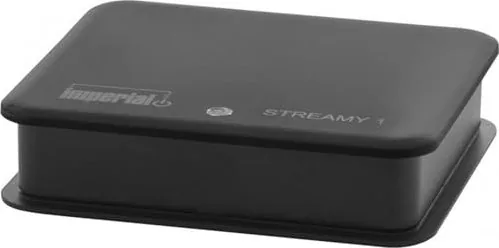
The Imperial Streamy 1 is a compact Wi‑Fi audio receiver that brings wireless streaming to existing hi‑fi systems and amplifiers. Small and unobtrusive, it connects to audio equipment via a 3.5 mm analog line out or an optical S/PDIF (TOSLINK) digital output, enabling smartphones, tablets and PCs to stream music directly to traditional audio setups. Power is supplied via the included 5 V USB adapter, and the device supports common streaming protocols and codecs for broad compatibility.
What it does
Engineered for straightforward integration, the Streamy 1 offers two primary modes: Direct Play, which lets a mobile device connect directly to the Streamy for immediate streaming, and network integration, which enrolls the Streamy into an existing Wi‑Fi network for continuous connectivity. A companion "STREAMY Configuration" app (iOS, Android, Windows) simplifies setup, network naming, internet radio configuration and firmware handling. Multi‑Play support allows synchronized playback on multiple Streamy units when the network and source app support multiroom streaming.
Key features and compatibility
- Dual audio outputs: 3.5 mm analog line out and optical TOSLINK for digital connections.
- Small form factor (21 × 81 × 70 mm) and USB power (5 V / 0.8 A).
- Supports AirPlay, DLNA and UPnP and a wide range of audio formats including MP3, AAC, FLAC, ALAC and PCM/WAV.
- LED status indicator for connection and firmware update feedback; reset button for restoring factory defaults.
- Internet radio storage and direct streaming via the configuration app.
The Streamy 1 is suited for users who want to upgrade legacy audio gear with wireless convenience without replacing existing amplifiers or speakers. It prioritizes compatibility and ease of use: plug in, name the device, and stream. For multiroom setups, ensure adequate network bandwidth (802.11n recommended) and use player apps that support Multi‑Play.
Notes
- Use only the supplied USB power adapter or an equivalent 5 V / 0.8 A source.
- For best audio quality, use higher bitrate files or streams (MP3 ≥ 192 kbps recommended).
- If network pairing fails, use the reset button to return to factory settings and retry.
- Dispose of the device according to local electronic recycling regulations.
Search for 67,706 Manuals online


Type-in Brand or Model
Laura Weber
9 months ago
I received my AirLino and it shows an older hardware version than the current model. Is this normal or should I request a replacement?
Manual.ly
9 months ago
Thanks for reaching out. It can happen that stock or bundles include earlier hardware revisions, even when the product name matches the current AirLino line. Please check the hardware revision or model label on the device or in the device info section in the settings. If the revision does not match what was confirmed in your order or you expected specific features that are tied to the newer hardware, contact support with a photo of the label and your order number. We will verify the batch and can arrange an exchange or other solution if a mismatch is confirmed.