

Imperial DABMAN PBB 2 Manual
PDF manual · 152 Pages
English



Quick check
Incorrect answer, please try again.
Chat with your Imperial DABMAN PBB 2 manual using AI
Get instant AI answers from your Imperial DABMAN PBB 2 manual
Ask anything about the Imperial DABMAN PBB 2. Answers come from this manual, with the pages they are based on.
DABMAN PBB 2 Maintenance Schedule
Unplug the device before cleaning. Use a dry, soft cloth. Do not use liquids, solvents, or cleaning agents as they may damage the surface.
Run an automatic or manual station search periodically to update the list with new stations and services that are regularly activated.
Ask a Question
Do you recommend DABMAN PBB 2?
Yes NoFrequently Asked Questions
Press the Mode button repeatedly until the desired mode appears on the display. The screen will show either DAB or FM depending on your selection.
Is this answer helpful?
Yes, the device supports MP3 audio files. Simply insert a USB drive with a maximum capacity of 32 GB into the front port and select USB mode.
Is this answer helpful?
The radio uses six 1.5V C-type (LR20) batteries for portable operation. Do not mix new and old batteries, and remove them if not used for long periods.
Is this answer helpful?
Yes, you can set the sleep timer for 15, 30, 45, 60, or 90 minutes by accessing the System menu and selecting the Sleep option.
Is this answer helpful?
Ensure the CD is inserted label-side up and the tray is closed. Check if the transport protection strip was removed from the laser unit before first use.
Is this answer helpful?
Yes, the system includes preset equalizer modes like Rock, Pop, Jazz, and Classic, plus a manual setting to adjust bass and treble levels individually.
Is this answer helpful?
You can connect external audio sources like phones via the 3.5mm AUX input, but the device does not have an output jack to connect external powered speakers.
Is this answer helpful?
Advantages and Disadvantages
Advantages

- Crystal clear DAB+ digital reception eliminates static noise
- Versatile playback options including CD, USB, FM, and AUX inputs
- Customizable equalizer settings for tailored sound quality
- Portable design with optional battery operation for flexibility
- Intuitive controls and informative display for ease of use
Disadvantages

- AUX cable is not included in the package
- Display brightness cannot be adjusted during standby when running on batteries
- Battery operation requires six large C-type cells which may be bulky
- CD transport protection must be manually removed before initial setup
- No built-in rechargeable battery; relies on disposable cells for portability
Product Specification
Power
2W RMS
Audio Formats
CD-Audio, MP3
Tuner
FM, DAB, DAB+
Display
LCD
Audio Connections
AUX In (3.5mm Jack)
Other Connections
USB-A 2.0
Power Supply
C Battery, Mains Power
Color
Black, Silver
Dimensions
9.45x4.61x9.45in (WxHxD)
Weight
2.20lbs
Product Description
Discover the Imperial DABMAN PBB 2: Your Ultimate Compact Audio Companion
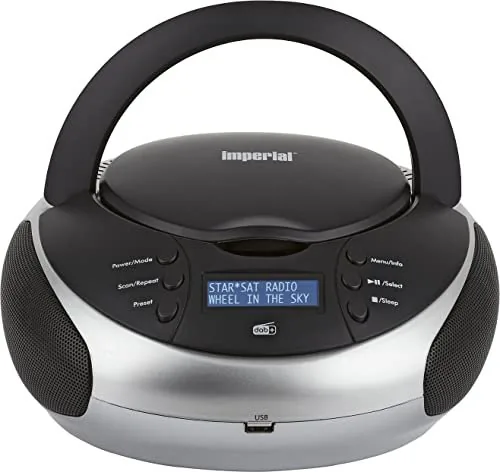
The Imperial DABMAN PBB 2 stands as a versatile centerpiece for modern audio enjoyment, blending classic radio functionality with digital precision. Designed for both home and portable use, this compact unit delivers crystal-clear sound through its robust speaker system. Whether you are tuning into your favorite local news stations via DAB+ or enjoying the nostalgic warmth of FM broadcasts, the device ensures an immersive listening experience without static interference.
Beyond traditional radio reception, the Imperial DABMAN PBB 2 embraces digital media formats. Users can seamlessly play music stored on USB drives or classic CDs directly through the unit. The CD mechanism supports both standard audio discs and MP3 formats, offering flexibility for diverse music libraries. For those who prefer streaming from personal devices, the AUX input allows easy connection to smartphones or tablets, turning any source into a high-quality audio player.
The interface is intuitive, featuring clearly labeled controls for power, mode selection, volume, and track navigation. A bright display provides real-time information about station names, song titles, and signal strength, ensuring you stay connected to your content. The device also includes a sleep timer, allowing you to fall asleep to your favorite tunes while automatically powering down after a set duration. Customizable equalizer settings let you adjust bass and treble levels to match your personal taste or the specific genre of music being played.
Built with safety and longevity in mind, the unit features reinforced insulation and clear warnings regarding battery handling and environmental conditions. It operates efficiently on mains power or six large C-type batteries, making it suitable for use during power outages or in locations without immediate access to an outlet. The telescopic antenna extends fully to maximize signal reception, ensuring consistent performance across various environments.
This audio solution is perfect for living rooms, bedrooms, or even outdoor gatherings where portability is key. Its compact dimensions allow it to fit on small shelves or desks without taking up excessive space. By combining DAB+, FM, CD, and USB capabilities into one sleek package, the Imperial DABMAN PBB 2 offers a comprehensive entertainment hub that caters to all your auditory needs.
Key Notes
- Ensure the transport protection strip is removed from the CD laser before first use.
- Always use the included power adapter to prevent damage to the internal circuitry.
- Remove batteries if the device will not be used for an extended period to prevent leakage.
Search for 67,706 Manuals online


Type-in Brand or Model