
Imperial DABMAN i600 Manual
PDF manual · 184 Pages
English



Quick check
Incorrect answer, please try again.
Chat with your Imperial DABMAN i600 manual using AI
Get instant AI answers from your Imperial DABMAN i600 manual
Ask anything about the Imperial DABMAN i600. Answers come from this manual, with the pages they are based on.
Ask a Question
Do you recommend DABMAN i600?
Yes NoFrequently Asked Questions
It supports Internet radio, DAB+, FM, Bluetooth audio, USB playback, and network streaming through UPnP/DLNA. This makes it useful for both traditional broadcast listening and digital music playback.
Is this answer helpful?
Yes. You can listen to FM and DAB+ without an internet connection. Wi-Fi or LAN is mainly needed for Internet radio, network playback, weather updates, and app-based control.
Is this answer helpful?
Yes. You can save favorite stations and access them quickly through the memory buttons or the remote control. This is helpful for switching between regularly used stations with minimal effort.
Is this answer helpful?
Yes. It includes alarm functionality and can wake you with a tone, melody, or a chosen radio station. A sleep timer is also available for bedtime listening.
Is this answer helpful?
You can use Bluetooth, AUX input, or the AirMusicControl app depending on your setup. Bluetooth is ideal for wireless playback, while AUX works for a direct wired connection.
Is this answer helpful?
Yes. The brightness can be changed with the dimmer function, and the display can also be switched between color and black-and-white view in the settings.
Is this answer helpful?
Extend the antenna fully, improve the radio’s placement, and run a new station scan. For FM, switching to mono can also help when the signal is weak or noisy.
Is this answer helpful?
Advantages and Disadvantages
Advantages

- Combines Internet radio, DAB+, FM, Bluetooth, USB, and DLNA in one unit.
- Remote control and app support make daily operation convenient.
- Alarm, sleep timer, and weather display add useful everyday functions.
- Equalizer and brightness settings help personalize listening and viewing.
Disadvantages

- Internet features depend on a stable network connection.
- The interface may feel complex for first-time users.
- Best reception requires proper antenna positioning and placement.
- Advanced features are useful, but not as intuitive as a modern smart speaker.
Product Specification
Power
25W Peak
Tuner
FM, DAB, DAB+, Internet Radio
Voice Assistants
no
Audio Connections
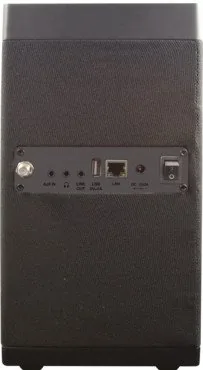
AUX In (3.5mm jack), Stereo Line Out (3.5mm jack), Headphones (3.5mm jack)
Other Connections
USB-A, RJ-45
Wireless
Bluetooth, Wi-Fi (WLAN)
Power Supply
Mains Operation
Features
Remote Control
Dimensions
10.08x3.15x4.09in (WxHxD)
Weight
5.71 lb
Product Description
Imperial DABMAN i600: A Smart Radio for Everyday Listening
The Imperial DABMAN i600 is built for listeners who want more than a basic radio. Guided by the Imperial DABMAN i600 Manual, it becomes clear that this device combines classic broadcast reception with modern streaming comfort. It supports Internet radio, DAB+, FM, Bluetooth, USB playback, and network audio, making it a flexible companion for the kitchen, office, workshop, or living room.
What makes the i600 stand out is its balance of simplicity and range. You can use the front-panel controls, the included remote control, or even the AirMusicControl app on a smartphone or tablet. That means you are not locked into one way of using it. For daily use, this is a practical advantage: switch stations, adjust sound, save favorites, or set alarms without needing a complicated setup each time.
The radio is also designed for connected homes. It can join a network through Wi-Fi or LAN, giving access to thousands of online stations and local station lists. Its media center functions let it play audio from USB storage devices or stream music via UPnP and DLNA-compatible devices. For users who like variety, the i600 offers a lot in a compact format.
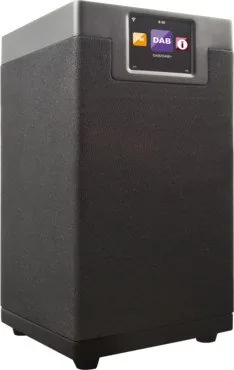
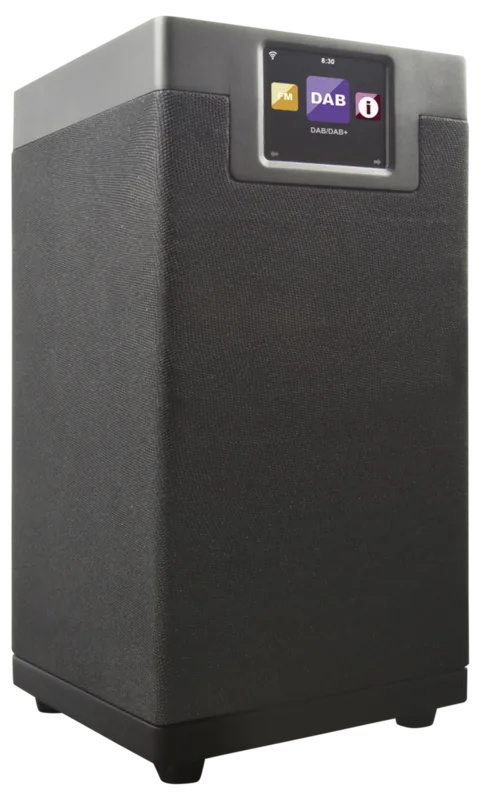
Another strong point is its flexible sound and display options. The equalizer, dimmer, weather display, and mono/stereo FM settings help tailor the experience to your environment. The 2.8-inch color display is small but useful, and the built-in alarm and sleep timer make the radio suitable for bedside or routine use. If you want one device that can act as a radio, player, and alarm clock, the i600 fits that role well.
Of course, this model is still a practical home audio device rather than a high-end smart speaker. It relies on proper network setup for internet features and benefits from careful placement for best reception. Even so, the overall package is impressive for users who want broad functionality without overcomplication.
Notes
- Best for users who want FM, DAB+, and internet radio in one device.
- Network setup unlocks the full feature set.
- Remote control use is the easiest way to navigate the menu.
- Ideal for favorite stations, alarms, and casual music playback.
Search for 67,706 Manuals online


Type-in Brand or Model