

Imperial DABMAN i450 CD Manual
PDF manual · 184 Pages
English



Quick check
Incorrect answer, please try again.
Chat with your Imperial DABMAN i450 CD manual using AI
Get instant AI answers from your Imperial DABMAN i450 CD manual
Ask anything about the Imperial DABMAN i450 CD. Answers come from this manual, with the pages they are based on.
Ask a Question
Do you recommend DABMAN i450 CD?
Yes NoFrequently Asked Questions
It stands out by combining multiple listening sources in one device: internet radio, DAB+, FM, Bluetooth, USB media, and AUX input. It is meant for users who want one radio to cover both streaming and traditional broadcast listening.
Is this answer helpful?
Yes. The radio supports FM and DAB+ reception, so you can listen to terrestrial stations without any internet connection. Internet radio is only needed when you want access to online stations and network-based features.
Is this answer helpful?
Yes. You can stream audio through Bluetooth or use the AirMusic Control app on a compatible mobile device. This makes it easy to play local music files or send audio wirelessly to the radio.
Is this answer helpful?
The radio includes station memory and favorites functions. You can store frequently used stations directly on the device or through the remote control, which makes switching channels faster during daily use.
Is this answer helpful?
Yes. It includes alarm, sleep timer, dimmer, and clock-related functions, making it practical for bedroom use. The display and preset controls also help keep nighttime operation simple.
Is this answer helpful?
Yes. The unit provides AUX IN for external sources and LINE OUT for sending audio to an amplifier or active speakers. That makes it useful as part of a larger home audio setup.
Is this answer helpful?
Advantages and Disadvantages
Advantages

- Combines internet radio, DAB+, FM, Bluetooth, USB, and AUX in one device.
- Offers convenient presets, favorites, alarm, sleep timer, and dimmer controls.
- Supports network use through Wi‑Fi or LAN for flexible installation.
- Can stream from mobile devices and play local media with minimal effort.
Disadvantages

- Menu-rich design may feel complex for users who prefer a very simple radio.
- Internet features depend on a stable network connection.
- Some functions require extra setup, such as Wi‑Fi passwords or app pairing.
- External USB CD playback depends on compatible attached hardware.
Product Specification
Power
14W Peak
Audio Formats
CD-Audio
Tuner
FM, DAB+, Internet Radio
Display
LCD
Audio Connections
AUX In (3.5mm Jack), Stereo Line Out (3.5mm Jack), Headphones (3.5mm Jack)
Other Connections
USB-A 2.0, RJ-45
Wireless
Bluetooth, Wi-Fi (WLAN)
Power Supply
Mains Operation
Dimensions
12.60x3.35x10.43in (WxHxD)
Weight
4.85 lbs
Product Description
Imperial DABMAN i450 CD Manual: A Versatile Radio for Modern Listening
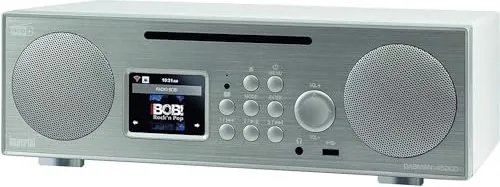
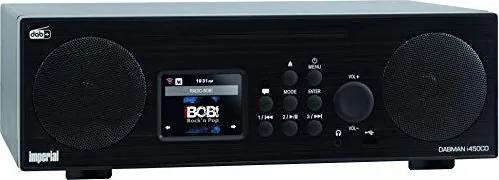
The Imperial DABMAN i450 CD Manual introduces a feature-rich radio designed for listeners who want far more than basic FM playback. This compact unit brings together internet radio, DAB+, FM, Bluetooth, USB media support, and AUX input in one easy-to-use device. It is built for homes that value flexibility, whether you prefer live broadcasts, streaming stations, or your own music library.
One of the strongest points of the DABMAN i450 is its wide range of listening options. With internet radio access, it can open the door to thousands of stations from around the world, while DAB+ delivers digital terrestrial reception with clear sound and simple station browsing. FM mode is also available for traditional radio fans, making the device suitable for mixed listening habits. The inclusion of favorites memory and station presets makes everyday use quick and practical.
The radio is also designed as a multimedia hub. Through USB, it can play stored audio files and even support an external USB CD/DVD drive for disc playback, giving it a broader role in a living room or kitchen setup. Bluetooth connectivity adds another layer of convenience, allowing music to be streamed from a smartphone or tablet without complicated setup. For wired listening, AUX IN and LINE OUT connections make it easy to integrate with other audio gear.
Usability is another major highlight. The device includes a clear color display, remote control, alarm functions, sleep timer, dimmer settings, weather display, and language selection. Network setup can be done via LAN or Wi‑Fi, and the AirMusic Control app offers remote management from a mobile device. The result is a radio that feels modern, adaptable, and comfortable to operate.
Notes
- Ideal for users who want internet radio, DAB+, FM, and Bluetooth in one device.
- Useful as both a bedside radio and a small home audio center.
- Best suited for households that appreciate preset stations and app control.
- External antenna support helps improve reception in weaker signal areas.
Search for 67,706 Manuals online


Type-in Brand or Model