
Imperial DABMAN i300 CD Manual
PDF manual · 290 Pages
English



Quick check
Incorrect answer, please try again.
Chat with your Imperial DABMAN i300 CD manual using AI
Get instant AI answers from your Imperial DABMAN i300 CD manual
Ask anything about the Imperial DABMAN i300 CD. Answers come from this manual, with the pages they are based on.
DABMAN i300 CD Maintenance Schedule
Check the device for visible damages or defects before every use. Do not use if damaged.
Always disconnect the power unit from the socket before cleaning the device.
Wipe the device with a dry, soft cloth only. Do not use liquids or solvents.
Wipe fingerprints and dust from the recorded side with a clean, dry cloth from center to edge.
If the device is not used for a longer period, remove batteries from the remote control.
Ask a Question
Do you recommend DABMAN i300 CD?
Yes NoFrequently Asked Questions
It supports DAB/DAB+ and FM radio, Internet radio, podcasts and Radio-On-Demand, plus CD playback (CD-DA and MP3 CDs). For network music, it can play audio from UPnP servers. It also offers AUX IN, and Bluetooth is available as an optional feature.
Is this answer helpful?
During first start-up you use the network setup assistant: choose your Wi-Fi network, enter the password, and confirm. If your router supports WPS (PBC), you can pair more quickly using the router's WPS button and OK on the radio. For special cases, manual setup allows DHCP on/off and manual entry of network parameters.
Is this answer helpful?
Yes, as long as you use a compatible UPnP server (it can be on a computer or other network device such as a NAS). The radio accesses the shared media over the network and plays it directly, so the browsing workflow does not require a running computer application.
Is this answer helpful?
The device is designed for standard audio CDs (CD-DA) and MP3 CDs written to CD-R/CD-RW. MP3 discs need to be created using ISO 9660 Level 1 or Level 2. Multisession CDs are not readable, and some file extensions are not supported.
Is this answer helpful?
The radio includes two integrated alarms. You enable an alarm and set the time, then choose a wake source such as an alarm tone, the last listened station, or one of your favorites. The manual describes setting alarm volume during setup so the alarm plays at your preferred loudness.
Is this answer helpful?
The sleep timer automatically powers the radio down after a set duration (with options up to around one hour). Snooze is used when an alarm is active: it temporarily delays the alarm interruption, letting you rest a bit longer before it triggers again.
Is this answer helpful?
Yes. The manual warns that during a firmware update, custom settings can be lost, including network profiles, station favorites, and equalizer settings. After the update, you may need to reconfigure the preferences you changed.
Is this answer helpful?
Advantages and Disadvantages
Advantages

- Versatile audio sources: DAB/DAB+, FM, Internet radio, podcasts, CD, AUX IN, and optional Bluetooth.
- Large Internet radio catalog available after Wi-Fi setup, with station sorting and favorites.
- UPnP media streaming supports flexible browsing of shared music libraries.
- Two alarms plus sleep timer and snooze for practical daily routines.
- Equalizer with presets and a configurable custom mode for tailored sound.
Disadvantages

- Internet radio and UPnP depend on your network quality and correct Wi-Fi configuration.
- Bluetooth is optional, so it may not be available on every unit.
- Firmware updates can wipe custom settings like favorites and EQ.
- CD playback has format limits (for example, multisession discs are not supported).
- UPnP content cannot be stored as favorites, requiring menu navigation instead.
Product Specification
Comprising
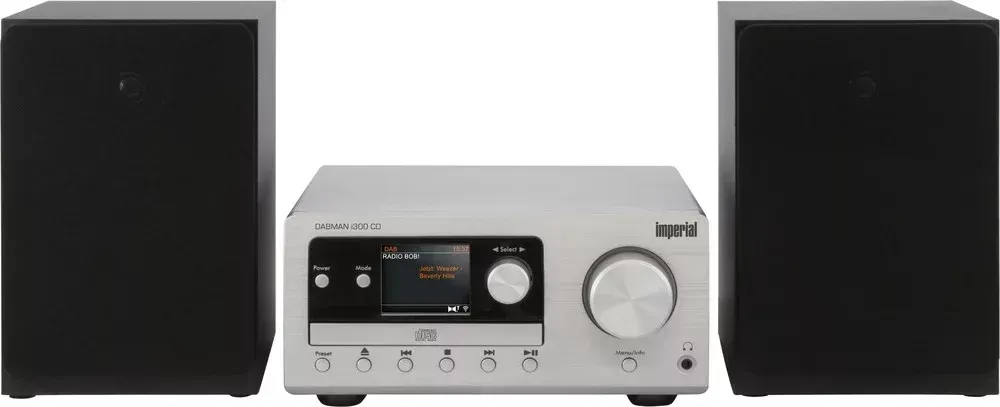
CD player, Tuner, Speakers
Power
2x 20W RMS
Tuner
FM, DAB, DAB+
Audio connections
AUX In (3.5mm jack), Stereo Line In (RCA), Headphones (3.5mm jack)
Wireless
Bluetooth, NFC
Device color
silver
Speaker color
black
Device dimensions
9.72x4.76x11.50in (WxHxD)
Speaker dimensions
5.98x8.82x7.80in (WxHxD)
Weight
7.96 lbs
Product Description
Imperial DABMAN i300 CD with Keyword: Imperial DABMAN i300 CD Manual
If you want one compact system that covers modern streaming and classic disc listening, the Imperial DABMAN i300 CD brings together DAB/DAB+, FM, Internet radio, podcasts, and CD playback in a single tabletop player. The Imperial DABMAN i300 CD Manual highlights how the device works as a true network radio: once connected to your home Wi-Fi, it gives access to a large and regularly updated selection of Internet stations, plus content you can save as favorites. It also supports media streaming via UPnP, making it possible to play audio from compatible computers or network storage without needing to keep a browser tab open.
The user experience is built around quick navigation and a clear on-screen display. You can switch modes between DAB radio, FM radio, Internet radio, Bluetooth (as an optional feature), CD, and AUX IN. Volume, mute, source selection, and menu browsing are designed for daily use, and the device includes practical extras such as a sleep timer, two alarm times, and a snooze function. Sound shaping is also covered with an equalizer that offers several presets, plus the option to create your own custom settings.
For CD listeners, the i300 CD supports audio CDs (CD-DA) and MP3 CDs recorded on CD-R/CD-RW. It provides playback controls like search within a track, repeat modes, and shuffle. The manual emphasizes care for disc handling and storage, and it notes limitations for certain disc types (for example, multisession discs are not readable).
On the network side, setup is flexible. During first start-up, a wizard guides you through time format and time zone, then connects to Wi-Fi by selecting your network and entering the password. If your router supports it, WPS (PBC) can simplify connection. For advanced users or special router environments, manual configuration options include DHCP control and a manual approach to entering network parameters.
Notes
- The device is intended for indoor, dry use.
- After a firmware update, custom settings such as favorites and EQ can be reset.
- For best Internet radio performance, stable Wi-Fi and correct network settings matter.
Key results (most important takeaways)
- Internet radio and podcasts use a network connection for a continually updated station catalog.
- DAB/DAB+ reception includes scanning, cleaning the station list, and station sorting.
- CD playback supports CD-DA and MP3 (with specific disc-format limitations).
- UPnP streaming enables network audio playback with flexible organization, but UPnP items cannot be saved as favorites.
- Alarms (2) and a sleep timer make the radio suitable for wake-ups and bedtime listening.
Search for 67,706 Manuals online


Type-in Brand or Model