

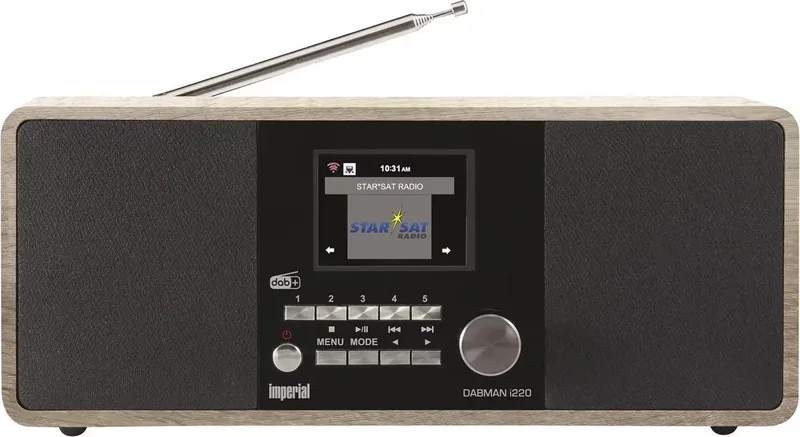
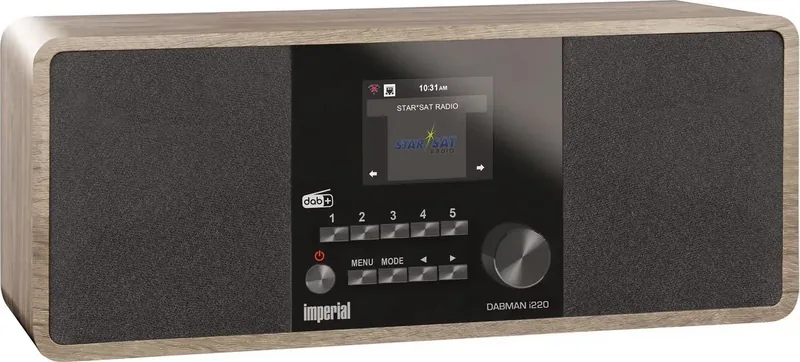
Imperial DABMAN i220 Manual
PDF manual · 196 Pages
English



Quick check
Incorrect answer, please try again.
Chat with your Imperial DABMAN i220 manual using AI
Get instant AI answers from your Imperial DABMAN i220 manual
Ask anything about the Imperial DABMAN i220. Answers come from this manual, with the pages they are based on.
DABMAN i220 Maintenance Schedule
Inspect the device before every use. If visible damage is found, stop operating it immediately to avoid electric shock or fire.
Unplug the device and clean with a dry, soft cloth. Do not use liquids, solvents, or cleaning agents as they may damage the surface.
If batteries leak, remove them immediately and clean the contacts before inserting new ones to prevent corrosion and injury.
Ask a Question
Do you recommend DABMAN i220?
Yes NoFrequently Asked Questions
Connect the device to your Wi-Fi network using the built-in receiver or by using a LAN cable. Access the network settings in the menu to select your connection type and enter the password key.
Is this answer helpful?
Yes, you can use the USB input to play audio tracks stored on flash drives or hard disks. The Media Center function supports playback from these local storage devices directly.
Is this answer helpful?
Yes, the display brightness can be adjusted using the dimmer function in the settings menu. You can also switch to a black and white mode for sleep visibility.
Is this answer helpful?
Updates are performed via the USB interface. Download the software from the official website, unpack the file, and connect the storage medium to the USB port of the unit.
Is this answer helpful?
Troubleshooting steps include resetting to factory defaults or restarting the power supply. Contact the service center if the problem persists after basic diagnostics.
Is this answer helpful?
Yes, the device works as a radio alarm clock. You can set up to two alarms to wake you up with a tone, melody, or radio station station.
Is this answer helpful?
The package includes the radio unit, remote control, external power supply, operating instructions, guarantee card, and a telescopic antenna.
Is this answer helpful?
Advantages and Disadvantages
Advantages

- Strong DAB+ and FM reception quality with clear digital audio output.
- Supports over ten thousand internet radio stations worldwide via Wi-Fi.
- Includes AirMusic Control App for remote smartphone management.
- Versatile connectivity options including Bluetooth and USB media playback.
- Energy saving features reduce power consumption during standby mode.
Disadvantages

- Requires external power supply and cannot run on internal batteries.
- No built-in rechargeable battery for portable use anywhere.
- Remote control batteries are not rechargeable and must be replaced.
- Some advanced settings require navigation through multiple menu layers.
- Antenna may need positioning adjustment for optimal signal reception.
Product Specification
Power
20W Peak
Audio Formats
AAC, AAC+, MP3, WMA
Tuner
FM, DAB, DAB+
Display
2.8" LCD, Clock
Audio Connections
AUX In (3.5mm Jack), Stereo Line Out (3.5mm Jack), Headphones (3.5mm Jack)
Other Connections
USB-A 2.0, RJ-45
Wireless
Bluetooth, Wi-Fi (Wireless LAN)
Power Supply
AC Power
Features
App Control, Remote Control, Sleep Timer, Telescopic Antenna, Alarm Function
Product Description
Imperial DABMAN i220 Overview
Welcome to the world of high-fidelity sound with the Imperial DABMAN i220. This advanced digital radio brings your favorite broadcasts directly to your living room or office space. Whether you prefer traditional terrestrial signals or streaming over the internet, this device handles it all with ease and modern convenience. The Imperial DABMAN i220 Manual provides essential guidance for setup and operation, ensuring you get the best experience from the start without confusion.
One of the standout features is the DAB+ tuning capability. It offers crystal clear digital sound quality that significantly surpasses standard FM broadcasts in terms of clarity and noise resistance. You can store your favorite local and national stations instantly using the dedicated memory keys located conveniently on the top panel. Internet radio connectivity opens the door to thousands of global stations beyond local borders. Simply connect to your Wi-Fi network and access over ten thousand channels from around the sphere without additional subscription fees.
Connectivity options are incredibly versatile for all types of users. Bluetooth technology allows wireless streaming from smartphones or tablets directly through the main speakers without cables. USB ports let you play local media tracks stored on flash drives or hard disks conveniently. The Media Center function supports UPnP and DLNA protocols for networked audio playback from PCs. An auxiliary input connects external devices like MP3 players for direct line-in access when needed.
Setup is straightforward thanks to the intuitive menu system designed for all ages. Navigation is handled via a dedicated remote control or front panel buttons for physical interaction. The included AirMusic Control App lets you manage the radio completely from your mobile device screen. Display settings can be adjusted for brightness or even switched to a black and white mode for standby visibility during sleep.
Safety is a top priority during manufacturing. The device complies with EU standards and includes reinforced double insulation for electrical protection. Keep the unit dry and away from heat sources to maintain longevity and optimal performance. Battery replacement for the remote is simple using standard AAA types found in most homes. If issues arise, the troubleshooting section helps resolve common errors without immediate service calls. Regular maintenance involves lightly dusting with a soft dry cloth. No liquids should ever touch the casing to prevent damage.
This unit serves as a reliable companion for serious music lovers everywhere. It combines modern streaming capabilities with classic radio tuning for a unified experience. Updates can be performed via USB to keep software current and functional. The warranty covers defects under normal usage conditions as per law. Customer support is available via dedicated hotline for technical assistance regarding configuration. Enjoy crystal clear audio without the clutter of complex wired connections. The Imperial DABMAN i220 stands out in its class for value and functionality. It represents a significant upgrade for home audio systems seeking versatility.
Search for 67,706 Manuals online


Type-in Brand or Model