
Imperial DABMAN i200 Manual
PDF manual · 88 Pages
English



Quick check
Incorrect answer, please try again.
Chat with your Imperial DABMAN i200 manual using AI
Get instant AI answers from your Imperial DABMAN i200 manual
Ask anything about the Imperial DABMAN i200. Answers come from this manual, with the pages they are based on.
Ask a Question
Do you recommend DABMAN i200?
Yes NoFrequently Asked Questions
It combines internet radio, DAB+, FM, USB playback, and network media support in one compact device. That makes it useful for users who want flexible listening without switching between multiple products.
Is this answer helpful?
Yes. The radio can still play FM and DAB+ stations without internet access. Internet radio, weather data, and network media features, however, require a network connection.
Is this answer helpful?
Yes. The device supports saved favorites for quick access. You can store stations using the preset keys on the radio or through the remote control, depending on the mode you are using.
Is this answer helpful?
Yes. It can be used as a radio alarm clock and also includes a sleep timer. You can choose how the alarm sounds, including tone, melody, or selected radio sources.
Is this answer helpful?
You can use the USB port for local files or connect a phone or tablet through AUX. If your phone and radio are on the same network, UPnP/DLNA and the app may also help with playback.
Is this answer helpful?
Extend the antenna fully, move the radio closer to a window if needed, and run a new station scan. For network issues, confirm Wi‑Fi details, router access, and the correct password.
Is this answer helpful?
Advantages and Disadvantages
Advantages

- Supports Internet radio, DAB+, FM, USB, AUX, and UPnP/DLNA for wide listening flexibility.
- Stores favorites and offers a remote control, making station access quick and simple.
- Includes alarm, sleep timer, weather display, and automatic time sync for everyday convenience.
- Wi‑Fi and LAN connectivity give users multiple ways to connect to the network.
Disadvantages

- Advanced features depend on a stable internet connection and proper network setup.
- The built-in speakers are good for compact use, but not a replacement for a full hi-fi system.
- Menu navigation can feel detailed at first because the radio offers many functions.
- Reception quality still depends on antenna position, location, and signal strength.
Product Specification
Power
20W RMS
Audio Formats
MP3
Tuner
FM, DAB, DAB+, Internet Radio
Streaming Clients
Spotify
Display
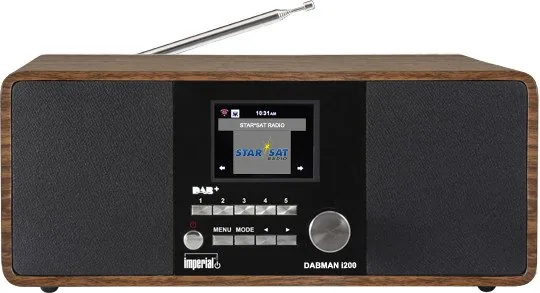
2.8" LCD, Time
Audio Connections
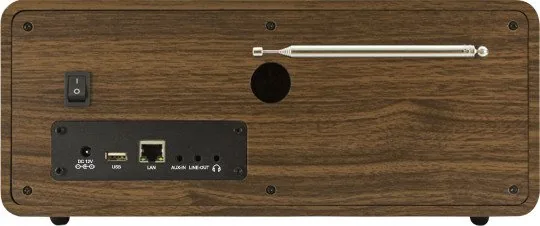
AUX In (0.14in Jack), Stereo Line Out (0.14in Jack), Headphones (0.14in Jack)
Other Connections
USB-A, RJ-45
Wireless
Wi-Fi (WLAN)
Power Supply
Mains Operation
Special Features
Remote Control, Sleep Timer, Telescopic Antenna, Alarm Function
Dimensions
12.72x5.35x4.33in (WxHxD)
Weight
4.17lb
Product Description
Imperial DABMAN i200: Flexible Radio for Modern Listening
The Imperial DABMAN i200 blends classic radio listening with modern streaming convenience, making it a practical choice for everyday entertainment. As the Imperial DABMAN i200 Manual suggests, the device is designed for users who want one radio that handles internet stations, DAB+, FM, and local media with minimal fuss. Its compact form hides a surprisingly broad set of features, from Wi‑Fi and LAN connectivity to USB playback and app control.
A radio built for variety
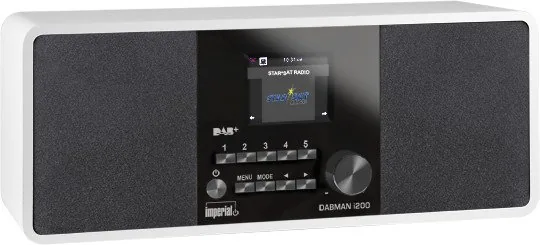
One of the strongest points of the DABMAN i200 is its versatility. You can switch between Internet Radio, DAB+, FM, UPnP, AUX, and USB modes depending on what you want to hear. That flexibility makes it suitable for kitchens, bedrooms, home offices, or any space where a dependable audio companion is welcome. The 2.8-inch color display, preset keys, and remote control also help keep daily use straightforward.
Easy setup and useful extras
The setup process is clearly focused on convenience. Network connection can be made through Wi‑Fi or LAN, and once online, the radio can sync time automatically, show weather updates, and access a large selection of stations. It can store favorite stations, support alarm and sleep timer functions, and even act as a radio alarm clock. For people who like tidy workflows, the AirMusic Control app adds another way to manage playback from a smartphone or tablet.
Sound, connectivity, and everyday use
For its size, the DABMAN i200 offers solid audio output and multiple connection options. Line out, headphone out, AUX in, and USB expand its usefulness beyond simple radio listening. It can also serve as a bridge to external speakers or an amplifier, making it easy to integrate into a larger sound setup. The equalizer presets are a welcome touch for tailoring the sound to music, speech, or casual background listening.
Notes
- Best results come from a stable network connection and a fully extended antenna.
- The remote control is the easiest way to navigate menus and save stations.
- Firmware updates and network features may vary depending on availability and settings.
Overall, the Imperial DABMAN i200 stands out as a feature-rich radio that balances traditional broadcast reception with internet-based listening. It is especially appealing for users who want a single device for multiple audio sources without sacrificing ease of use.
Search for 67,706 Manuals online


Type-in Brand or Model