
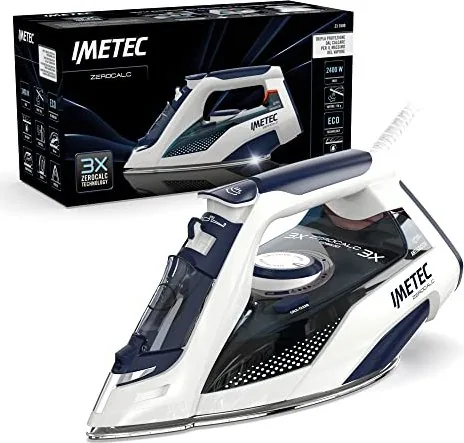

Imetec ZeroCalc Z3 3500 Manual
PDF manual · 114 Pages
English



Quick check
Incorrect answer, please try again.
Chat with your Imetec ZeroCalc Z3 3500 manual using AI
Get instant AI answers from your Imetec ZeroCalc Z3 3500 manual
Ask anything about the Imetec ZeroCalc Z3 3500. Answers come from this manual, with the pages they are based on.
ZeroCalc Z3 3500 Maintenance Schedule
Fill reservoir, heat to max, unplug, and hold Calc-Clean button over a sink until water and steam flush out impurities.
Unplug iron, open fill cover, turn upside down and shake lightly to empty remaining water before storing upright.
Ask a Question
Do you recommend ZeroCalc Z3 3500?
Yes NoDo you recommend ZeroCalc Z3 3500?
Yes NoFrequently Asked Questions
Use only demineralized water or natural bottled mineral water. Tap water or softener-processed water risks immediate damage to the internal components and voids warranty coverage.
Is this answer helpful?
The appliance is guaranteed for two years from the delivery date shown on the invoice or receipt. Professional use voids this coverage. Contact authorized service for repairs.
Is this answer helpful?
Yes, press the super-steam button intermittently to iron hanging garments like curtains or shirts. Ensure the temperature is high enough to prevent leaking water.
Is this answer helpful?
Use the Calc Clean system every five to ten uses by holding the button while cooling. Fill the reservoir and follow the manual instructions for residue release.
Is this answer helpful?
Children under eight years old must not play with the cord or appliance during operation. Keep it out of reach when hot or unplugged to prevent burns.
Is this answer helpful?
Increase temperature setting or interval between steam bursts. Check that temperature is not too low. Do not exceed maximum fill level in the tank.
Is this answer helpful?
Always store the iron upright on a stable surface with the handle accessible and cord unplugged. Unplug immediately after sessions finish to ensure safety.
Is this answer helpful?
Advantages and Disadvantages
Advantages

- ZeroCalc system reduces limescale effectively with a permanent resin filter inside the tank
- Eco mode optimizes steam production to lower energy consumption during daily ironing cycles
- Super steam button enables powerful vertical ironing for curtains and hanging garments
- Two year warranty provides confidence against manufacturer defects under normal use conditions
- Calc Clean function allows internal plate cleaning without chemical descaling agents added
Disadvantages

- Reservoir requires demineralized water to prevent damage which may add ongoing cost for users
- Warranty excludes professional use and damages caused by improper electrical installation systems
- Spray function cannot be used on delicate silk or synthetic fabrics due to potential harm
- Device lacks cord storage mechanism which might make storage less tidy in tight spaces
- Cleaning requires waiting for complete cooling to avoid risk of fire or personal injury
Product Specification
Power
2400W
Color
White/Blue
Steam Boost
5.29 oz/min
Water Tank
10.14 fl oz
Soleplate
Stainless Steel
Features
Steam and Dry Ironing, Vertical Steam, Anti-Calc Function, Anti-Drip Function
Cord Length
6.23 ft
Product Description
Discovering the Power of the Imetec ZeroCalc Z3 3500 Steam Iron Manual
Revolutionizing Household Chores
Managing clothes can be time-consuming. The Imetec ZeroCalc Z3 3500 Steam Iron Manual provides comprehensive understanding of a machine built for modern homes. This iron integrates safety, speed, and effectiveness seamlessly. Its robust construction supports high wattage operations, ensuring rapid heat-up times for eager users. The device operates at 220-240 V with power ranging from 2020 to 2400 Watts. It delivers consistent performance across domestic environments.
Advanced Limescale Protection
One standout feature is the ZeroCalc technology. A permanent resin filter resides within the water tank. It actively reduces hardness before water reaches the soleplate. This prevents white spots and extends the units life. Furthermore, the Calc Clean system performs internal cleaning every five to ten uses. This maintains steam output consistency without harsh chemicals. Users simply hold the button while the iron cools slightly to release residue.
Versatility for Every Fabric
Temperature control is precise for delicate synthetics or heavy cottons. Different fabric types respond uniquely to heat and steam exposure requiring careful selection of settings. An LED indicator shows when the soleplate is hot or cool enough. The vertical steam function aids in refreshing hanging clothes or curtains without a board. Users appreciate the continuous steam mode when moving horizontally, but safety dictates stopping steam when resting vertically to avoid leaks.
Proper Usage and Care
Water quality is critical. Only demineralized or approved bottled mineral water should fill the tank. Tap water or softener-processed water risks immediate damage. Do not add chemicals or perfumes to the reservoir. Always unplug the cord before refilling or cleaning. Plastic parts clean easily with a wet cloth, while the metal soleplate needs drying. Maintaining the appliance requires patience and adherence to the steps found within the documentation.
Support and Long-Term Value
The manufacturer offers a two-year warranty from delivery. This covers manufacturing defects under normal household conditions. Professional use voids this coverage. If problems arise, consult the authorized service center rather than attempting DIY repairs on electrical components. Proper disposal follows environmental standards for electronic waste. Keeping the unit upright when storing prevents accidental damage or leaks. It is recommended to contact the support center if the LED indicator behaves unusually during heating phases. Regular checks ensure long term safety compliance.
Important Notes for Users
- Always verify voltage compatibility before plugging in.
- Keep the iron out of reach of children under eight years during use or cooling.
- Check for visible damage before unpacking or storing.
- Recycle packaging materials according to local environmental laws.
- Do not use extension cords or adaptors.
- Unplug the iron immediately after ironing sessions finish.
Search for 67,732 Manuals online


Type-in Brand or Model