
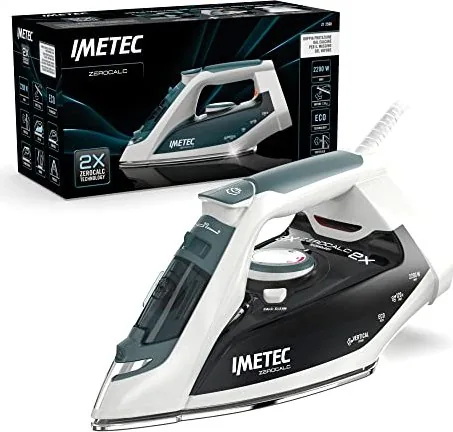
Imetec ZeroCalc Z1 2500 Manual
PDF manual · 94 Pages
English



Quick check
Incorrect answer, please try again.
Chat with your Imetec ZeroCalc Z1 2500 manual using AI
Get instant AI answers from your Imetec ZeroCalc Z1 2500 manual
Ask anything about the Imetec ZeroCalc Z1 2500. Answers come from this manual, with the pages they are based on.
ZeroCalc Z1 2500 Maintenance Schedule
Fill reservoir, set max temp, unplug, and press Calc-Clean button over a sink to expel limescale. Clean plate with damp cloth after cooling.
Unplug iron, open fill cover, turn upside down and shake lightly to empty. Let cool completely before storing upright.
Remove starch deposits from soleplate with damp cloth and non-abrasive detergent. Wipe plastic parts with damp then dry cloth.
Ask a Question
Do you recommend ZeroCalc Z1 2500?
Yes NoDo you recommend ZeroCalc Z1 2500?
Yes NoFrequently Asked Questions
You should only use demineralized water for irons or natural mineral water in bottles available at supermarkets. Do not use water from dryers, air conditioners, or filtered water with softeners.
Is this answer helpful?
It is recommended to clean the inside of the plate from limescale and impurities every 5 to 10 times the appliance is used by pressing the specific button.
Is this answer helpful?
No, you should not use the spray function on silk or synthetic fabrics. Instead, place a damp cloth between the iron and the fabric for delicate items.
Is this answer helpful?
The appliance is guaranteed for a period of two years from the date of delivery, provided you have the receipt or invoice which is clearly legible.
Is this answer helpful?
If water leaks, the plate temperature might be too low. Increase the temperature setting between the 3 dots and maximum temperature position on the knob.
Is this answer helpful?
The appliance can be used by children aged 8 years and above if supervised or instructed. Younger children must not play with the appliance or cord.
Is this answer helpful?
Advantages and Disadvantages
Advantages

- Permanent resin filter reduces limescale and requires no replacement.
- ECO function optimizes steam production to reduce energy consumption significantly.
- Super-steam button generates powerful bursts for stubborn wrinkles easily.
- Spray function allows dampening of delicate fabrics before ironing safely.
- Calc Clean system cleans internal plate from impurities automatically.
Disadvantages

- Only demineralized or specific bottled water is permitted for reservoir.
- Chemical additives or scented substances can damage the product internally.
- Must wait for LED indicator to turn off before beginning ironing.
- Vertical ironing function requires high temperature settings strictly.
- Warranty does not cover damage from improper water usage or neglect.
Product Specification
Power
2200W
Color
white/green
Steam Boost
4.23 oz/min
Water Tank
8.45 fl oz
Soleplate
Stainless Steel
Features
Steam and dry ironing, Steam level control, Vertical steam, Anti-calc function, Anti-drip function
Cable Length
6.23 ft
Product Description
Experience Effortless Ironing with the Imetec ZeroCalc Z1 2500
A Reliable Home Appliance
The Imetec ZeroCalc Z1 2500 Steam Iron Manual provides comprehensive guidance for maintaining your wardrobe in pristine condition. This advanced steam iron is engineered to handle a wide variety of fabrics while minimizing the hassle of maintenance. Whether you are dealing with delicate silks or tough cottons, the adjustable temperature settings ensure optimal care for every material. The device is suitable for domestic use only and meets European safety standards. It is essential to read all safety notes before the first operation to prevent accidents and ensure personal safety during usage.
Advanced Limescale Protection
One of the standout features of this device is the ZeroCalc system. It incorporates a special resin filter located within the water reservoir. This permanent filter reduces water hardness and limits limescale formation inside the iron. You do not need to replace this filter, making the long-term ownership cost lower. However, you must use only demineralized water or specific bottled mineral water to protect the unit from deposits. Do not add chemical additives or scented liquids to the water as this damages the product.
Versatile Steam Functions
The iron offers continuous steam control along with a super steam boost button. This allows you to tackle deep wrinkles quickly. The eco function optimizes steam production to reduce energy consumption during your ironing sessions. Additionally, the spray function helps dampen very delicate fabrics before ironing starts without burning them. You can even iron vertically using the steam jet, which is perfect for curtains or hanging clothes that are harder to press flat on a board.
Safety and Maintenance
Safety is a priority for this manufacturer. The iron includes specific warnings regarding children and electrical safety. Always unplug the appliance before filling the water tank with the provided measuring cup. The Calc Clean system helps remove internal impurities by releasing hot water and steam. Regular cleaning ensures the plate stays free of starch or residue without damaging the soleplate. Use a soft cloth for cleaning and avoid metal objects that could scratch the surface.
Warranty and Support
Purchasing this iron comes with a two-year warranty from the date of delivery. Please keep your receipt or invoice to validate the product date. The appliance is designed for home use specifically. Proper usage ensures longevity and consistent performance. If you encounter issues, consult the troubleshooting section. By following the instructions found in the Imetec ZeroCalc Z1 2500 Steam Iron Manual, you ensure safe operation and maximum satisfaction with your purchase today.
Search for 67,732 Manuals online


Type-in Brand or Model