
Icy Dock ToughArmor MB996SK-6SB Manual
PDF manual · 2 Pages
English



Quick check
Incorrect answer, please try again.
Chat with your Icy Dock ToughArmor MB996SK-6SB manual using AI
Get instant AI answers from your Icy Dock ToughArmor MB996SK-6SB manual
Ask anything about the Icy Dock ToughArmor MB996SK-6SB. Answers come from this manual, with the pages they are based on.
Ask a Question
Do you recommend ToughArmor MB996SK-6SB?
Yes NoFrequently Asked Questions
It can hold up to six 2.5-inch SATA hard drives or SSDs simultaneously within a single 5.25-inch expansion bay.
Is this answer helpful?
Yes, the unit supports both traditional mechanical hard disk drives and modern solid-state drives using standard SATA interfaces.
Is this answer helpful?
No, the design features a tool-less mechanism that allows for quick and easy installation and removal of drive trays.
Is this answer helpful?
It utilizes two 4-pin Molex power connectors and includes support for 24-pin ATX power connections depending on the adapter used.
Is this answer helpful?
Yes, the hot-swap capability allows you to remove or insert drives without shutting down the system, provided the motherboard supports it.
Is this answer helpful?
Advantages and Disadvantages
Advantages

- Supports six 2.5-inch SATA drives in a single 5.25-inch bay
- Hot-swappable design enables easy drive replacement without shutdown
- Dual power input redundancy enhances system reliability
Disadvantages

- Requires a 5.25-inch bay which may be scarce in smaller cases
- No built-in RAID controller limits advanced array management options
- Cable management can be complex due to the number of required connections
Product Specification
Type
Backplane
Internal connectors
6x 2.5" SATA 6Gb/s
External connectors
6x SATA 6Gb/s
Hot-Swap
Yes
Drive bay
1x 5.25"
Drive height
0.37 inches
Case cooling
1x Fan (1.57 inches)
Power supply
2x 4-Pin Molex
Lock
Yes
Features
Full metal construction, vibration protection
Manufacturer warranty
three years
Product Description
Icy Dock ToughArmor MB996SK-6SB: The Ultimate Storage Expansion Solution
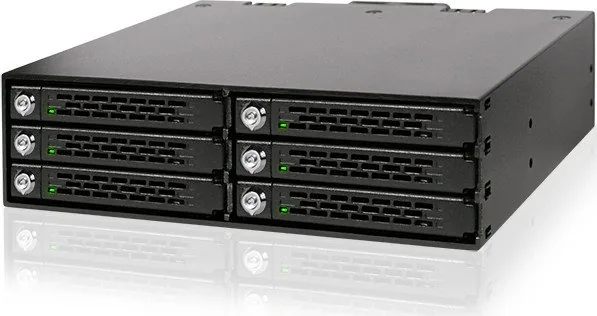
The Icy Dock ToughArmor MB996SK-6SB stands as a pinnacle of internal storage expansion technology, designed specifically for users who demand high performance and reliability in their data centers or high-end workstations. This robust chassis allows for the seamless installation of up to six 2.5-inch SATA hard drives or solid-state drives within a single 5.25-inch bay. Its rugged aluminum construction ensures that your valuable data remains protected against physical shocks and vibrations, making it an ideal choice for environments where stability is paramount.
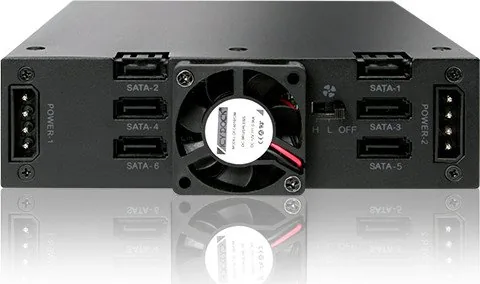
At the heart of this device lies its impressive connectivity architecture. The unit features dual power inputs and multiple SATA ports arranged to optimize airflow and cable management. By utilizing a hot-swap mechanism, administrators can replace failed drives without powering down the entire system, drastically reducing downtime. The manual guide provides detailed insights into the pinout configurations, ensuring that users can easily connect the necessary 4-pin and 24-pin power connectors alongside the standard SATA interfaces. This attention to detail simplifies the installation process even for those with limited technical experience.
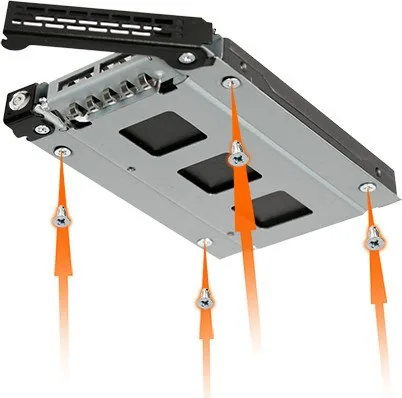
Beyond mere functionality, the MB996SK-6SB offers a sleek aesthetic that complements modern server racks and desktop towers. The tool-less design allows for rapid deployment and maintenance, saving valuable time during setup or upgrades. Whether you are building a massive media server or expanding the storage capacity of a gaming rig, this enclosure delivers consistent speed and durability. It effectively bridges the gap between consumer-grade components and enterprise-level requirements, providing a versatile solution for diverse computing needs.
Key Features Overview
The product integrates advanced thermal management strategies to prevent overheating during intensive operations. Its compact form factor maximizes space efficiency while maintaining structural integrity. Users appreciate the straightforward layout of the ports, which minimizes clutter inside the case. Furthermore, the inclusion of clear labeling on the chassis aids in quick identification of each drive slot.
Important Notes
Ensure all power connections are secure before initializing the system to prevent potential hardware damage. Regularly check the alignment of the drive trays to maintain optimal cooling performance. Always refer to the specific wiring diagrams provided by the manufacturer when connecting multiple units together.
Search for 67,706 Manuals online


Type-in Brand or Model