
Icy Dock ToughArmor MB839SP-B Manual
PDF manual · 1 Pages
English


Quick check
Incorrect answer, please try again.
Chat with your Icy Dock ToughArmor MB839SP-B manual using AI
Get instant AI answers from your Icy Dock ToughArmor MB839SP-B manual
Ask anything about the Icy Dock ToughArmor MB839SP-B. Answers come from this manual, with the pages they are based on.
Ask a Question
Do you recommend ToughArmor MB839SP-B?
Yes NoFrequently Asked Questions
No, the Icy Dock ToughArmor MB839SP-B is specifically designed for 2.5-inch SATA SSDs and HDDs only. It does not support larger 3.5-inch drives.
Is this answer helpful?
Yes, the device uses a PCIe 2.0 x1 connector but is fully compatible with x1, x4, x8, and x16 slots, fitting securely into any of these interfaces.
Is this answer helpful?
If the LED fails to blink but you can still read and write data, it is likely due to drive-specific signaling differences. If you cannot access the drive at all, contact support for troubleshooting.
Is this answer helpful?
No special software is required. However, your motherboard or controller card must natively support the hot-swap function for the feature to work correctly.
Is this answer helpful?
Use the included M3*4 flat head screws provided in the kit to attach the bottom side of the 2.5-inch drive to the metal tray before insertion.
Is this answer helpful?
Installation is simple and tool-based. You just need to remove a plastic bar, screw in the drive, mount the unit, and optionally connect the LED header cable.
Is this answer helpful?
Advantages and Disadvantages
Advantages

- Supports hot-swapping for 2.5-inch SATA drives without shutting down the system
- Compatible with PCIe x1, x4, x8, and x16 slots via PCIe 2.0 x1 interface
- Includes LED indicators for power status and drive activity monitoring
- Rugged metal construction provides excellent protection against dust and impact
Disadvantages

- Some third-party drives may not support the drive access LED signal
- Requires host system to explicitly support hot-swap functionality
- Limited to 2.5-inch form factor drives only, no support for 3.5-inch
Product Specification
Conversion
PCIe -> SATA 2.5"
Host
1x PCIe 2.0 x1 (male)
Target
1x SATA 6Gb/s + SATA Power (female)
Additional Power Supply
N/A
Form Factor
Add-In Card (full size)
Dimensions
6.06x4.80x0.87 inches
Features
Hot-Swap
Product Description
Elevate Your Storage with the Icy Dock ToughArmor MB839SP-B
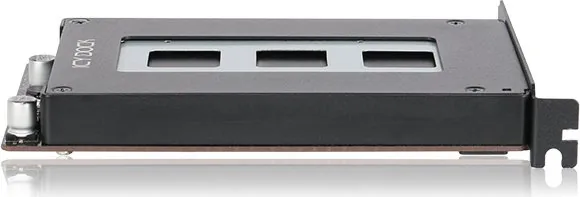
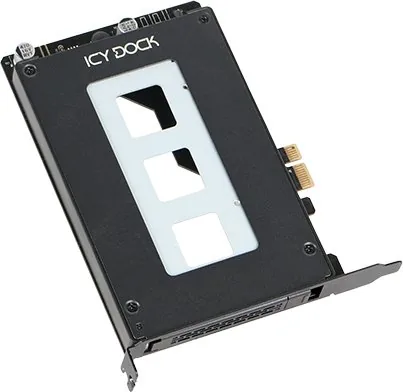
The Icy Dock ToughArmor MB839SP-B represents a pinnacle of modular storage solutions designed for modern computing environments. This robust mobile rack transforms standard PCIe expansion slots into powerful hot-swap bays, allowing users to install and remove 2.5-inch SATA SSDs or HDDs without powering down their systems. Ideal for workstations, servers, and enthusiasts who demand flexibility, this device bridges the gap between high-speed data access and physical hardware management.
Constructed with durability in mind, the ToughArmor series features a rugged metal chassis that protects internal components from dust and minor impacts. The unit utilizes a PCIe 2.0 x1 interface, which is fully compatible with x1, x4, x8, and x16 slots on your motherboard or controller card. This backward compatibility ensures seamless integration into a wide array of computer builds, whether you are upgrading an older machine or building a new one from scratch.
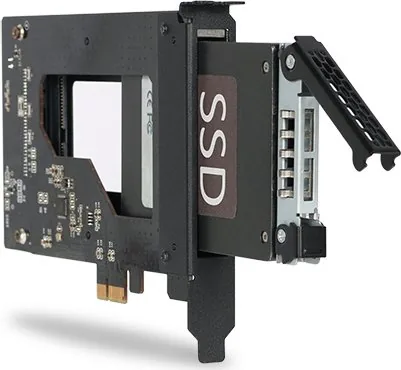
One of the standout features of this product is its intuitive hot-swap capability. Equipped with a dedicated drive tray ejection button, users can safely remove drives while the system remains operational. The front panel includes LED indicators that provide real-time status updates; a solid green light confirms power, while blinking activity signals read/write operations. Although some drives may not trigger the access LED due to manufacturer-specific signaling differences, the core functionality of reading and writing data remains unaffected.
Installation is straightforward and requires minimal tools. The package includes specific M3 screws for securing the drive to the tray and a #6-32 screw for mounting the entire unit into the case. A plastic bar must be removed during setup to accommodate the drive properly. Once installed, connecting the optional 2-pin header cable allows the system to utilize the front panel LEDs for enhanced monitoring. This level of detail makes it an excellent choice for anyone looking to expand storage capacity with ease and reliability.
Important Notes
- Ensure your host system supports hot-swap functionality before attempting to use this feature.
- The included screws are specifically designed for this device; using incorrect fasteners may cause damage.
- ICY DOCK reserves the right to modify technical specifications without prior notice.
Search for 67,706 Manuals online


Type-in Brand or Model