
Icy Dock ToughArmor MB699VP-B V3 Manual
PDF manual · 1 Pages
English


Quick check
Incorrect answer, please try again.
Chat with your Icy Dock ToughArmor MB699VP-B V3 manual using AI
Get instant AI answers from your Icy Dock ToughArmor MB699VP-B V3 manual
Ask anything about the Icy Dock ToughArmor MB699VP-B V3. Answers come from this manual, with the pages they are based on.
Ask a Question
Do you recommend ToughArmor MB699VP-B V3?
Yes NoFrequently Asked Questions
It is designed for 2.5-inch U.2 NVMe drives up to 15mm in height, accommodating multiple drives in a 4-bay configuration.
Is this answer helpful?
The package provides various M3 screws including M3*2.5 for the device and M3*4 flat head screws for the drives.
Is this answer helpful?
The rear includes miniSAS HD SFF-8643 and OCuLink SFF-8612 connectors for data, plus power and fan headers.
Is this answer helpful?
Yes, the front has LED indicators where solid green power means on and flashing green indicates drive access.
Is this answer helpful?
Yes, this is a backplane cage sold separately for use in compatible chassis or external units.
Is this answer helpful?
Warranty details are provided on the official Icy Dock International website support page.
Is this answer helpful?
Advantages and Disadvantages
Advantages

- Full metal construction ensures durability and heat dissipation.
- 4-bay layout designed for U.2 NVMe SSD drives.
- Includes miniSAS HD and OCuLink connectivity ports.
Disadvantages

- Requires 5.25 bay enclosure for installation.
- Complex installation involves many small M3 screws.
- No built-in cooling fan included in the cage.
Product Specification
Type
Backplane
Internal Connectors
4x 2.5" U.3/U.2/SFF-8639 (PCIe 4.0 x4)
External Connectors
4x OCuLink/SFF-8612 (PCIe 4.0 x4), Pin-Out according to SFF-9402 Rev 1.1
Hot-Swap
Yes
Drive Bay
1x 5.25"
Drive Height
0.59"
Case Cooling
2x Fan (1.57")
Power Supply
2x 15-Pin SATA
Features
Full metal construction
Manufacturer Warranty
5 years
Product Description
Exploring the Icy Dock ToughArmor MB699VP-B V3 Overview
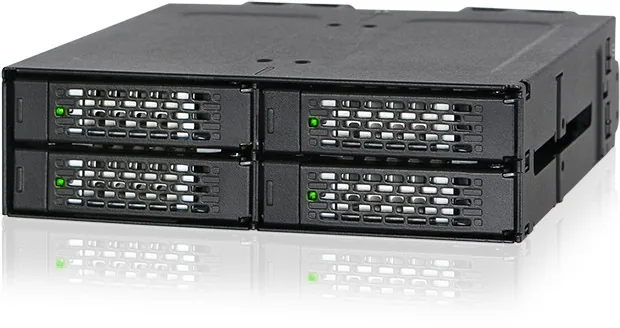
Welcome to a comprehensive guide regarding the Icy Dock ToughArmor MB699VP-B V3, designed for enthusiasts and professionals seeking powerful, flexible storage solutions. This robust backplane cage is engineered to hold four U.2 NVMe SSDs within a standard external 5.25 bay enclosure, ensuring compatibility with a wide range of computer chassis. The full metal construction ensures durability and excellent heat dissipation for your high-speed drives, which is critical for maintaining performance over time. When referencing the Icy Dock ToughArmor MB699VP-B V3 Manual, you find clear guidance on securing the device and installing your storage media efficiently without needing specialized tools.
Hardware Specifications and Connectivity Details
The unit features a 4-bay layout specifically optimized for U.2 NVMe drives with a maximum height of 15mm. Users must align the screw holes and use the included M3 screws to mount the drives securely to ensure stability during high-speed data transfer. The rear panel connects to a miniSAS HD SFF-8643 Connector for fast data transfer rates. Additionally, the OCuLink SFF-8612 Connector offers alternative connectivity options for modern systems that support this interface. These ports are situated next to a 15 Pin Power Port and a 13 Pin Fan Header Port to maintain optimal operating temperatures under load.
Installation Process and Visual Indicators
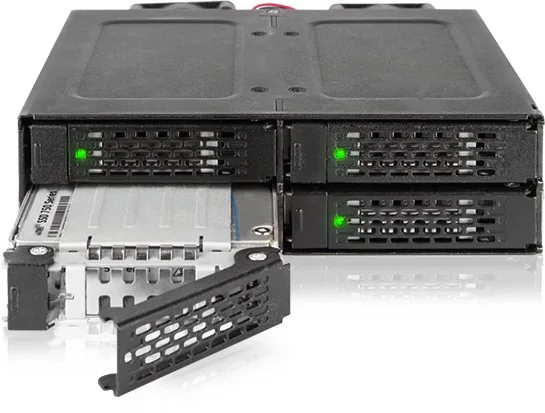
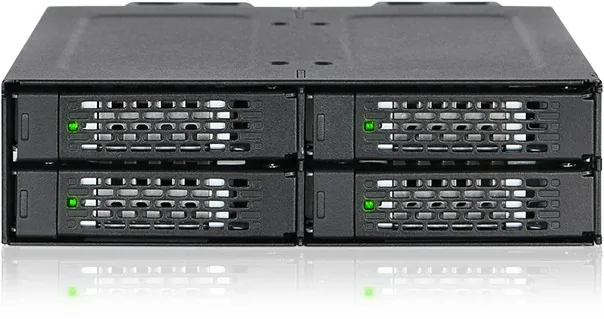
Installing the device requires inserting it into the 5.25 bay and securing it with M3*2.5 screws provided in the box. The tray accommodates the drives, and users flip the tray to insert the SSDs before sliding the assembly back into the cage. Once installed, they can use the drive ID Plug to customize slot usage. The front view displays LED indicators where a solid green light shows power status and a flashing green light indicates active drive access. This visual feedback helps monitor system health without opening the case or running diagnostic software constantly.
Package Contents and Manufacturer Support
The package includes multiple screws and an installation guide provided in multiple languages to assist users globally. Warranty information is available directly on the manufacturer website for peace of mind regarding long-term reliability and support. This comprehensive setup ensures that users get the most out of their enterprise-grade NVMe drives for storage tasks in demanding environments. Whether for professional workstations, servers, or high-performance gaming rigs, this backplane provides a stable foundation for critical data storage needs.
Note: Ensure all connections are snug before powering on to prevent data loss or hardware damage during initial operation and system stability. Always check the screw tightness to avoid vibration issues over time.
Search for 67,706 Manuals online


Type-in Brand or Model