
Icy Dock ToughArmor MB606SPO-B Manual
PDF manual · 6 Pages
English



Quick check
Incorrect answer, please try again.
Chat with your Icy Dock ToughArmor MB606SPO-B manual using AI
Get instant AI answers from your Icy Dock ToughArmor MB606SPO-B manual
Ask anything about the Icy Dock ToughArmor MB606SPO-B. Answers come from this manual, with the pages they are based on.
Ask a Question
Do you recommend ToughArmor MB606SPO-B?
Yes NoFrequently Asked Questions
The MB606SPO-B accommodates up to six 2.5" SAS/SATA drives with a maximum thickness of 7mm, plus one ultra-slim optical disk drive (ODD) bay for a 9.5mm slim ODD. Use the supplied M3 and M2 screws to secure drives and the ODD.
Is this answer helpful?
Icy Dock recommends using power cables that are not shared with other devices to ensure the enclosure receives sufficient and stable power. Shared or undersized power feeds can cause instability or degraded performance under heavy load.
Is this answer helpful?
Some drives use different specifications for the activity signal and may not support the enclosure’s LED method. If the drive can be read and written to normally, a non-functioning LED is expected behavior. If the drive is inaccessible, contact support for troubleshooting.
Is this answer helpful?
To use hot-swap, your host system (motherboard or RAID/controller card) must support hot-swap. Confirm this in your host’s documentation. With hot-swap enabled, drives can be removed and inserted via the tray ejection without powering down, following proper software unmount procedures.
Is this answer helpful?
Place a 2.5" drive onto the tray following the arrow direction, secure it with the supplied M3*4 screws, flip the tray to the top side, and insert the tray fully until it latches. Use the ejection button to release the latch and remove trays safely.
Is this answer helpful?
Yes. Remove the ODD dust cover, unscrew and remove the front ODD bracket, secure the slim 9.5mm ODD to the bracket using M2*2.5 screws, and reattach the bracket to the device. Tighten the front panel screw to secure the ODD.
Is this answer helpful?
Visit the official Icy Dock website for product updates, downloads, and support. The manual advises contacting Icy Dock for hardware issues related to their products; other hardware or software faults should be addressed with the respective vendors.
Is this answer helpful?
Advantages and Disadvantages
Advantages

- Six hot-swappable 2.5" bays plus an integrated ultra-slim ODD slot for versatile drive/ODD configurations.
- Tool-less tray ejection with clear drive-tray latch and included mounting screws simplifies serviceability.
- Adjustable cooling via fan header and speed switch helps balance noise and thermal needs.
- Dedicated power recommendation reduces risk of insufficient power under heavy load.
- Drive ID plug slots aid quick visual identification and drive management.
Disadvantages

- Some drive models may not support the activity LED signal, causing possible confusion without functional LED feedback.
- Requires host/motherboard support for hot-swap to use hot-swap capabilities fully.
- Supports only 2.5" drives up to 7mm height, limiting compatibility with taller SSDs/HDDs.
- Physical installation still requires correct screw use and attention to mounting direction.
- Product specifications subject to change without notice; firmware/hardware limitations may apply.
Product Specification
Type
Backplane
Internal connectors
6x 2.5" SAS/SATA 6Gb/s, 1x 5.25" UltraSlimLine
External connectors
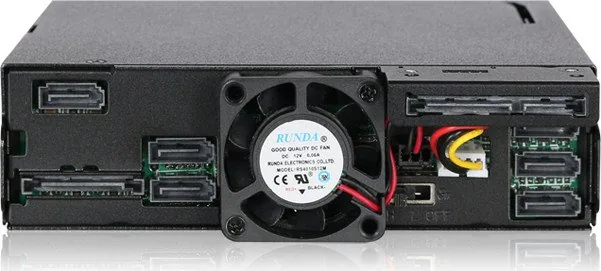
7x SATA 6Gb/s
Hot-Swap
Yes
Drive bay
1x 5.25"
Drive height
0.28 in
Case cooling
1x fan (1.57 in)
Power connector
2x 15-Pin SATA
Lock
No
Features
Full metal construction, fan control, vibration protection
Manufacturer's warranty
three years
Note
Operating SAS drives requires connection to a SAS controller via SAS/SATA adapter cable.
Product Description
Icy Dock ToughArmor MB606SPO-B Manual
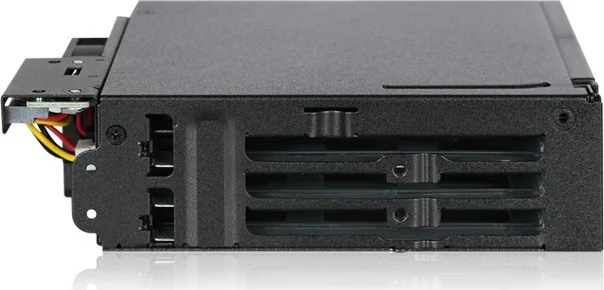
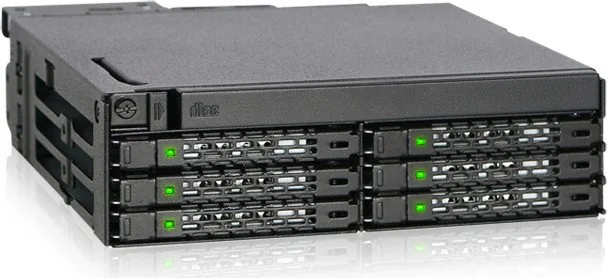
The Icy Dock ToughArmor MB606SPO-B is a rugged 6-bay 2.5" storage bay designed for hot-swappable SAS/SATA SSDs and HDDs, with an integrated ultra-slim ODD slot. Built for dense storage applications and workstation or server environments, this enclosure prioritizes tool-less drive access, robust drive retention, and flexible power and cooling options. It supports drives up to 7mm in height and includes drive trays with screw mounting, drive ID plug slots, and an easy-to-use ejection mechanism for rapid serviceability.
Constructed with enterprise usage in mind, the ToughArmor MB606SPO-B features clear LED indicators for device power and drive activity, while accommodating a slim optical disk drive (ODD) in the front bay. The unit includes multiple screw types for drive and device mounting and recommends dedicated power cabling to ensure reliable performance. A fan header and fan speed switch allow administrators to tune cooling to workload and noise requirements.
Installation is straightforward: mount 2.5" drives onto the trays using supplied M3 screws, insert each tray following the arrow direction, and push fully until latched. The ejection button releases the tray latch for safe removal. For the optional Drive ID plugs, twist them from the mold and insert into the front slot to visually label drive positions. When installing a slim ODD, remove the dust cover, detach the front bracket, secure the ODD to the bracket with M2 screws, and reattach to the cage.
Key considerations include ensuring the host system supports hot-swap to utilize the tray's hot-swap functionality, and noting that some drives may not support the activity LED signal due to varying drive firmware—if read/write works but LED does not, operation is normal; if the drive is inaccessible, contact support. Icy Dock also advises using power cables not shared with other devices to prevent power insufficiency. The product manual and multi-language notes emphasize that Icy Dock is responsible only for its hardware and may change specifications without notice.
Notes
- Supports up to six 2.5" drives (7mm height) plus an ultra-slim 9.5mm ODD slot.
- Use included screws (M3 and M2 sizes) for proper mounting; spare screws are provided.
- Verify motherboard/controller hot-swap support for full hot-swap capability.
- Some drive models may not trigger the activity LED despite functioning normally.
- Visit Icy Dock official site for updates and support.
Search for 67,706 Manuals online


Type-in Brand or Model