
Icy Dock ToughArmor MB604SPO-B Manual
PDF manual · 6 Pages
English



Quick check
Incorrect answer, please try again.
Chat with your Icy Dock ToughArmor MB604SPO-B manual using AI
Get instant AI answers from your Icy Dock ToughArmor MB604SPO-B manual
Ask anything about the Icy Dock ToughArmor MB604SPO-B. Answers come from this manual, with the pages they are based on.
Ask a Question
Do you recommend ToughArmor MB604SPO-B?
Yes NoFrequently Asked Questions
Yes, the device supports hot swapping, but your host system must also support this feature. Check your motherboard or controller manual to confirm compatibility.
Is this answer helpful?
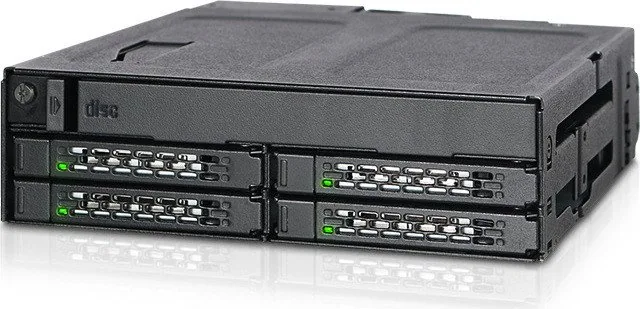
You can install four 2.5-inch SAS or SATA SSDs and HDDs, as well as one slim or ultra-slim optical disc drive using the provided brackets and spacers.
Is this answer helpful?
A solid green light indicates device power is on. A blinking green light signifies active data access on the connected hard drive or SSD.
Is this answer helpful?
Yes, most standard 2.5-inch SAS or SATA drives are compatible. However, some drives might not trigger the access LED due to signal differences, even if they function normally.
Is this answer helpful?
The package includes M3 screws for 2.5-inch drives, M2 screws for optical drives, EVA foam spacers, and a spacer installation guide for proper fitting.
Is this answer helpful?
ICY DOCK is not responsible for data loss or damage to software and other hardware. They only cover repairs related to their own product defects.
Is this answer helpful?
Advantages and Disadvantages
Advantages

- Supports hot-swapping for four 2.5-inch drives plus an optical drive bay
- Includes comprehensive hardware kit with spare screws for various drive types
- Durable ToughArmor chassis provides excellent protection against shocks
- Clear LED indicators for power status and active drive access
- Versatile mounting options for both slim and ultra-slim optical drives
Disadvantages

- Requires host system support to fully utilize hot-swap capabilities
- LED indicators may not function correctly with certain third-party drives
- EVA foam spacer installation requires careful alignment for optical drives
- Limited to 2.5-inch form factor drives only
- No built-in fan cooling; relies on case airflow
Product Specification
Type
Backplane
Internal connections
4x 2.5" SAS/SATA 6Gb/s, 1x 5.25" SlimLine (up to 0.5" height)
External connections
5x SATA 6Gb/s
Hot-Swap
Yes
Drive bay
1x 5.25"
Drive height
0.37 inch
Case cooling
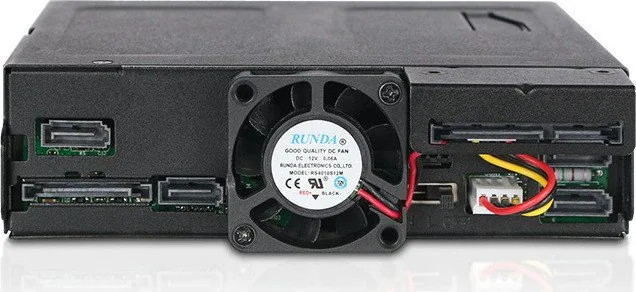
1x Fan (1.57 inch)
Power supply
2x 15-Pin SATA
Lock
No
Features
All-metal construction, fan control, vibration protection
Manufacturer warranty
three years
Note
Operating SAS drives requires connection to a SAS controller via SAS/SATA adapter cable.
Product Description
The Icy Dock ToughArmor MB604SPO-B: Ultimate Storage Expansion
The Icy Dock ToughArmor MB604SPO-B represents a pinnacle in storage expansion technology, designed specifically for users who demand high capacity and reliability within a compact form factor. This robust backplane cage accommodates four 2.5-inch SAS or SATA SSDs and HDDs, alongside an ultra-slim optical disc drive bay. It is engineered to provide a seamless hot-swapping experience, allowing administrators and enthusiasts to replace drives without powering down the system, thereby ensuring continuous operation and minimal downtime.
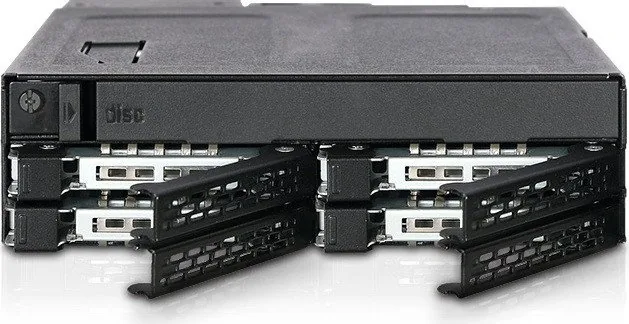
Constructed with durability in mind, this unit features a sturdy chassis that protects internal components from physical shock and vibration. The front panel includes intuitive controls such as a drive tray ejection button and LED indicators that clearly display device power status and hard drive access activity. While the green solid light confirms power, the blinking pattern signals active data transfer. Users can also install Drive ID plugs into dedicated slots to easily identify specific drives within a crowded server environment, streamlining maintenance tasks.
Installation is straightforward yet versatile. The package includes all necessary hardware, such as M3 screws for securing 2.5-inch drives and M2 screws for mounting slim ODDs. For optical drives, the design supports both standard slim and ultra-slim models by utilizing EVA foam spacers to ensure a snug fit and prevent rattling. The inclusion of spare screws guarantees that you have backups for future repairs or replacements. Whether used in professional data centers or high-performance workstations, the MB604SPO-B delivers exceptional flexibility.
It is important to note that while the device supports hot-swapping, the host system must also be configured to support this feature. Additionally, LED functionality may vary depending on the specific drive manufacturer's specifications. If a drive operates normally but the LED does not blink, it is generally considered a non-issue. However, if read/write operations fail, contacting support is recommended.
Important Notes
- Ensure your motherboard or controller card supports hot-swap functionality before installation.
- Verify drive compatibility regarding LED access signals if visual feedback is critical.
- Always use the included screws to secure drives properly to prevent damage during transit.
Search for 67,706 Manuals online


Type-in Brand or Model