
Icy Dock ToughArmor MB602SPO-B Manual
PDF manual · 6 Pages
English



Quick check
Incorrect answer, please try again.
Chat with your Icy Dock ToughArmor MB602SPO-B manual using AI
Get instant AI answers from your Icy Dock ToughArmor MB602SPO-B manual
Ask anything about the Icy Dock ToughArmor MB602SPO-B. Answers come from this manual, with the pages they are based on.
Ask a Question
Do you recommend ToughArmor MB602SPO-B?
Yes NoFrequently Asked Questions
It is designed for two 2.5-inch SAS or SATA SSDs/HDDs and also supports a Slim or Ultra Slim optical drive. That makes it useful for mixed storage setups in compact systems.
Is this answer helpful?
Yes, but only if the host system also supports hot swap. You should confirm that your motherboard or controller card includes this feature before relying on it.
Is this answer helpful?
The drives are mounted with the included screws. 2.5-inch drives go into the tray, while the optical drive uses the bracket and spacer method for a stable fit.
Is this answer helpful?
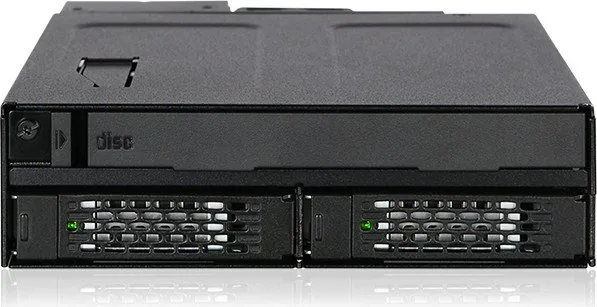
The LED shows power with a solid green light and drive activity with a blinking green light. It is a simple way to check whether the unit is powered and accessing data.
Is this answer helpful?
The spacer helps the slim optical drive sit correctly in place and improves alignment inside the bracket. It is especially important for Ultra Slim ODD installation.
Is this answer helpful?
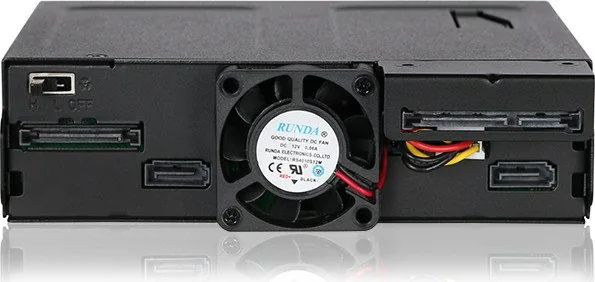
The rear panel includes SATA data and 15-pin power connections, along with a 3-pin fan header and a fan speed switch for better thermal management.
Is this answer helpful?
Advantages and Disadvantages
Advantages

- Supports two 2.5-inch SAS/SATA drives plus a Slim or Ultra Slim ODD in one cage.
- Tray ejection and hot-swap support make drive changes quick when the host system allows it.
- Includes LED status, dust cover, fan header, and fan speed switch for practical day-to-day use.
- Bundled screws and spacer guides help secure drives properly and simplify installation.
Disadvantages

- Hot-swap only works if the motherboard or controller card also supports it.
- Some drives may not fully support the access LED signal, which can confuse troubleshooting.
- ODD installation needs careful spacer placement and extra steps compared with a basic drive bay.
- The design is limited to 2.5-inch drives and slim optical drives, so it is not for larger form factors.
Product Specification
Type
Backplane
Internal connectors
2x 2.5" SAS/SATA 6Gb/s, 1x 5.25" SlimLine
External connectors
3x SATA 6Gb/s
Hot-Swap
Yes
Drive bay
1x 5.25"
Drive height
0.59 in
Case cooling
1x fan (1.57 in)
Power supply
2x 15-Pin SATA
Lock
No
Special features
Full metal construction, fan control, vibration protection
Manufacturer's warranty
three years
Note
The operation of SAS drives requires a connection to a SAS controller via a SAS/SATA adapter cable.
Product Description
Icy Dock ToughArmor MB602SPO-B: Compact Storage Flexibility for Modern Builds
The Icy Dock ToughArmor MB602SPO-B Manual points to a storage solution built for users who want more than a standard drive bay. This ToughArmor cage blends two 2.5-inch SAS/SATA drive positions with support for an Ultra Slim or Slim ODD, making it a practical choice for workstations, industrial systems, and compact desktops that still need broad storage options.
A Practical Mix of Drive Support
One of the biggest strengths of the MB602SPO-B is its versatility. It can hold 2.5-inch SSDs or HDDs while also accommodating a slim optical drive, giving builders room to combine fast solid-state storage with legacy media support. That is especially useful for users who still rely on disc-based tools, recovery media, or archive access but do not want to sacrifice modern drive performance.
Designed for Everyday Use
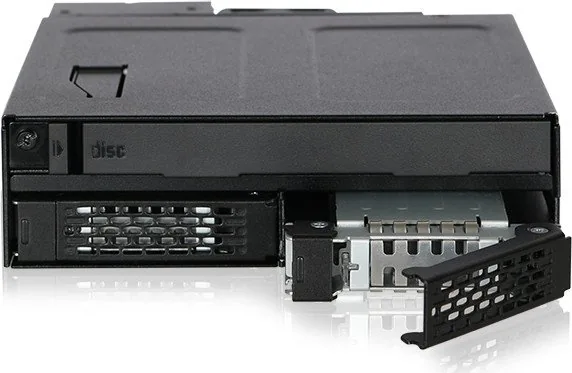
The front panel includes a drive tray ejection button and a status LED that shows both power and access activity. The tray-based design makes drive swaps faster and cleaner, while the dust cover helps protect the ODD slot when it is not in use. On the rear, the cage provides SATA data and power connections, plus a fan header and fan speed switch for added thermal control.
Installation Notes That Matter
The manual emphasizes using the included screws for every drive type, which helps keep everything securely mounted. 2.5-inch drives are installed into the tray and fastened before the tray slides back into place. Slim and Ultra Slim ODD installation takes a little more attention, especially because the EVA foam spacer must be positioned correctly for the best fit. Once installed, the result is a stable and organized setup that feels purpose-built rather than improvised.
Why It Stands Out
This model is a strong fit for users who want flexibility without adding clutter. Hot-swap support can improve workflow, but only when the host system also supports it. The design is clearly aimed at dependable operation, secure mounting, and practical access rather than flashy extras. For builders who value neat integration and multi-purpose drive support, the MB602SPO-B delivers a thoughtful balance of utility and durability.
Notes
- Hot-swap support depends on the motherboard or controller.
- Some drives may not trigger the access LED as expected.
- ODD installation is easiest when the spacer guide is followed carefully.
Search for 67,706 Manuals online


Type-in Brand or Model