
Icy Dock ToughArmor MB601M2K-1B Manual
PDF manual · 1 Pages
English


Quick check
Incorrect answer, please try again.
Chat with your Icy Dock ToughArmor MB601M2K-1B manual using AI
Get instant AI answers from your Icy Dock ToughArmor MB601M2K-1B manual
Ask anything about the Icy Dock ToughArmor MB601M2K-1B. Answers come from this manual, with the pages they are based on.
Ask a Question
Do you recommend ToughArmor MB601M2K-1B?
Yes NoFrequently Asked Questions
This device accommodates M.2 NVMe SSDs in 2230, 2242, 2260, 2280, and 22110 lengths. The adjustable locker allows you to set the correct spacing for any of these form factors before securing the drive.
Is this answer helpful?
Yes, the hardware supports hot swapping. However, your computer's host system, such as the motherboard or controller card, must also be configured to support the hot-swap function for it to work correctly.
Is this answer helpful?
If you can read and write data but the LED is off, this is due to differences in drive specifications regarding activity signals. If you cannot read or write data either, please contact support for troubleshooting.
Is this answer helpful?
First, adjust the locker to the drive length. Push the SSD down to connect it to the M-Key connector, then secure it with the provided M3*4 pan head screw. Finally, latch the tray into the 3.5-inch bay.
Is this answer helpful?
While not strictly mandatory, we strongly suggest using a power cable dedicated to this device. Sharing power with other devices may result in insufficient power delivery, affecting performance and stability.
Is this answer helpful?
Advantages and Disadvantages
Advantages

- Supports multiple M.2 NVMe form factors up to 22110 length
- Adjustable locker mechanism fits various drive sizes easily
- Dual-segment keylock provides enhanced physical security
- Clear LED indicators show power status and data activity
- Robust construction designed for 3.5-inch bay integration
Disadvantages

- Requires host system support for full hot-swap functionality
- Some SSD models may not trigger the activity LED indicator
- Dedicated power cable recommended to avoid sharing loads
- Proper chassis airflow is necessary to prevent overheating
- Specific M.2 screws required for secure mounting
Product Specification
Type
Rackmount
Internal connectors
1x M.2/M-Key 2230/2242/2260/2280/22110 (PCIe 3.0 x4)
External connectors
1x U.2/SFF-8639 (PCIe 3.0 x4)
Hot-Swap
Yes
Drive bay
1x 3.5"
Case cooling
N/A
Tray cooling
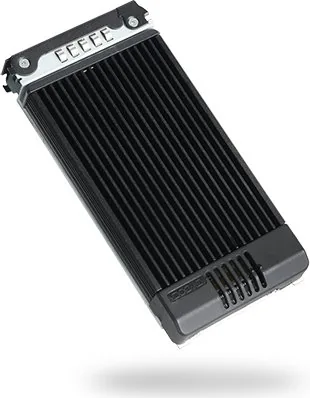
Heatsink (Aluminum), thermal pads
Lock
Yes
Features
All-metal construction
Manufacturer warranty
three years
Product Description
Unlocking High-Speed Storage with the Icy Dock ToughArmor MB601M2K-1B
The Icy Dock ToughArmor MB601M2K-1B stands as a robust solution for professionals seeking to integrate high-speed M.2 NVMe SSDs into standard 3.5-inch drive bays. Designed with durability in mind, this mobile rack transforms internal storage technology into a versatile external powerhouse. Whether you are managing large datasets or require rapid boot times for demanding applications, this device bridges the gap between compact modern drives and traditional chassis layouts.
At the heart of the MB601M2K-1B is its ability to support various M.2 form factors including 2280, 2260, 2242, 2230, and 22110. The unit features an adjustable locker mechanism that allows users to secure different lengths of SSDs without needing additional adapters. This flexibility ensures that whether you are using a small portable drive or a massive enterprise-grade module, the connection remains stable and reliable. The installation process is straightforward, involving a simple push-down action to lock the drive into place before connecting it to the M-Key connector.
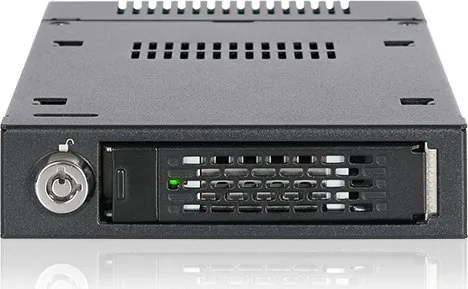
Thermal management is a critical aspect of NVMe performance, and the ToughArmor series addresses this with precision. The device includes thermal pads specifically designed for the M.2 version to assist in heat dissipation. Proper airflow within the computer chassis is recommended to ensure optimal operation and prevent heat buildup during intensive tasks. The front panel provides clear visual feedback through LED indicators; a solid green light confirms device power, while a flashing green light signals active data access.
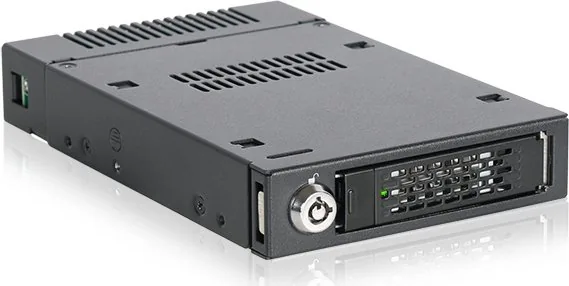
Security and ease of use are further enhanced by a dual-segment keylock system. This feature protects your valuable data from unauthorized removal or tampering. When paired with a compatible host system that supports hot-swapping, users can effortlessly add or remove drives without shutting down the computer. It is important to note that while the hardware supports these functions, the host motherboard or controller card must also be configured correctly to enable full hot-swap capabilities. For those requiring maximum stability, using a dedicated power cable for the device rather than sharing one with other components is highly advised.
Key Notes
- Ensure the host system supports hot swap for seamless operations.
- Verify motherboard specifications if LED activity indicators do not function as expected.
- Use included screws to secure drives properly for long-term reliability.
Search for 67,706 Manuals online


Type-in Brand or Model