
Icy Dock ToughArmor MB411SPO-B Manual
PDF manual · 1 Pages
English


Quick check
Incorrect answer, please try again.
Chat with your Icy Dock ToughArmor MB411SPO-B manual using AI
Get instant AI answers from your Icy Dock ToughArmor MB411SPO-B manual
Ask anything about the Icy Dock ToughArmor MB411SPO-B. Answers come from this manual, with the pages they are based on.
Ask a Question
Do you recommend ToughArmor MB411SPO-B?
Yes NoFrequently Asked Questions
The Slim ODD models support 2.5-inch drives up to 9.5mm in height, while the Ultra Slim ODD models are designed specifically for thinner drives up to 7mm.
Is this answer helpful?
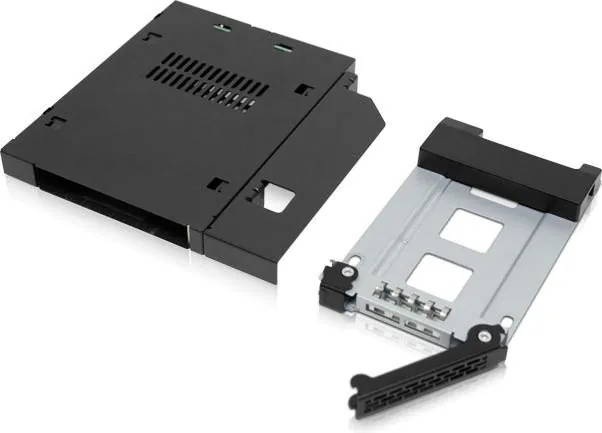
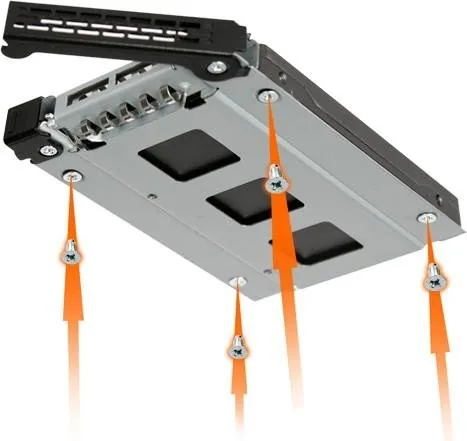
Remove the plastic bar, place the drive connector at the rear of the tray, flip the assembly over, and secure the drive using the included M3*4 flat head screws.
Is this answer helpful?
Yes, the MB411SKO-1B model includes an EZ-Lock mechanism that allows you to lock or unlock the drive tray using the two keys provided in the package.
Is this answer helpful?
A solid green light indicates that the device is powered on, while a blinking green light signifies that the hard drive is currently accessing or transferring data.
Is this answer helpful?
No, the installation is user-friendly and requires no special tools beyond the included screws. You simply slide the drive in and secure it to the metal tray.
Is this answer helpful?
The package contains one device, four M3*4 screws for the drive, eight M2*4 screws for the device, a user manual, and two keys if you have the SKO model.
Is this answer helpful?
Advantages and Disadvantages
Advantages

- Supports both 9.5mm and 7mm height 2.5-inch drives for maximum flexibility
- Includes EZ-Lock feature with keys for enhanced physical security
- Features clear LED indicators for power and HDD access status
- Easy installation with included screws and simple tray mechanism
- Utilizes standard SATA connectivity for universal compatibility
Disadvantages

- Requires manual screwing of the drive which may take extra time
- Plastic bar must be removed and kept as spare parts during setup
- Lock mechanism is only available on specific SKO model variants
- No external power supply required but relies on internal system power
- Limited to 2.5-inch form factor drives only
Product Specification
Type
Chassis
Internal connections
1x 2.5" SAS/SATA 6Gb/s
External connections
1x SATA 6Gb/s
Hot-Swap
Yes
Drive bay
1x 5.25" SlimLine (up to 0.37 inch)
Drive height
0.37 inch
Case cooling
N/A
Power supply
1x 4-Pin Floppy
Lock
N/A
Features
All-metal construction
Manufacturer warranty
five years
Product Description
The Icy Dock ToughArmor MB411SPO-B Series: Ultimate Drive Expansion
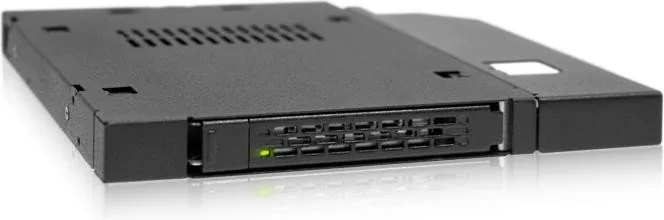
The Icy Dock ToughArmor MB411SPO-B series represents a pinnacle of storage flexibility for users needing to integrate 2.5-inch drives into optical drive bays. Designed with robust engineering, this mobile rack transforms unused space in laptops and desktops into high-speed storage solutions. Whether you require the standard Slim ODD compatibility or the Ultra Slim variant, these enclosures offer a seamless way to expand your digital capacity without compromising on performance or aesthetics.
At the heart of the MB411SPO-B design is its ability to accommodate various drive heights. The Slim ODD models support drives up to 9.5mm, while the Ultra Slim versions are optimized for thinner 7mm drives. This versatility ensures that whether you are using older mechanical hard drives or modern ultra-thin SSDs, the fit remains secure and reliable. The installation process is straightforward, featuring a tool-less tray system where users simply slide the drive in and secure it with included M3*4 flat head screws. A plastic bar must be removed during setup, but all necessary hardware is provided in the package.
Visual feedback is integrated directly into the chassis through LED indicators. A solid green light confirms power status, while a blinking green light signals active data access. This immediate visual confirmation helps users monitor system health and drive activity at a glance. For added security, specific models like the MB411SKO-1B include an EZ-Lock mechanism. Using the included keys, users can easily toggle between locked and unlocked states, protecting valuable data from unauthorized removal or accidental ejection.
Connectivity is handled via standard SATA interfaces, ensuring broad compatibility with existing systems. The rear view reveals a clean layout with distinct 6-pin power and 7-pin SATA connectors. The device also features an ejection button for quick removal of the drive tray when needed. With a focus on durability and ease of use, the ToughArmor line delivers a professional-grade solution for enthusiasts and professionals alike who demand reliability from their secondary storage options.
Search for 67,706 Manuals online


Type-in Brand or Model