
Icy Dock MB882SP-1S-3B Manual
PDF manual · 1 Pages
English


Quick check
Incorrect answer, please try again.
Ask a Question
Do you recommend MB882SP-1S-3B?
Yes NoFrequently Asked Questions
It converts a 3.5-inch drive bay into a mountable slot for 2.5-inch drives, allowing users to utilize smaller drives in larger spaces.
Is this answer helpful?
The unit requires #6-32 screws for the frame and M3*4 screws specifically for securing the 2.5-inch drive inside the adapter.
Is this answer helpful?
No, this is purely a mechanical mounting frame. You must connect your drive's power and data cables directly to the motherboard or power supply.
Is this answer helpful?
Yes, it is designed to hold any 2.5-inch storage device, including both Solid State Drives and traditional Hard Disk Drives.
Is this answer helpful?
Typically no, as each adapter occupies the full width of a standard 3.5-inch bay, though specific stacking kits may exist separately.
Is this answer helpful?
Advantages and Disadvantages
Advantages

- Enables installation of 2.5-inch drives in 3.5-inch bays
- Secure mounting reduces vibration and noise
- Simple installation process with standard screws
- Cost-effective way to expand storage options
Disadvantages

- Does not provide power or data connectivity on its own
- Requires existing SATA cables from the motherboard
- Adds slight depth to the drive bay profile
Product Specification
Type
Adapter, mounting frame
Mounting height
1x 3.5"
Supported form factors
1x 2.5"
Connection
1x SATA 6Gb/s
Drive connection
1x SATA 6Gb/s
Dimensions
5.77x4.00x1.00 in
Weight
3.23 oz
Color
black
Material
plastic
Manufacturer warranty
three years
USB spelling
Link
Product Description
Enhancing Storage Flexibility with the Icy Dock MB882SP-1S-3B
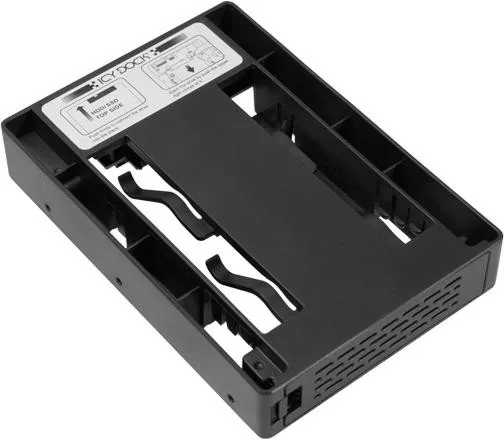
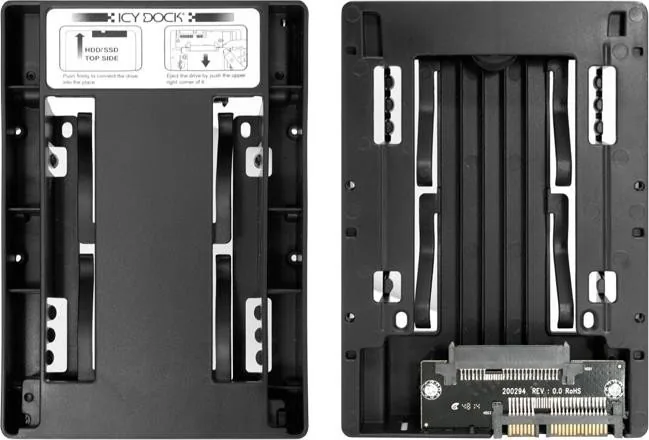
The Icy Dock MB882SP-1S-3B Adapter Mounting Frame represents a clever solution for enthusiasts and professionals seeking to maximize storage capacity within standard drive bays. This device is designed to bridge the gap between modern, compact 2.5-inch solid-state drives or hard disk drives and traditional 3.5-inch expansion slots found in most computer cases and server racks. By utilizing this adapter, users can install smaller form factor drives into larger bays without requiring complex modifications or additional cabling solutions.
At the heart of the MB882SP-1S-3B is its robust mechanical design, which ensures that smaller drives remain securely fastened during operation. The unit typically utilizes standard #6-32 screws for securing the frame itself and M3*4 screws specifically for holding the 2.5-inch drive in place. This attention to detail prevents vibration issues and ensures long-term reliability for data integrity. Whether you are upgrading an aging workstation or building a custom home lab, this frame allows for seamless integration of high-speed SSDs into legacy systems.
Installation is straightforward, making it accessible for users of all skill levels. The adapter fits snugly into a 3.5-inch bay, providing a stable platform for your drive. It effectively transforms unused space into valuable storage real estate. Users often appreciate the ability to mix drive types, allowing them to pair a fast 2.5-inch SSD for the operating system with a larger 3.5-inch drive for bulk storage, all managed through a single mounting point. This flexibility is crucial for optimizing performance and cost-efficiency in personal computing environments.
Notes:
- Ensure all screws are tightened evenly to prevent drive damage.
- Verify case compatibility before purchasing to ensure proper fitment.
- Regularly check connections to maintain optimal thermal performance.
Key Advantages and Limitations
Pros
- Enables installation of 2.5-inch drives in 3.5-inch bays
- Secure mounting reduces vibration and noise
- Simple installation process with standard screws
- Cost-effective way to expand storage options
Cons
- Does not provide power or data connectivity on its own
- Requires existing SATA cables from the motherboard
- Adds slight depth to the drive bay profile
Search for 67,706 Manuals online


Type-in Brand or Model