
Icy Dock flexiDOCK MB830SP-B Manual
PDF manual · 1 Pages
English


Quick check
Incorrect answer, please try again.
Chat with your Icy Dock flexiDOCK MB830SP-B manual using AI
Get instant AI answers from your Icy Dock flexiDOCK MB830SP-B manual
Ask anything about the Icy Dock flexiDOCK MB830SP-B. Answers come from this manual, with the pages they are based on.
Ask a Question
Do you recommend flexiDOCK MB830SP-B?
Yes NoFrequently Asked Questions
This docking station supports up to three 3.5-inch SATA or SAS hard drives. It is designed to fit two external 5.25-inch drive bays within a standard computer chassis for efficient space utilization.
Is this answer helpful?
Yes, the device supports hot swap function. However, your host system must also support hot swap. You should check your motherboard or controller card specifications to confirm this feature availability.
Is this answer helpful?
The unit includes a SATA 7 pin cable and a 15 pin SATA power cable. You also receive M3*2.5 pan head screws to secure the device inside the drive bay once installed.
Is this answer helpful?
Some drives may not support the drive access light signal due to different specifications. If the LED does not function but you can read and write to the drive, this is normal.
Is this answer helpful?
ICY DOCK is only responsible for repairs and services of ICY DOCK products. We will not be liable for any software, hardware, or data stored or interfacing with the product.
Is this answer helpful?
Yes, but if using SAS drives, the host requires a SAS compatible motherboard or an installed SAS card. Basic motherboards without SAS support may not function correctly with SAS drives.
Is this answer helpful?
You can remove 3.5-inch drives by pulling them out with your fingers. To utilize hot swap function safely, ensure your host supports it to prevent data corruption or hardware damage.
Is this answer helpful?
Advantages and Disadvantages
Advantages

- Supports three 3.5-inch SATA or SAS hard drives simultaneously for expanded storage capacity.
- Fits into two external 5.25-inch drive bays for standard case integration.
- Includes LED indicators for power status and hard drive access activity.
- Includes an 80mm fan to maintain cool temperatures during intensive operations.
- Supports hot swap functionality provided the host system is compatible.
Disadvantages

- Requires host motherboard or card support for hot swap to function correctly.
- SAS drives require a specific SAS compatible motherboard or SAS card installed.
- LED access light may not function on all drives due to specification differences.
- Manufacture reserves the right to change technical specifications without notice.
- Warranty covers only the product itself, excluding data or host hardware damage.
Product Specification
Type
Interchangeable Frame
Internal Ports
3x 3.5" SATA 6Gb/s
External Ports
3x SATA 6Gb/s
Hot-Swap
Yes
Mounting Bay
2x 5.25"
Case Cooling
1x Fan (3.15 inch)
Power Connectors
2x 15-Pin SATA
Lock
No
Features
Full Metal Construction, Toolless
Manufacturer's Warranty
3 Years
Product Description
Exploring the Icy Dock flexiDOCK MB830SP-B Manual
Overview
When considering expanding your personal computer storage capabilities, finding the right housing solution is absolutely crucial for modern data centers or home lab setups. The Icy Dock flexiDOCK MB830SP-B stands out as a versatile docking station designed for users who need significant drive capacity within a standard case environment. This device allows for three 3.5-inch SATA or SAS hard drives to be integrated efficiently into existing infrastructure. Many users search for the Icy Dock flexiDOCK MB830SP-B Manual to understand the specific installation requirements for this robust hardware component.
Installation Process
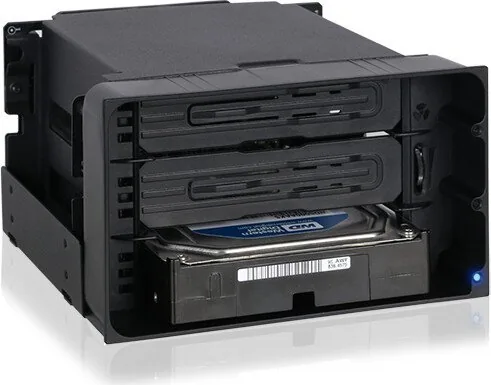
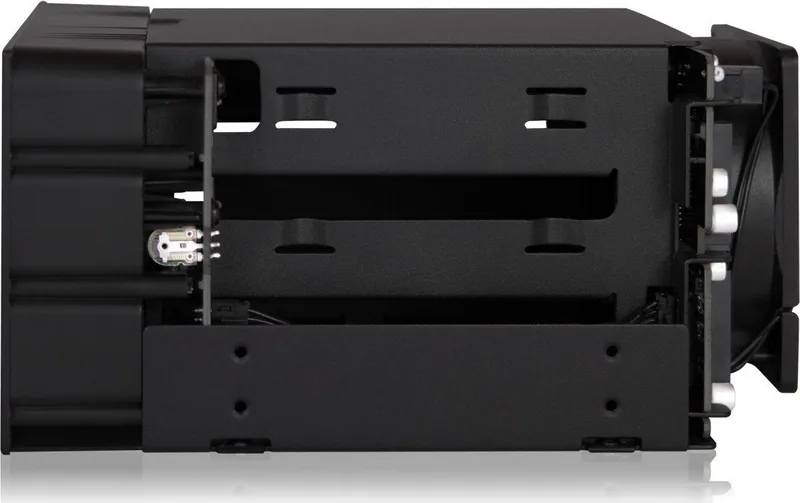
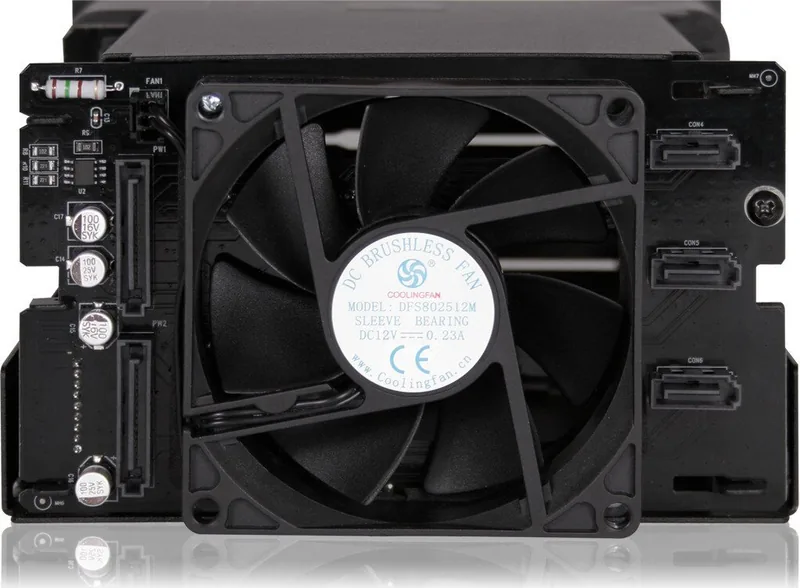
The unit is engineered specifically to fit into two external 5.25-inch drive bays. Installation involves securing the device using the included M3 pan head screws to ensure stability within the chassis. Once positioned correctly, connection cables are attached to ensure seamless data transfer and power delivery. The rear view shows the necessary SATA 7 pin and 15 pin power ports clearly labeled for extreme ease of use. It is extremely important to ensure your host system supports hot swap functions if you wish to utilize this feature without shutting down the machine completely.
Features and Indicators
Visual feedback is provided through LED indicators located on the front view panel. A solid blue light confirms device power status while a blinking light indicates active hard drive access during operations. Additionally, an 80mm fan keeps the system cool during intensive operations to prevent dangerous overheating. Users should note that some drives may not trigger the access LED due to specification differences in signaling, though functionality remains intact. This specific case applies if read and write access is still possible despite the light status.
Technical Considerations
For those utilizing SAS drives, compatibility is key to success in this setup. The host requires a SAS compatible motherboard or an installed SAS card to function correctly in all scenarios. Icy Dock reserves the right to update specifications without prior notice to ensure best performance levels. This product focuses on hardware reliability, explicitly excluding liability for data lost due to host failures or software conflicts. Ensure your configuration aligns with these strict requirements for optimal performance.
Notes on Safety
Always use included screws to secure the device properly inside the chassis. Damage resulting from improper use or external forces is not covered under service guarantees provided by the manufacturer. Always refer to technical specifications for troubleshooting regarding LED issues. Contact support if read and write access fails completely.
The documentation covers installation steps for both SATA and SAS drives clearly. It details the LED indicators and fan speed control mechanisms found on the device. Warranty information specifies that repairs are handled for the product itself. Liability for software or data is excluded from service agreements. Reading the text fully ensures no confusion during setup or usage phases.
In conclusion, this docking solution offers a robust way to manage multiple hard drives internally with high efficiency. It supports both SATA and SAS interfaces for maximum flexibility in storage expansion. The manual provides essential steps for successful mounting and operation. Proper care ensures longevity of your investment. We recommend checking host compatibility first.
Search for 67,706 Manuals online


Type-in Brand or Model