
Icy Dock flexiDOCK MB516SP-B Manual
PDF manual · 1 Pages
English


Quick check
Incorrect answer, please try again.
Chat with your Icy Dock flexiDOCK MB516SP-B manual using AI
Get instant AI answers from your Icy Dock flexiDOCK MB516SP-B manual
Ask anything about the Icy Dock flexiDOCK MB516SP-B. Answers come from this manual, with the pages they are based on.
Ask a Question
Do you recommend flexiDOCK MB516SP-B?
Yes NoFrequently Asked Questions
The MB516SP-B is designed for hot-swap, but the host system (motherboard or SAS/SATA controller) must also support hot-swap. Check your host’s specifications and documentation to confirm compatibility before using hot-swap features.
Is this answer helpful?
LED behavior depends on the drive’s access-signal specification. Some drives do not output the signal the enclosure expects; if read/write operations are normal, the LED absence does not indicate failure. If I/O also fails, contact support.
Is this answer helpful?
The unit accommodates 2.5" HDDs and SSDs up to 7mm in height. Drives must be secured to the tray with the included M3 screws. It supports SATA and SAS drives when used with appropriate controllers and connectors.
Is this answer helpful?
Use dedicated power cables where possible and avoid sharing power lines with multiple devices to ensure stable power delivery. The manual recommends using the included or proper-rated power connectors to avoid insufficient power issues.
Is this answer helpful?
Icy Dock is responsible for repairs and services of its own products. They disclaim liability for third-party software, hardware, or data-related damages. For product assistance or to initiate service, contact Icy Dock or visit their official website.
Is this answer helpful?
Place the 2.5" drive on the tray with the connector at the rear, flip the tray to secure the drive underside with the included M3*4 screws, then return the tray to the top side and insert it into the bay slot.
Is this answer helpful?
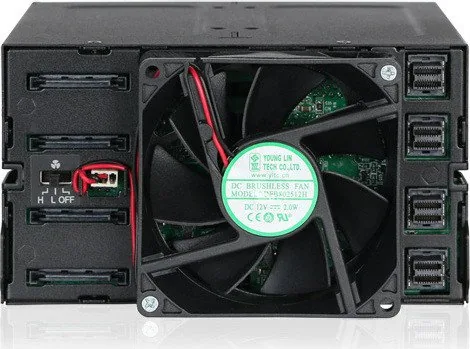
Typical connections include a miniSAS HD connector for host data and a 15-pin power port. The unit may also expose a 3-pin fan header. Confirm exact connectors on your model and use compatible cables.
Is this answer helpful?
Advantages and Disadvantages
Advantages

- Compact 5-bay 2.5" solution fits a single 5.25" bay for high density in small chassis.
- Tool-less trays with included screws allow fast drive swaps and secure mounting.
- Supports hot-swap workflows when paired with a host that supports hot-swap.
- Solid metal construction enhances durability and protects drives in frequent-use environments.
- Clear power and activity LEDs (subject to drive signal compatibility) help monitor drive status.
Disadvantages

- Some drives may not support the LED access signal, causing no activity indication.
- Hot-swap function requires host-side support; otherwise hot-swap won’t work.
- Limited to 2.5" drives up to 7mm height; thicker drives are not supported.
- Icy Dock only services its hardware; third-party software or data issues are not covered.
- Requires appropriate connectors (miniSAS HD or compatible) which may need additional cables/adapters.
Product Specification
Type
Backplane
Internal connectors
16x 2.5" SAS/SATA 6Gb/s
External connectors
4x SFF-8643 (SAS 12Gb/s)
Hot-Swap
Yes
Drive bay
2x 5.25"
Drive height
0.28 in
Case cooling
1x fan (3.15 in)
Power supply
4x 15-Pin SATA
Lock
No
Special features
Full metal construction
Manufacturer's warranty
three years
Product Description
Icy Dock flexiDOCK MB516SP-B Manual
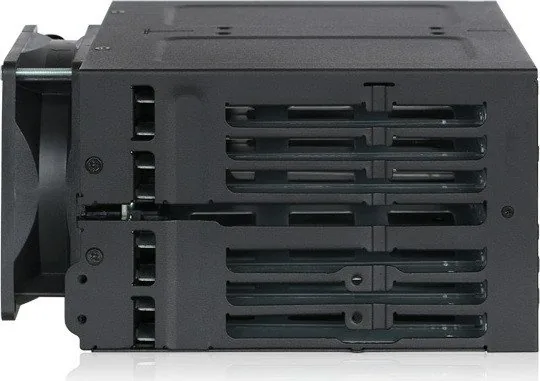
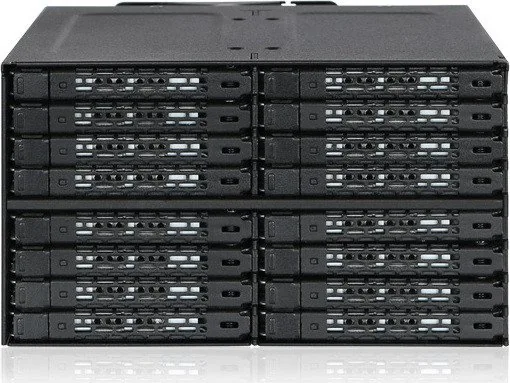
The Icy Dock flexiDOCK MB516SP-B is a robust hot-swap drive bay solution designed for users who need quick, secure access to multiple 2.5" SATA/SAS drives. Built with a durable metal chassis and tool-less drive trays, it supports up to five 2.5" drives in a single 5.25" bay, making it ideal for workstations, servers, and compact storage arrays. The design emphasizes fast drive changes, hardware-level reliability, and clear status indicators to streamline maintenance and expandability.
Key features and functionality
The MB516SP-B features individual drive trays with a simple ejection mechanism and standardized screw mounting for 2.5" HDDs and SSDs up to 7mm thick. Each tray includes an LED area for power and activity status, although LED behavior depends on the drive’s own access-signal compatibility. A removable drive ID plug lets users label and organize drives for quick identification. Internally, the unit exposes standard connectors such as miniSAS HD and power headers and provides a fan header for improved cooling when required.
Installation is straightforward: slide each secured drive tray into its slot, connect power and data via the appropriate connectors, and verify host support for hot-swap if you intend to use that functionality. The manual emphasizes using the included screws to secure drives and recommends dedicated power cables for reliable operation. If drive LEDs do not illuminate but read/write operations remain normal, the device is still functioning; if both LEDs and I/O fail, contact support.
Practical use cases
This enclosure suits system builders, IT technicians, and content creators who frequently swap drives for backups, cloning, or drive maintenance. It’s particularly useful in environments where minimizing downtime matters and where a compact multi-drive solution is required without sacrificing durability or accessibility.
Notes
- Host system must support hot-swap to fully leverage the MB516SP-B hot-swap capability.
- Some drives may not support the device’s LED access signal—lack of LED does not necessarily indicate drive failure.
- Icy Dock covers repair and service for its own products but is not liable for third-party software, hardware, or data issues.
- Refer to your motherboard or controller documentation to confirm hot-swap support.
Search for 67,706 Manuals online


Type-in Brand or Model