
Icy Dock flexiDOCK MB021VP-B Manual
PDF manual · 1 Pages
English


Quick check
Incorrect answer, please try again.
Chat with your Icy Dock flexiDOCK MB021VP-B manual using AI
Get instant AI answers from your Icy Dock flexiDOCK MB021VP-B manual
Ask anything about the Icy Dock flexiDOCK MB021VP-B. Answers come from this manual, with the pages they are based on.
Ask a Question
Do you recommend flexiDOCK MB021VP-B?
Yes NoFrequently Asked Questions
This enclosure specifically supports 2.5-inch U.2 NVMe SSDs. It does not support standard 2.5-inch SATA drives as it utilizes the U.2 connector interface for higher performance and bandwidth capabilities.
Is this answer helpful?
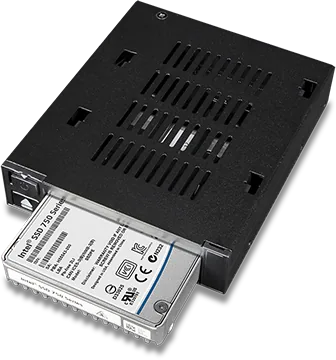
You simply insert the 2.5-inch U.2 SSD into the drive slot until it stops securely. The drive eject button will pop out when the connection is fully seated, indicating proper insertion and locking mechanism engagement.
Is this answer helpful?
The solid blue indicator means device power is active and the unit is ready. The flashing blue light indicates drive access in progress, showing that data is being read or written to the connected SSD.
Is this answer helpful?
Yes, the device supports hot swapping capabilities. You can push the eject button to release the mechanism and remove the drive from the slot without needing to power down the entire chassis unit.
Is this answer helpful?
The package contains the device, four M3 by 2.5 screws for securing the device, and a user manual. These screws are required to mount the unit securely into an external 3.5-inch drive bay.
Is this answer helpful?
For warranty details please visit the official Icy Dock website at www.icydock.com/warranty.php. This page provides registration and protection terms for your purchased hardware components.
Is this answer helpful?
Yes, the drive slot supports 2.5-inch U.2 SSDs up to 15 millimeters in height. This ensures most common U.2 drives will fit without physical interference or pin damage.
Is this answer helpful?
Advantages and Disadvantages
Advantages

- Supports high speed 2.5-inch U.2 NVMe SSDs effectively
- Fits into standard external 3.5-inch drive bay easily
- Features clear LED indicators for power and access status
- Tool-free design allows quick removal and installation
- Includes necessary mounting screws for secure chassis fitting
Disadvantages

- Requires specific M3 by 2.5 mounting screws provided
- Limited to 2.5-inch drives up to 15 mm height
- Compatible only with U.2 interface not standard SATA
- Requires external 3.5-inch drive bay availability
- Relies on manual installation steps for initial setup
Product Specification
Type
Hot-swap Carrier
Internal Interfaces
1x 2.5" U.2 / SFF-8639 (PCIe 4.0 x4)
External Interfaces
1x SlimSAS / SFF-8654 (PCIe 4.0 x4)
Drive Bay
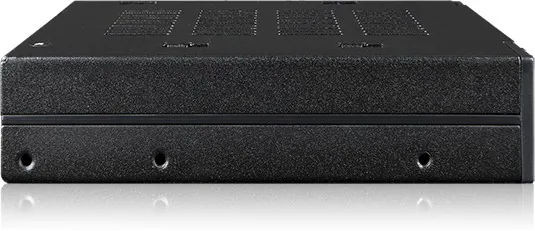
1x 3.5"
Drive Height
0.59"
Chassis Cooling
N/A
Tray Cooling
N/A
Power Connector
1x 15-Pin SATA
Lock
No
Features
Trayless
Manufacturer Warranty
3 Years
Product Description
Unlocking High Speed Storage Solutions for Modern Systems
Modern computing relies on fast solid state drives for efficiency and responsiveness. The Icy Dock flexiDOCK MB021VP-B Manual provides guidance for users upgrading hardware significantly. This enclosure is designed for 2.5-inch U.2 NVMe SSDs, offering robust solutions exceeding standard SATA limits. It fits into an external 3.5-inch drive bay, suitable for professional setups and home labs.
Installation is straightforward once you understand the layout in the guide. Insert the 2.5-inch U.2 SSD into the drive slot until it stops securely. The design includes a drive eject button that pops out when connected. Removal is easy; push the button to release the drive mechanism. This design ensures minimal downtime during maintenance or upgrades.
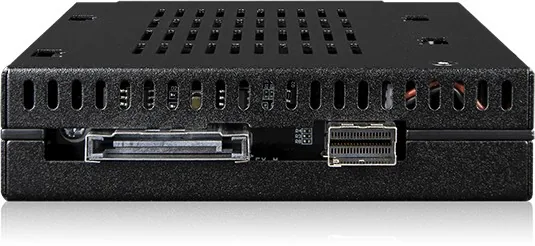
Power management uses a dual LED indicator system on the front panel. A solid blue light confirms device power is active. A flashing blue light indicates drive access during data reads. These cues help users monitor status instantly. Rear connection includes a SATA 15 pin power and slimline SAS interface for stability.
The package includes necessary screws for securing the device properly. You must use the included M3 by 2.5 screws to mount the unit into the external 3.5-inch drive bay. Failure to secure it physically might lead to instability. The drive slot supports 2.5-inch U.2 SSD up to 15 millimeters height to ensure compatibility.
Users should consult the official resources for warranty details and registration. Visiting the manufacturer website ensures you are covered under proper terms for protection. This device bridges the gap between enterprise grade speeds and consumer accessibility effectively. It allows technicians to manage multiple U.2 drives effectively within a standard chassis frame.
Whether for large backups or high performance gaming tasks, this enclosure delivers on promises of speed. The manual serves as a critical tool for anyone integrating this hardware efficiently. Proper installation ensures longevity and optimal performance over the lifespan of the equipment. Enjoy the freedom of hot swapping capabilities while maintaining enterprise standards.
Search for 67,706 Manuals online


Type-in Brand or Model