
Icy Dock EZConvert MB705M2P-B Manual
PDF manual · 2 Pages
English



Quick check
Incorrect answer, please try again.
Ask a Question
Do you recommend EZConvert MB705M2P-B?
Yes No
sed50
4 months ago
Does the included thermal pad work well for heat dissipation?
Frequently Asked Questions
It supports B-key, M-key, and B+M key M.2 SSDs, allowing flexibility for both SATA and NVMe protocols depending on the specific module installed.
Is this answer helpful?
Remove the protective membrane from the thermal pad, then press it firmly onto the heat sink cover before inserting the SSD to ensure proper heat transfer.
Is this answer helpful?
While it fits standard 3.5-inch bays, check your case dimensions first as the height and width may exceed clearance in very compact SFF enclosures.
Is this answer helpful?
Yes, it typically includes necessary cables to connect to standard SATA power and data interfaces found in most computer power supplies.
Is this answer helpful?
The included heat sink helps manage temperatures, but for extreme loads, adding additional airflow or upgrading the thermal interface material may be beneficial.
Is this answer helpful?
Advantages and Disadvantages
Advantages

- Supports multiple M.2 key types for broad SSD compatibility
- Easy conversion of 3.5-inch bays for modern NVMe drives
- Robust metal construction protects against dust and impact
Disadvantages

- Requires careful thermal pad installation to prevent overheating
- May not fit in all compact chassis due to height constraints
- No built-in power supply requires connection to existing PSU rails
Product Specification
Conversion
M.2 (PCIe) to U.2 2.5"
Host
1x U.2 2.5\u200bSFF-8639 (PCIe 3.0 x4, male)
Target
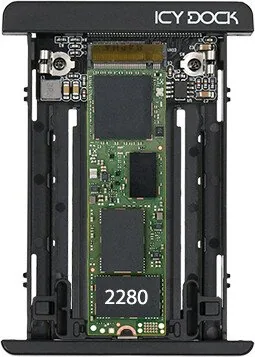
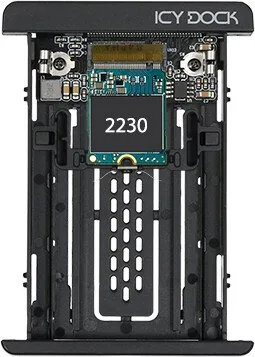
1x M.2\u200bM-Key (PCIe 3.0 x4, 2280\u200b2260\u200b2242\u200b2230, female)
Additional Power Supply
N\/u200bA
Form Factor
2.5" Enclosure (0.37 inches)
Dimensions
3.98x2.76x0.37 inches
Product Description
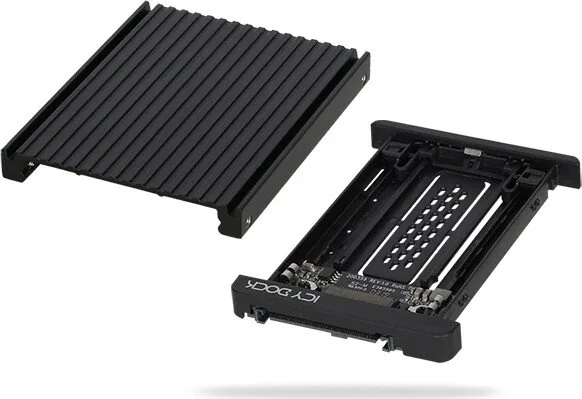
The Icy Dock EZConvert MB705M2P-B: A Versatile Storage Solution
The Icy Dock EZConvert MB705M2P-B stands out as a robust and flexible storage expansion tool designed for modern computing environments. This device allows users to seamlessly integrate M.2 NVMe or SATA SSDs into standard 3.5-inch drive bays, making it an ideal choice for upgrading older systems or optimizing server configurations without requiring complex internal modifications. Its primary appeal lies in its ability to convert legacy form factors into high-speed storage options, bridging the gap between traditional hard drives and next-generation solid-state technology.
One of the standout features of this product is its ease of installation and adaptability. The unit supports various M.2 key types, including B-key, M-key, and B+M key modules, ensuring compatibility with a wide range of SSDs on the market. Whether you are building a home lab, managing a data center, or simply looking to enhance your personal workstation, this converter provides a reliable pathway to increased storage capacity and faster data access speeds. The design prioritizes airflow and thermal management, often incorporating heat sinks to prevent overheating during intensive operations.
Proper maintenance is crucial for longevity. Users should be aware that installing thermal pads correctly is essential for effective heat dissipation. This involves carefully removing any protective membranes before applying the pad to the heat sink cover, ensuring direct contact between the SSD and the cooling mechanism. Neglecting this step can lead to thermal throttling, which significantly impacts performance over time. The manual guide for the Icy Dock EZConvert MB705M2P-B offers detailed instructions to help enthusiasts navigate these technical steps with confidence.
Beyond raw performance, the physical build quality ensures durability in demanding environments. The metal casing provides structural integrity while protecting sensitive components from dust and minor impacts. This makes it suitable for both stationary desktop setups and mobile workstations where vibration might be a concern. By combining high-speed connectivity with a user-friendly form factor, the MB705M2P-B remains a top contender for anyone seeking to future-proof their storage infrastructure.
Important Notes
- Always ensure the system is powered off before installing hardware.
- Check compatibility lists before purchasing specific M.2 modules.
- Thermal paste application should be minimal and even for optimal transfer.
Search for 67,706 Manuals online


Type-in Brand or Model
qui74
4 months ago
How is the build quality and thermal performance of this product?
Manual.ly
4 months ago
The product features excellent build quality with all parts fitting perfectly. Thermal performance is very good, providing effective cooling and heat dissipation thanks to the included thermal pad. We highly recommend it.