
Icy Dock EZ-Adapter MB931U-1VB Manual
PDF manual · 1 Pages
English


Quick check
Incorrect answer, please try again.
Chat with your Icy Dock EZ-Adapter MB931U-1VB manual using AI
Get instant AI answers from your Icy Dock EZ-Adapter MB931U-1VB manual
Ask anything about the Icy Dock EZ-Adapter MB931U-1VB. Answers come from this manual, with the pages they are based on.
Ask a Question
Do you recommend EZ-Adapter MB931U-1VB?
Yes NoFrequently Asked Questions
The MB931U-1VB configuration supports USB 3.2 Gen 2 speeds which offer high throughput for NVMe drives. However, transfer speeds may drop to USB 3.2 Gen 1 rates on some systems depending on the chipset limitation of your operating system and hardware.
Is this answer helpful?
You can physically install both types, but the system will typically detect only the M.2 hard drive if you install both simultaneously. It is recommended to use only one drive type configuration to avoid detection failures.
Is this answer helpful?
Firmware updates are sometimes available on the official website download section to enhance transfer speeds if needed. Generally, the adapter operates via standard USB drivers, but checking for updates ensures optimal performance.
Is this answer helpful?
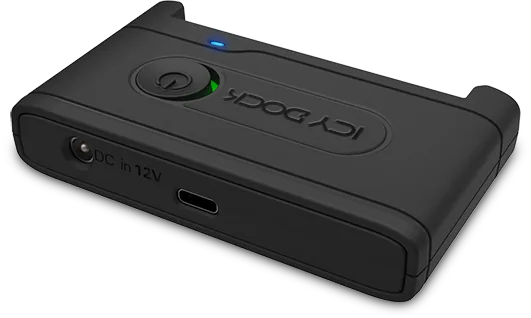
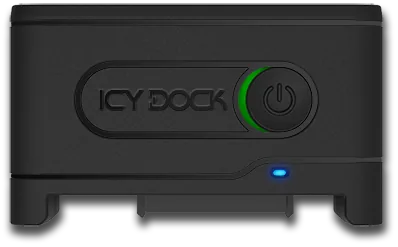
The device features LED indicators where solid blue means power is active. Flashing blue indicates that data transfer is in progress. Green indicates the switch is on and red indicates the switch is off.
Is this answer helpful?
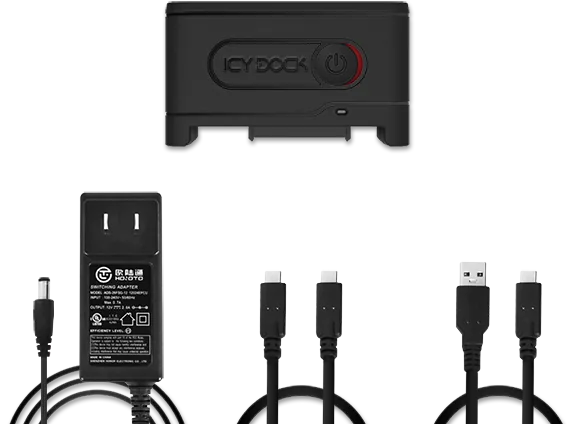
Yes, it connects via USB Type C or Type A cables included in the package. Users must ensure all cables are securely connected and the external power adapter is connected during operation for stable voltage.
Is this answer helpful?
For warranty information please visit the official Icy Dock website at the warranty page. Terms vary by region and product type so it is best to review the local terms provided on their portal.
Is this answer helpful?
Always turn off the device before installing or removing any storage medium to prevent electrical damage. This safety protocol protects both the drive and the adapter interface from potential power surges or shorts.
Is this answer helpful?
Advantages and Disadvantages
Advantages

- Supports high-speed USB 3.2 Gen 2 for NVMe drives reducing transfer times significantly compared to older interfaces.
- Includes dedicated power switch and LED indicators for clear visual feedback on power and data activity status.
- Compatible with multiple drive form factors including U.2 NVMe, 2.5 inch SATA and M.2 options via different models.
- USB Type C connector ensures broad compatibility with modern laptops and desktops for easy connectivity.
- Cables and power adapter are included to facilitate immediate connection right out of the box for users.
Disadvantages

- Requires external DC 12V power supply which adds to the cable clutter and port requirements.
- Transfer speeds may drop to USB 3.2 Gen 1 rates on certain systems due to chipset limitations with U.2 SSDs.
- System detects M.2 drive only if both M.2 and 2.5 inch drives are installed simultaneously on same device.
- Requires turning off device before installing or removing SSDs to prevent potential electrical damage to components.
- Firmware updates may be needed occasionally to enhance transfer speeds if initial performance is limited by drivers.
Product Specification
Conversion
USB -> U.2 2.5"
Host
1x USB-C 3.1 (male)
Target
1x U.2 2.5" / SFF-8639 (PCIe 3.0 x4, male)
Additional Power Supply
Power Supply (12V/2A)
Form Factor
Cable/Dongle
Chipset
ASMedia ASM2362
Dimensions
3.62x2.13x0.72 in
Features
On/Off Switch
Product Description
Revolutionizing Storage Connectivity
Expanding your personal computing infrastructure often requires versatile hardware that bridges the gap between internal components and external peripherals. The Icy Dock EZ-Adapter MB931U-1VB stands out as a premium solution for users demanding high-speed data transfer and flexible storage options. Whether you are a content creator needing rapid access to large media files or a system architect optimizing storage arrays, this adapter provides the necessary connectivity interface. When consulting the Icy Dock EZ-Adapter MB931U-1VB Manual for setup details, users gain insight into proper installation procedures that ensure optimal longevity and performance of the entire system.
Key Specifications and Design
This device supports multiple drive form factors including U.2 NVMe SSDs and 2.5 inch SATA drives depending on the specific model variant. The MB931U-1VB configuration targets U.2 NVMe drives and offers USB 3.2 Gen 2 speeds which significantly reduce transfer times compared to older interfaces. Conversely, the MB031U-1SMB variant handles SATA connections over USB 3.2 Gen 1. The USB Type C connector ensures compatibility with modern laptops and desktops. Each unit features a dedicated power switch and LED indicators that show power status and drive activity. Power must be supplied externally via a DC 12V connector to handle the drive loads correctly. The LED lights provide clear visual feedback where solid blue means power is active and flashing blue indicates data transfer in progress. Green light indicates the switch is on while red indicates off.
Installation and Usage Guidelines
Installing a drive is straightforward but requires attention to safety protocols. Always turn off the device before installing or removing any storage medium to prevent electrical damage. Connect the USB cable first, then insert the drive into the correct connector, and finally power on the unit. USB Type C or Type A cables are included to facilitate connection. Proper alignment guides on the drive bay assist in smooth insertion. If mixing M.2 and 2.5 inch drives, the system typically detects only the M.2 drive. Users should verify their operating system and chipset limitations as certain U.2 drives might limit speeds to USB 3.2 Gen 1 rates. Firmware updates to enhance transfer speeds are sometimes available on the official download section of the manufacturer portal. Note that transfer speeds may drop if the chipset cannot support the full bandwidth of the NVMe drive interface. Scan the QR code provided on the box for more detailed information regarding the product specifications.
Final Considerations
Reliability is paramount when managing critical data. Ensure all cables are securely connected to avoid intermittent disconnections. The external power adapter must remain connected during operation to maintain stable voltage. For support regarding warranty or technical specifications, visit the official Icy Dock warranty page. Warranty terms vary by region and product type so review locally. Proper usage ensures that you extract maximum value from your storage investment without encountering interface bottlenecks. Always check the documentation for specific connector pinout details like the five-pin layout for M.2 SATA drives to ensure correct alignment during installation. The guide also warns against concurrent installation of incompatible drive types which may cause detection failures.
Search for 67,706 Manuals online


Type-in Brand or Model