
Icy Dock EZ-Adapter MB931U-1VB R1 Manual
PDF manual · 1 Pages
English


Quick check
Incorrect answer, please try again.
Chat with your Icy Dock EZ-Adapter MB931U-1VB R1 manual using AI
Get instant AI answers from your Icy Dock EZ-Adapter MB931U-1VB R1 manual
Ask anything about the Icy Dock EZ-Adapter MB931U-1VB R1. Answers come from this manual, with the pages they are based on.
Ask a Question
Do you recommend EZ-Adapter MB931U-1VB R1?
Yes NoFrequently Asked Questions
Yes, the device requires a DC 12V power adapter included in the package for proper operation.
Is this answer helpful?
Some M.2 NVMe drives do not support the hot-plug function, so install them before connecting the USB cable.
Is this answer helpful?
Cleaning the connector with a rubber eraser or alcohol is recommended to restore good drive detection.
Is this answer helpful?
Always turn off the device power before installing or removing drives to protect the electronics.
Is this answer helpful?
Speed may reduce to 3.2 Gen 1 5Gbps with certain U.2 SSDs or operating systems due to compatibility.
Is this answer helpful?
Yes avoiding simultaneous connection limits detection priority, sometimes only the M.2 2.5 inch drive is detected.
Is this answer helpful?
Warranty information is available on the official ICY DOCK website support page for registration.
Is this answer helpful?
Advantages and Disadvantages
Advantages

- High speed USB 3.2 Gen 2 connection enables rapid data transfers for demanding workflows.
- Visual LED indicators provide clear power and drive status feedback without extra tools.
- DC 12V power adapter included ensures stable power delivery for NVMe SSDs.
- Supports U.2 NVMe and various SATA configurations for versatile storage expansion.
- Clear instructions for connector cleaning help prevent oxidation issues over time.
Disadvantages

- External power adapter required instead of receiving power solely from USB bus.
- Some M.2 NVMe drives do not support hot plugging functions properly.
- Speed may drop to 3.2 Gen 1 under specific compatibility or OS conditions.
- Potential for connector oxidation over time if maintenance is not performed regularly.
- 12V drive support is not compatible in certain modes limiting drive selection.
Product Specification
Adapter
USB -> U.2 2.5"
Host
1x USB-C 3.1 (male)
Target
1x U.2 2.5" / SFF-8639 (PCIe 3.0 x4, male)
Additional Power Supply
Power Supply (12V/2A)
Form Factor
Cable/Dongle
Chipset
ASMedia ASM2362
Dimensions
3.62 x 2.13 x 0.72 in
Features
On/Off switch, compatible with SSD Trays / Caddy
Product Description
Unlock High Performance with Icy Dock Storage Solutions
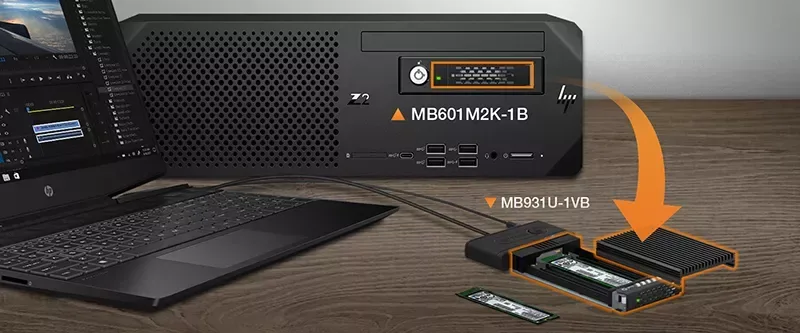
The Icy Dock EZ-Adapter MB931U-1VB R1 revolutionizes how professionals access high performance solid state drives. This adapter serves as a robust bridge between your computer and advanced U.2 NVMe SSD technology. It ensures seamless data transfer through a USB 3.2 Gen 2 Type-C connection. Users benefit from rapid read and write speeds essential for heavy data processing tasks. External storage often becomes a bottleneck, but this tool eliminates that concern effectively.
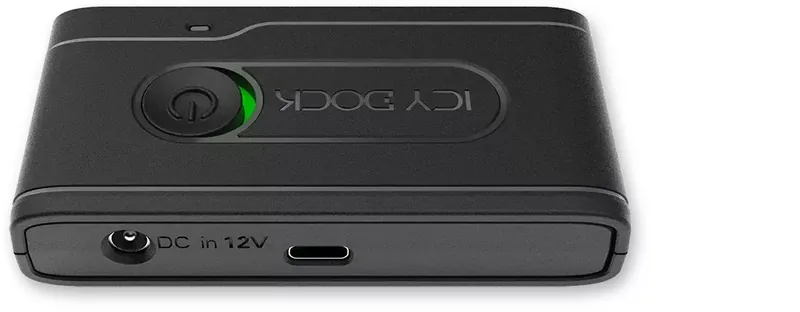
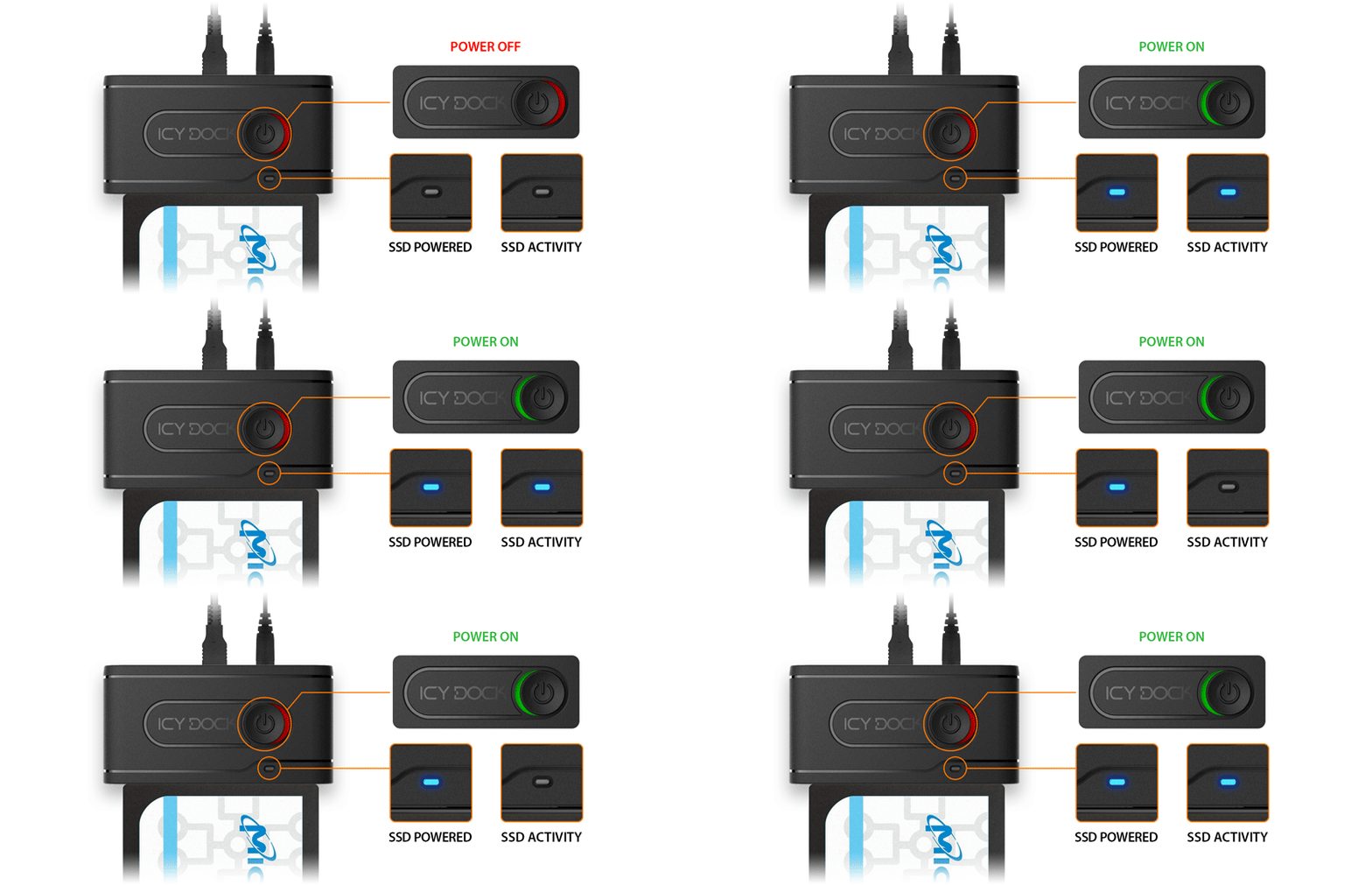
Unlike solutions requiring bus power, this unit needs a dedicated adapter. The package includes a DC 12V power adapter and Type-C cables to ensure stability. A power switch with LED indicators provides visual feedback on power and drive activity status. Blue lights signify device power and drive access events. This visibility helps prevent accidental data loss during unexpected disconnections. It alerts users when data is moving across the bus interface.
The company offers a lineup of similar adapters for different drive types. The MB104U-1SMB supports both SATA and NVMe M.2 drives alongside 2.5 inch SATA units. It provides maximum flexibility for mixed storage environments. The MB031U-1SMB caters to standard SATA M.2 configurations using USB 3.2 Gen 1. Each unit focuses on specific compatibility needs while maintaining a consistent design philosophy. The ecosystem allows users to mix and match drives based on budget and speed requirements.
Installation requires attention to detail for safety. Always toggle the power switch to the off position before attaching or detaching any storage media. This precaution protects both the hardware interface and the drive electronics from voltage spikes. Some M.2 NVMe drives do not support hot plug functions. In such cases, insert the drive before connecting the USB cable to the host system. This prevents electrical stress.
Over time, connector oxidation can occur on metal contacts. If detection becomes unstable, cleaning the connector with a rubber eraser or alcohol is recommended. Users should verify drive compatibility on the official website before purchasing specific U.2 SSD models. Speed limitations may occur depending on the operating system or drive architecture. Performance might reduce to 3.2 Gen 1 speeds of five gigabits per second in specific scenarios involving certain U.2 SSDs.
Icy Dock backs this hardware with dedicated support resources. Customers can email the support team for technical assistance. The warranty page is available for registration details. ICY DOCK reserves the right to change product specifications or accessories without prior notice. This ensures the company can integrate the latest semiconductor advancements quickly.
Maintaining a clean connection and adhering to power protocols ensures long-term reliability. This hardware adapter provides a scalable solution for expanding storage capacity. It bridges the gap between internal speed and external portability. Maintenance keeps the system running optimally without degradation.
Note: Power must be off during drive changes.
Search for 67,706 Manuals online


Type-in Brand or Model