
Icy Dock ExpressCage MB741SP-B Manual
PDF manual · 6 Pages
English



Quick check
Incorrect answer, please try again.
Chat with your Icy Dock ExpressCage MB741SP-B manual using AI
Get instant AI answers from your Icy Dock ExpressCage MB741SP-B manual
Ask anything about the Icy Dock ExpressCage MB741SP-B. Answers come from this manual, with the pages they are based on.
Ask a Question
Do you recommend ExpressCage MB741SP-B?
Yes NoFrequently Asked Questions
It supports two 2.5-inch SAS or SATA SSDs/HDDs in a single external 3.5-inch bay, making it useful for compact storage expansion.
Is this answer helpful?
Yes, the ExpressTray supports tool-less drive installation. The tray is designed to secure the drive mechanically once inserted, though optional screws can be added for extra stability.
Is this answer helpful?
Yes, but only if the host system also supports hot swap. You should check your motherboard or controller card documentation before relying on that feature.
Is this answer helpful?
Yes, but your host must have SAS-compatible hardware, such as a SAS motherboard or a SAS controller card. Without that, SAS drives will not function properly.
Is this answer helpful?
Some drives use different access LED signaling and may not support the indicator in this enclosure. If read and write access works, the LED issue may be drive-specific rather than a failure.
Is this answer helpful?
You need standard 15-pin SATA power and 7-pin SATA data cables to complete the installation and connect the device to your system.
Is this answer helpful?
Advantages and Disadvantages
Advantages

- Supports 2 x 2.5-inch drives in one external 3.5-inch bay, saving space inside the system.
- Tool-less ExpressTray design makes drive installation fast and convenient.
- Mechanical locking helps secure drives firmly after insertion.
- Compatible with both SAS and SATA SSDs or HDDs for flexible storage setups.
- Uses standard SATA power and data connections for easy integration.
Disadvantages

- Hot swap only works if the host system also supports it.
- SAS drives require SAS-compatible motherboard or controller hardware.
- Some drives may not support the access LED signal.
- Care is needed during installation to avoid flipping the tray with a drive mounted.
Product Specification
Type
Backplane
Internal connectors
1x 2.5" SAS/SATA 6Gb/s
External connectors
1x SATA 6Gb/s
Hot-Swap
Yes
Drive bay
1x 3.5"
Drive height
0.59 in
Case cooling
N/A
Power connector
1x 15-Pin SATA
Lock
No
Special features
Full metal construction, Vibration protection
Manufacturer's warranty
three years
Note
Operation of SAS drives requires connection to a SAS controller via SAS/SATA adapter cable.
Product Description
Icy Dock ExpressCage MB741SP-B: Small Form Factor Storage Made Practical
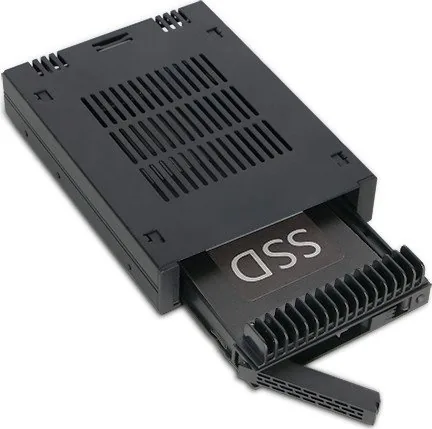
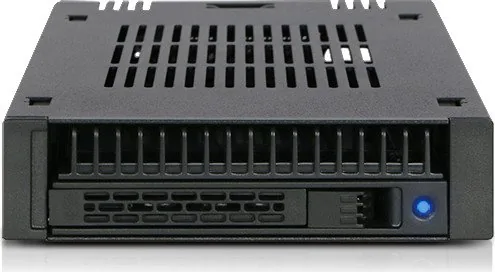
The Icy Dock ExpressCage MB741SP-B is a compact 2 x 2.5-inch SAS/SATA SSD/HDD mobile rack designed for an external 3.5-inch bay. It is built for users who want to turn a single bay into a flexible, high-density storage point without giving up too much space. For builders, upgrade enthusiasts, and workstation users, this kind of cage is especially appealing because it combines convenience, drive security, and compatibility with both solid-state and mechanical drives.
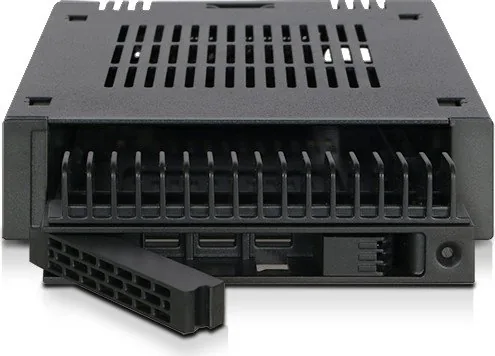
At the center of the design is the ExpressTray system. The tray supports tool-less drive installation, and the internal mechanical locking system helps hold each drive firmly once inserted into the enclosure. The installation flow is straightforward: align the drive with the built-in tray screws, press the rear into place, then slide the tray into the bay and secure the device with the included screws. If you want extra stability, optional M3 screws can also be used on the rear underside of the tray. This makes the product practical for users who value both speed and peace of mind.
The MB741SP-B also connects in a simple, familiar way through standard 15-pin SATA power and 7-pin SATA data cables. That makes it easy to integrate into many systems, especially when you are following the Icy Dock ExpressCage MB741SP-B Manual or setting up a new build. Its support for SAS and SATA drives gives it broader appeal than many basic trays, but SAS usage does require compatible host hardware, such as a SAS-ready motherboard or controller card.
Another important detail is hot swap support. The cage itself is designed with flexibility in mind, but the host system must also support hot swapping for the feature to work properly. Likewise, drive access LEDs may vary depending on the drive model, so a missing light does not always indicate a problem if read and write access still works normally.
Notes
- Avoid flipping the tray upside down with a drive installed.
- Check host compatibility before using SAS drives.
- Verify hot swap support in your motherboard or controller documentation.
This product is best understood as a compact, dependable storage expansion solution that balances ease of use with professional-style drive handling. For anyone building a tidy system with multiple 2.5-inch drives in a single 3.5-inch opening, the MB741SP-B offers a practical and well-thought-out approach.
Search for 67,706 Manuals online


Type-in Brand or Model