
IC Intracom Manhattan 1080p Manual
PDF manual · 2 Pages
English



Quick check
Incorrect answer, please try again.
Chat with your IC Intracom Manhattan 1080p manual using AI
Get instant AI answers from your IC Intracom Manhattan 1080p manual
Ask anything about the IC Intracom Manhattan 1080p. Answers come from this manual, with the pages they are based on.
Ask a Question
Do you recommend Manhattan 1080p?
Yes NoFrequently Asked Questions
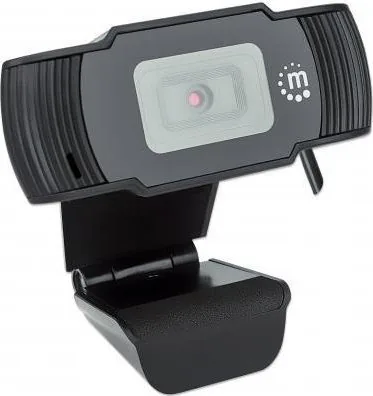
The webcam is identified as a 1080p USB webcam, which is commonly referred to as Full HD resolution. It is intended to provide a clearer image for everyday video calls, virtual meetings, online learning, and personal communication.
Is this answer helpful?
No. The product information states that it uses plug-and-play setup, so no driver download is required. Connect it by USB to a compatible computer and complete any setup needed within your chosen video calling application.
Is this answer helpful?
The model number listed in the supplied product information is 462006. This number can be useful when checking product support, warranty information, or compatibility details from the manufacturer.
Is this answer helpful?
It is suitable for common video communication tasks, including remote work meetings, online classes, conversations with friends and family, and basic content creation. Its 1080p capability and simple USB connection support convenient everyday use.
Is this answer helpful?
Yes. The supplied information includes FCC Class B and CE compliance statements. These references indicate that the product has documentation related to applicable electromagnetic compatibility requirements in relevant markets.
Is this answer helpful?
Do not dispose of the webcam with unsorted household waste where separate electronic-waste collection applies. Follow local recycling rules, return it to an appropriate collection point, or use a retailer or municipal electronics recycling program.
Is this answer helpful?
Advantages and Disadvantages
Advantages

- 1080p resolution supports clearer video for meetings, classes, and personal calls.
- USB plug-and-play setup avoids the need to download additional drivers.
- A dedicated webcam can provide more placement flexibility than a built-in laptop camera.
- FCC Class B and CE compliance information is provided for applicable regions.
Disadvantages

- The supplied details do not specify microphone features, field of view, frame rate, or autofocus.
- Compatibility requirements beyond plug-and-play USB operation are not stated.
- Users must follow local electronic-waste recycling rules for disposal.
- Warranty terms and service availability can vary by region.
Product Specification
Type
Webcam
Image sensor
1x 1/2.9" CMOS 2.0 MP
Resolution
1920 x 1080 pixels (30 fps)
Viewing angle
70 degrees
Compression/Codecs
MJPEG, YUY2
Wireless
N/A
Focusing
Fixed focus
Camera cover
N/A
Microphone
Integrated
Speaker
N/A
Lighting
N/A
Cable length
4.92 ft
Power supply
via USB
Mount
Mounting clip
Dimensions
4.33 x 3.03 x 1.26 in
Weight
3.28 oz
Product Description
IC Intracom Manhattan 1080p USB Webcam - Read, Download & Print Free
The IC Intracom Manhattan 1080p USB Webcam is designed for people who need a straightforward camera solution for everyday online communication. Whether you are joining remote meetings, talking with friends and family, attending virtual classes, or creating simple video content, this webcam focuses on convenient setup and dependable high-definition video.
Clear 1080p Video for Daily Calls
With 1080p resolution, the webcam is positioned to deliver a sharper, more detailed image than lower-resolution alternatives. This makes it a practical choice for video conferences where facial expressions, presentations, and visual clarity matter. It can support a more polished appearance during work calls while remaining suitable for casual conversations and online learning.
Simple USB Plug-and-Play Setup
One of the key benefits of the Manhattan 1080p USB Webcam is its plug-and-play operation. Connect it to a compatible computer through USB and begin setup without downloading additional drivers. This approach reduces installation steps and can be especially helpful for users who prefer uncomplicated peripherals.
The straightforward connection method also makes the webcam convenient for shared workspaces, home offices, and flexible desk setups. Users can move it between compatible computers when needed, helping keep video communication accessible without a lengthy configuration process.
Built for Convenient Video Communication
IC Intracom's Manhattan range emphasizes practical technology accessories, and this webcam follows that direction with an easy-to-use format. It is a sensible option for users who want a dedicated USB webcam instead of relying on a built-in laptop camera. A separate webcam can offer more flexibility in how a camera is positioned around a monitor or workspace.
The product is also supported by regulatory information for FCC Class B and CE requirements, indicating attention to applicable electromagnetic compatibility standards. For disposal, it should be handled through appropriate electronics recycling programs rather than placed with unsorted household waste where local rules require separate collection.
A Practical Choice for Everyday Setups
The IC Intracom Manhattan 1080p USB Webcam - Read, Download & Print Free keyword highlights a product intended for accessible, no-fuss use. Its combination of Full HD resolution and driver-free installation makes it appealing for users who want to get online quickly. It is best suited to routine video calls, virtual collaboration, remote instruction, and personal communication.
Notes
- Connect the webcam according to the instructions for your computer and conferencing software.
- Use local electronic-waste collection or recycling options when the product reaches end of life.
- Keep proof of purchase available for warranty support where applicable.
Search for 67,706 Manuals online


Type-in Brand or Model