
Ibiza Street-Sound Manual
PDF manual · 16 Pages
English



Quick check
Incorrect answer, please try again.
Chat with your Ibiza Street-Sound manual using AI
Get instant AI answers from your Ibiza Street-Sound manual
Ask anything about the Ibiza Street-Sound. Answers come from this manual, with the pages they are based on.
Street-Sound Maintenance Schedule
If the unit is not used for a longer period, keep the battery charged at 40% capacity and check/charge it once per month.
Charge the battery regularly after each use. Do not wait until it is discharged to avoid losing capacity or damaging the battery.
Free maintenance reminders
Timed to your purchase date. Always free, unsubscribe anytime.
Ask a Question
Do you recommend Street-Sound?
Yes NoDo you recommend Street-Sound?
Yes NoFrequently Asked Questions
Turn on both speakers and set them to Bluetooth mode. Press and hold the Next button on the master unit for three seconds until a tone sounds. The second unit will stop flashing, indicating they are connected. Pair your phone with the master unit named STREET-SOUND.
Is this answer helpful?
No, this product is designed for indoor use only. It should not be exposed to water, humidity, or rain to prevent electrical shock or damage. Do not place it near swimming pools or in bathrooms.
Is this answer helpful?
While specific times vary by charger efficiency, the red LED indicates charging is in progress. Once the battery is fully charged, the LED turns off. Always charge fully before the first use to ensure optimal battery health.
Is this answer helpful?
Yes, the device features a record and repeat function. You can record audio via the microphone or external source and repeat tracks or entire playlists using the remote control or panel buttons.
Is this answer helpful?
No, batteries are explicitly excluded from the warranty coverage. Damage resulting from improper handling, such as letting the battery discharge completely, voids any claims related to the battery.
Is this answer helpful?
Use the EQ button on the remote control to cycle through different sound styles such as Jazz, Rock, Pop, or Classic. This adjusts the equalizer settings to suit your preferred genre.
Is this answer helpful?
Check the button cell battery in the remote first. Ensure there are no obstacles between the remote and the sensor, and avoid strong sunlight which can interfere with the signal. Clean the sensor area if necessary.
Is this answer helpful?
Advantages and Disadvantages
Advantages

- High 100W output with dual 6.5-inch illuminated woofers for powerful sound
- True Wireless Stereo (TWS) function enables double power when paired
- Multiple input sources including Bluetooth, USB, SD, FM, and AUX
- Built-in rechargeable battery offers portability without constant power cords
- Includes remote control and microphone with echo adjustment for karaoke
Disadvantages

- Battery life may decrease significantly if fully discharged regularly
- Not suitable for outdoor use in rain or tropical climates
- Remote control range is limited to 2 meters and requires line of sight
- Button cell battery in remote poses ingestion risk for small children
- Device cannot be opened for user repairs due to sealed internal components
Product Specification
Power
100W Peak
Display
LED
Tuner
FM
Frequency Range
100Hz-20kHz
Connections
AUX In (3.5mm Jack), Mic In (6.35mm Jack), USB-A 2.0, Cardreader (microSD)
Wireless
Bluetooth
Power Supply
Battery (3600mAh), USB
Features
Stereo-Pairing, Remote Control, Light Effects
Color
Black
Dimensions
19.3x10.2x9.1in (WxHxD)
Weight
8.71lbs
Product Description
Experience the Vibes of Ibiza with Street-Sound
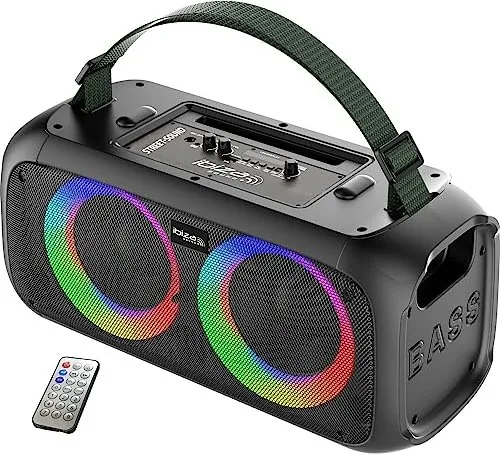
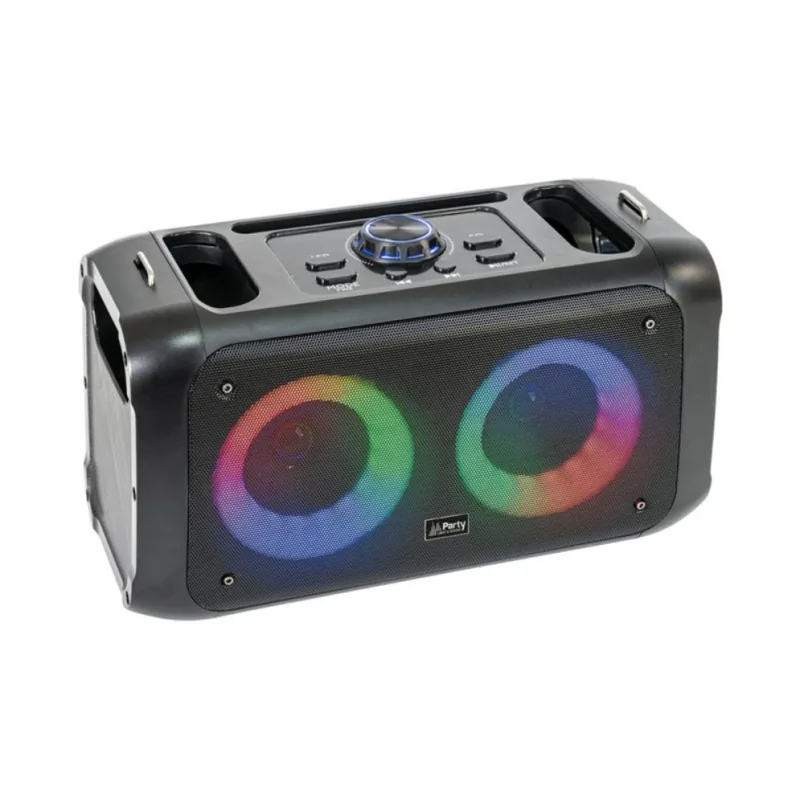
The Ibiza Street-Sound is more than just a speaker; it is a portable party companion designed to bring the energy of the island streets to any location. This active portable speaker box features two powerful 6.5-inch woofers that deliver a robust 100W of sound, ensuring your music fills the room or outdoor space with clarity and depth. The illuminated woofers add a dynamic visual element, creating an immersive atmosphere perfect for gatherings, beach days, or home entertainment.
Equipped with versatile connectivity options, this device supports Bluetooth streaming, USB drives, Micro-SD cards, FM radio, and AUX inputs. Whether you are playing MP3 files from a flash drive or tuning into local stations, the high-quality audio performance remains consistent. The built-in rechargeable lithium-ion battery ensures hours of wireless playtime, while the True Wireless Stereo (TWS) function allows you to pair two units for a true stereo experience that doubles the power output.
Designed for convenience, the unit includes recessed side handles and a shoulder strap for easy transport. The control panel features an intuitive layout with LED indicators, volume controls, and dedicated buttons for microphone and echo adjustments, making it ideal for karaoke or public announcements. A remote control is also provided for seamless operation from a distance. Safety features ensure the device operates reliably in moderate climates, with specific guidelines for battery maintenance to maximize longevity.
Key Highlights
- Immersive Audio: Dual 6.5-inch woofers with 100W power and illuminated cones.
- Wireless Freedom: Bluetooth connectivity with TWS pairing capability.
- Versatile Inputs: Supports USB, Micro-SD, FM, AUX, and Microphone.
- Portable Design: Lightweight construction with carrying handles and strap.
- Smart Features: Recording, repeat functions, and EQ settings for various genres.
Important Usage Notes
To maintain optimal performance, always fully charge the battery before first use. Avoid complete discharge as it can permanently damage capacity. Store the device in dry, indoor environments away from extreme temperatures. Keep batteries out of reach of children due to safety hazards associated with button cells in the remote control.
Search for 67,732 Manuals online


Type-in Brand or Model