
Ibiza MERCURE50 Manual
PDF manual · 24 Pages
English



Quick check
Incorrect answer, please try again.
Chat with your Ibiza MERCURE50 manual using AI
Get instant AI answers from your Ibiza MERCURE50 manual
Ask anything about the Ibiza MERCURE50. Answers come from this manual, with the pages they are based on.
MERCURE50 Maintenance Schedule
If the unit is not used for a long period, check the battery level monthly and recharge it to approximately 40% of its capacity.
Recharge the battery regularly after every use. Do not wait until it is fully discharged to avoid capacity loss or damage.
Free maintenance reminders
Timed to your purchase date. Always free, unsubscribe anytime.
Ask a Question
Do you recommend MERCURE50?
Yes NoFrequently Asked Questions
The speaker supports Bluetooth devices, USB drives, microSD cards, and wired audio sources through its 3.5 mm AUX input. Use the MODE control to select Bluetooth, AUX, USB, or TF playback.
Is this answer helpful?
Turn on the speaker, enable Bluetooth on your external device, and search for "MERCURE." Select it to pair. If a code is requested, enter "0000." A confirmation sound indicates successful pairing.
Is this answer helpful?
Yes. Insert a USB drive into the USB port or a microSD card into the TF port. Playback begins automatically when compatible music is detected. Track navigation is available from the top panel.
Is this answer helpful?
Yes. It has a microphone input and adjustable microphone volume and echo. Mic Priority can pause music while someone speaks and resume it when speaking stops. A microphone is not supplied.
Is this answer helpful?
TWS mode links two MERCURE50 speakers together. After pairing both units, one Bluetooth source can control them, providing broader sound coverage for larger spaces or events.
Is this answer helpful?
Fully charge the battery before first use and recharge it regularly after use. Avoid letting it drain completely. For long-term storage, keep it near 40 percent charge and check or recharge it monthly.
Is this answer helpful?
Advantages and Disadvantages
Advantages

- Dual 8-inch woofers and stated 500W output support high-impact party playback.
- Bluetooth, USB, microSD, and AUX inputs offer flexible music source options.
- TWS pairing allows two MERCURE50 speakers to work from one Bluetooth source.
- LED modes, microphone priority, echo, and tone controls add party and karaoke versatility.
Disadvantages

- The 6.25 kg weight may be less convenient for frequent carrying.
- Microphone use requires a separate microphone, which is not included.
- Battery care is important because deep discharge can permanently reduce capacity.
- TWS requires a second compatible MERCURE50 speaker to create a wider setup.
Product Specification
Power
500 W peak
Speakers
2 (2 x 8 in woofers)
Tuner
No
Audio connections
AUX in (3.5 mm jack), mic in (0.25 in jack)
Other connections
USB-A, card reader (microSD)
Wireless
Bluetooth
Power supply
Lithium-ion battery (3,600 mAh), AC power
Karaoke functions
Echo
Special features
Light effects, stereo pairing
Dimensions
10.83 x 22.76 x 11.61 in (W x H x D)
Weight
13.78 lb
Product Description
Ibiza MERCURE50 - Read, Download & Print Free
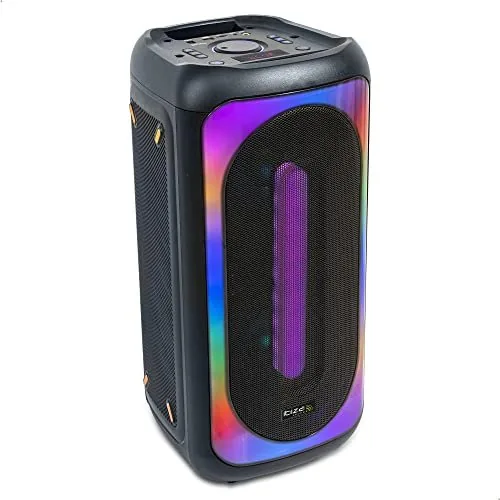
The Ibiza MERCURE50 is a portable Bluetooth party speaker designed to bring energetic sound, flexible playback, and colorful lighting to gatherings, home entertainment, and casual events. Its dual 8-inch woofers and stated 500W output give it a strong presence for music, announcements, karaoke sessions, and outdoor occasions where a compact all-in-one sound system is useful.
Built for flexible music playback
Bluetooth connectivity lets users pair a compatible phone, tablet, or other device by searching for "MERCURE." USB and microSD inputs provide direct playback from stored music, while the 3.5 mm AUX input supports wired sources. Switching between Bluetooth, AUX, USB, and TF modes is handled from the top control panel, making it easy to adapt the speaker to different setups.
The controls include play, pause, track skipping, and fast forward or rewind functions for USB and microSD playback. A built-in display indicates operating modes, Bluetooth status, and battery level, helping users keep track of the speaker during use.
Party features and sound controls
The MERCURE50 includes an LED lighting system with selectable light modes to add visual atmosphere. Lights can also be turned off when a more discreet setup is preferred. Sound adjustments are available through the menu and volume knob, with settings for treble, bass, music volume, microphone volume, echo, and remix volume.
A microphone input supports announcements and vocal performances. Microphone priority can pause the music when someone speaks and automatically resume playback afterward. This feature is useful for hosts, presenters, and karaoke-style activities. Microphone recording is also supported in USB and TF modes.
Expand the setup with TWS
For wider sound coverage, two compatible MERCURE50 speakers can be connected through True Wireless Stereo mode. Once paired, a single Bluetooth source can control both units. This is a practical option for larger rooms, wider party spaces, or listeners who want a more immersive audio arrangement.
Portable power and care
The speaker uses a rechargeable 7.4V, 3600mAh lithium-ion battery and charges through the supplied 9V adapter. It measures 275 x 295 x 578 mm and weighs 6.25 kg, balancing portability with a substantial speaker cabinet. For battery health, charge fully before first use, recharge after use, avoid complete discharge, and store it at around 40 percent charge during long periods without use.
Notes
- A microphone is not included.
- Bluetooth pairing may request the code "0000."
- Recycle the speaker through appropriate electronic waste collection systems.
Search for 67,732 Manuals online


Type-in Brand or Model