


Hyte Y40 Manual
PDF manual · 2 Pages
English



Quick check
Incorrect answer, please try again.
Chat with your Hyte Y40 manual using AI
Get instant AI answers from your Hyte Y40 manual
Ask anything about the Hyte Y40. Answers come from this manual, with the pages they are based on.
Ask a Question
Do you recommend Y40?
Yes NoFrequently Asked Questions
The package includes the Y40 ATX case, instructions, a PC headset adapter, an accessory box, motherboard/SSD screws, HDD screws, PSU screws, a standoff socket, and zip ties.
Is this answer helpful?
Yes. The included hardware pack and organized layout make it easier to get started. The manual-style instructions help simplify installation and reduce guesswork during assembly.
Is this answer helpful?
It works well for gaming PCs, clean showcase builds, and stylish everyday systems. Its design supports builders who want a balanced mix of appearance and practical compatibility.
Is this answer helpful?
The case is designed around common cooling sizes and flexible hardware layouts, which helps when planning fan or radiator setups. Always confirm exact fit with your parts before purchasing.
Is this answer helpful?
Be careful when the glass is removed. Do not place weight on a corner, and reinstall the glass before moving or transporting the case to avoid damage.
Is this answer helpful?
It comes with a 3-year limited warranty. For full terms and support details, check the official HYTE warranty information.
Is this answer helpful?
Advantages and Disadvantages
Advantages

- Includes useful accessories like screws, zip ties, a standoff socket, and a headset adapter.
- ATX-friendly layout suits a wide range of modern PC builds.
- Glass-forward design gives the system a clean, premium showcase look.
- Backed by a 3-year limited warranty for added peace of mind.
Disadvantages

- The glass panel needs careful handling during assembly and transport.
- Large components should be checked against clearance limits before buying.
- First-time builders may still need time to plan cable routing and part placement.
Product Specification
External
N/A
Internal
1x 3.5" or variant2: 2x 2.5"
Ports
1x USB-C 3.1 (10Gb/s, 20-Pin Key-A Header), 2x USB-A 3.0 (5Gb/s), 1x 3.5mm Jack (Line-In/Out)
PCI-Slots
11 (7x low profile, 4x Riser Card); incl. PCIe Riser Card (PCIe 4.0 x16)
Fan (front)
N/A
Fan (rear)
1x 4.72in, 1300rpm
Fan (left)
N/A
Fan (right)
2x 4.72in (optional) or 2x 5.51in (optional)
Fan (top)
3x 4.72in (optional)
Fan (bottom)
1x 4.72in, 1300rpm or 1x 5.51in (optional)
Fan (other)
N/A
Radiator sizes
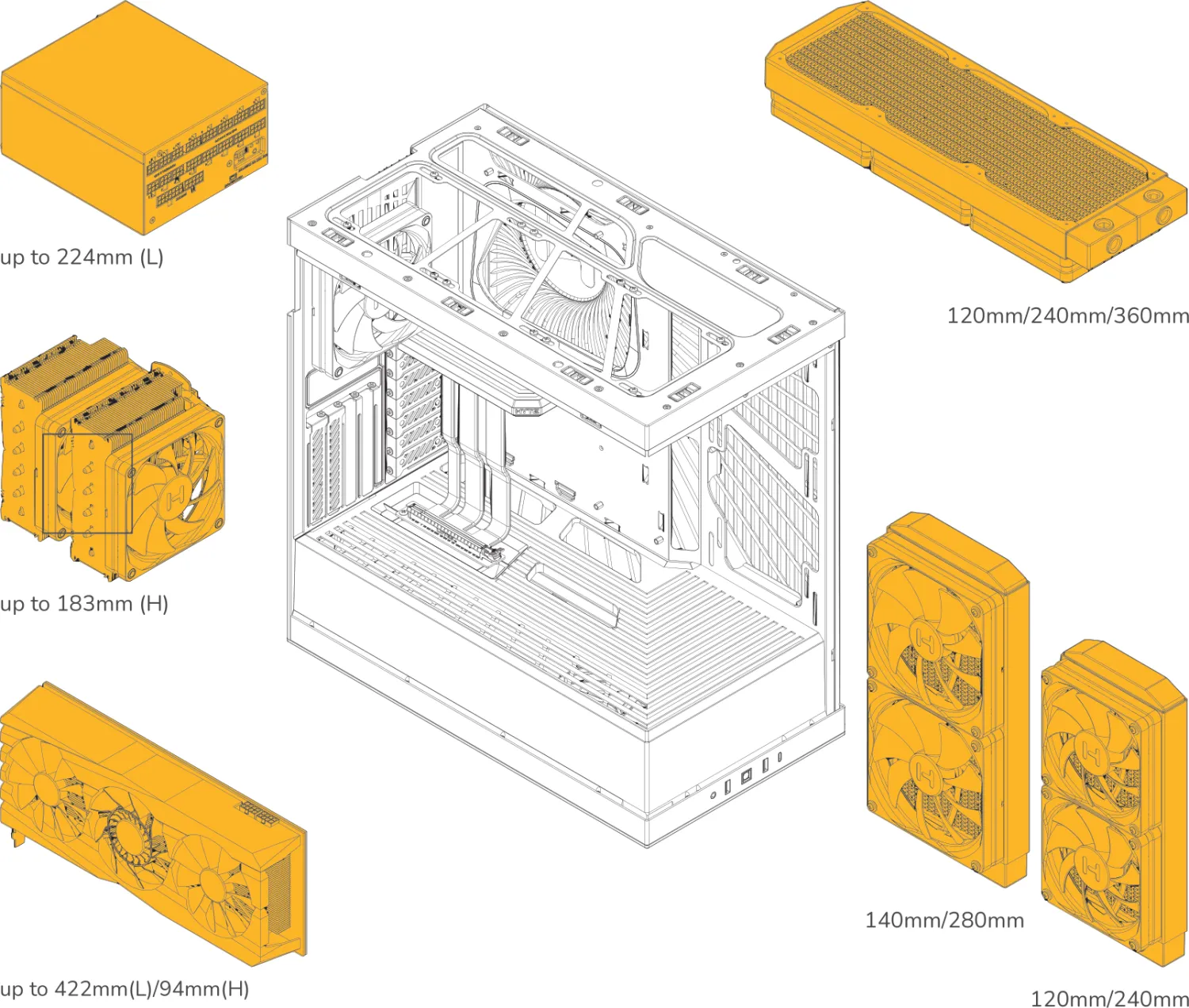
N/A front, 4.72/9.45/14.17in top, 4.72in rear, 4.72/5.51/9.45/11.02in right
Motherboard
up to ATX
Supported Motherboards
Mini-ITX (6.7"x6.7")/µATX (9.6"x9.6")/ATX (12"x9.6")
Power supply
ATX (max. 8.82in deep)
PSU position
bottom
CPU cooler
max. 7.20in height
Graphics cards
max. 16.61in
Lighting
without lighting
Dimensions (WxHxD)
9.45x18.58x17.28in
Volume
13.14gal
Weight
21.16lb
Case type
Midi-Tower
Front
closed, Glass
Top
partially closed, Mesh, mostly fan grille, Dust filter
Bottom
partially closed, mostly fan grille, Dust filter
Left
closed, Glass
Right
partially closed, Mesh, mostly fan grille, Dust filter
Rear
partially closed, fan grille top right, PCI-Slots (7x low profile horizontal, 4x vertical)
Front I/O Position
Case side: Front, Height: bottom, Position: center
Special features
incl. PCIe Riser Card (PCIe 4.0 x16), Cable management, Dust filter, Graphics card vertically mountable, Glass side panel
USB-Notation
Link
Product Description
Hyte Y40: A Stylish ATX Case for Clean Builds
The Hyte Y40 is a modern ATX computer case designed for builders who want a refined look without giving up practical space. From the first glance, it stands out with its glass-forward design and compact-yet-capable layout, making it a strong choice for gaming systems, creative workstations, and showcase builds. The Hyte Y40 Manual helps streamline the setup by organizing the included hardware and giving builders a straightforward path through assembly.
Inside the box, Hyte includes the essentials needed to get started: the case, instructions, a PC headset adapter, an accessory kit, screws for the motherboard, SSD, HDD, and power supply, a standoff socket, and zip ties for cable management. That thoughtful bundle matters because it reduces the need to hunt for extra parts during installation. It also makes the Y40 feel ready for a first-time build or an upgrade project.
What makes the Y40 especially appealing is its balance of visual presentation and component flexibility. The chassis is built to support common cooling and hardware arrangements, giving users room to plan around airflow, radiator placement, and large parts. For builders who care about a neat interior, the case layout can help produce a cleaner cable route and a more polished final result. Pair that with the included cable ties and the Y40 becomes a practical canvas for a tidy PC.
The case is also backed by a 3-year limited warranty, which adds extra confidence for long-term use. Still, the design calls for careful handling, especially around the glass panel. When the glass is removed, it should not bear weight on a corner, and the panel should be replaced before transporting the system. That kind of guidance is a reminder that premium materials deserve careful assembly and maintenance.
The Hyte Y40 Manual-style setup also appeals to builders who want a predictable installation process. With multilingual assembly notes and clear hardware labeling, the case is friendly to international users and anyone who prefers an organized approach. Whether the goal is a minimalist desktop, a themed gaming rig, or a showcase machine with visible lighting, the HYTE Y40 offers a polished foundation that is both attractive and usable.
Notes
- Check component clearance before buying large parts.
- Keep the glass panel secure during transport.
- Use the included accessories to simplify installation.
- Refer to the Hyte Y40 Manual for the cleanest build flow.
Search for 67,732 Manuals online


Type-in Brand or Model