
Hydor Mixo Manual
PDF manual · 36 Pages
English



Quick check
Incorrect answer, please try again.
Chat with your Hydor Mixo manual using AI
Get instant AI answers from your Hydor Mixo manual
Ask anything about the Hydor Mixo. Answers come from this manual, with the pages they are based on.
Ask a Question
Do you recommend Mixo?
Yes NoFrequently Asked Questions
You can program two independent feeding times per day. Each is shown by a FEED icon; programming exits automatically after 30 seconds of inactivity.
Is this answer helpful?
Yes. The timer must be reset every time batteries are removed or replaced. The BATTERY icon appears about a week before full discharge to warn you to change them.
Is this answer helpful?
Use dry foods such as flakes or granules only. Do not use live or frozen food. For flakes, removing the small pre-cut triangle on the blue regulator can improve distribution (this change is permanent).
Is this answer helpful?
Press the FISH button to test dispensing, then adjust the dosing outlet control until the amount matches what your fish can eat in about five minutes.
Is this answer helpful?
Yes. The feeder can be connected to an external air pump to ventilate the food. An internal system stops air flow automatically during dispensing to prevent overfeeding.
Is this answer helpful?
Clean the food compartment and the feed outlet regularly to avoid mold. If batteries fully discharge, clean the battery compartment and contacts carefully to remove any residue or acid.
Is this answer helpful?
The device has a 24-month warranty against manufacturing defects. The warranty excludes damage from misuse, lack of maintenance, frost or lime deposits. Dispose of the unit per local electronic waste regulations and recycling rules.
Is this answer helpful?
Advantages and Disadvantages
Advantages

- Reliable two-feed programmable timer with manual override.
- Adjustable dosing to tailor portions to fish appetite.
- Removable food compartment for easy refilling and cleaning.
- Optional air-pump connection to ventilate stored food.
- Simple installation for standard aquarium hoods (40x40 mm).
Disadvantages

- Requires reprogramming after every battery change.
- Not suitable for live or frozen food.
- Pre-cut regulator triangle removal is permanent.
- Battery operation requires replacement and risk of leakage.
- Placement must avoid condensation; needs good ventilation.
Product Specification
Category
Automation, Accessories
Type
Feeder (Flake food, Granules)
Specifications
3.04 fl oz capacity, 1x feeding chamber
Suitability
Freshwater, Saltwater
Power Source
2x AA Battery
Dimensions
5.91x2.99x2.36in (WxHxD)
Special Features
Digital timer, digitally adjustable feeding amount
Manufacturer's Warranty
two years
Product Description
Hydor Mixo Futterautomat Manual
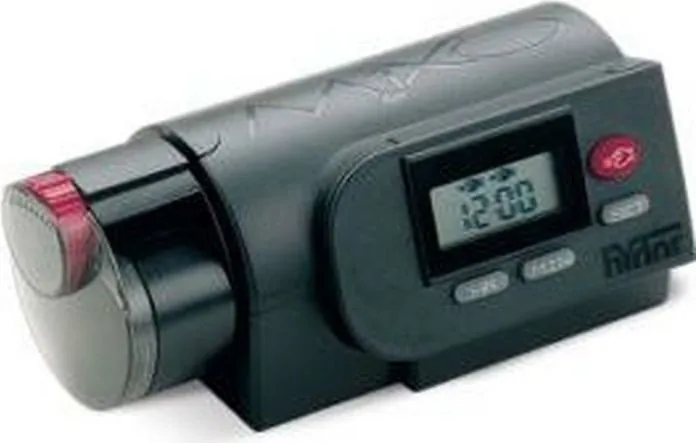
The Hydor Mixo automatic feeder (Hydor Mixo Futterautomat Manual) is a compact, battery-powered aquarium feeder designed for reliable, timed dispensing of dry fish food. Built around a user-friendly electronic timer and a simple mechanical dispenser, it lets aquarists program two daily feedings or deliver food manually when needed. Its modular design includes a removable food compartment, an adjustable dosing outlet, a motorized drive, and a battery compartment that takes two AA batteries.
Setting up the Hydor Mixo is straightforward: install two batteries, press SET to program the current time, then use HR and MIN to set two independent feeding times. Each programmed feed is shown by a FEED icon; programming exits automatically after 30 seconds of inactivity. Individual feed cycles can be temporarily disabled or re-enabled by selecting the corresponding FEED icon and toggling the FISH control. Manual feeding is immediate via the FISH button.
The feeder is optimized for dry foods such as flakes and granules — not for live or frozen feed. The dosing is adjustable at the feeding outlet so you can calibrate an amount your fish consume in about five minutes. For improved flake distribution, the device includes a small pre-cut triangle on the blue regulator that can be removed (permanently) to enhance flow. An optional air-pump connection helps ventilate stored food; a built-in system halts air flow during dispensing to avoid overfeeding.
Installation recommends positioning the unit on the aquarium hood above an opening at least 40 x 40 mm, avoiding placement over lights or accessories. The feeder should be mounted where air circulation reduces condensation risk. Fill the removable food chamber without compacting the flakes, secure it until it clicks into place, and fix the unit with the supplied adhesive tape if needed.
Maintenance is minimal but important: clean the food compartment and outlet regularly to prevent mold growth. Replace batteries when the BATTERY icon appears (about a week before depletion) and remember to reprogram the timer after battery changes. In case of fully discharged batteries, clean the battery compartment and contacts carefully to remove any residue.
Hydor backs the feeder with a 24-month warranty against manufacturing defects; the guarantee excludes damage from misuse, lack of maintenance, frost, lime deposits, or amateur repairs. At end of life, follow local electronic waste disposal regulations and recycle appropriately.
Notes:
- Use only dry flakes or granules; never live or frozen food.
- Reprogram the timer after every battery replacement.
- Keep the food chamber dry and ventilated to prevent mold.
- Remove the pre-cut blue regulator triangle only if needed — it cannot be replaced.
Pros and Cons
Pros:
- Reliable two-feed programmable timer with manual override.
- Adjustable dosing lets you tailor portions to fish appetite.
- Removable food compartment for easy refilling and cleaning.
- Optional air-pump connection to keep food ventilated.
- Simple installation fits standard aquarium hoods (40x40 mm hole).
Cons:
- Requires reprogramming after every battery change.
- Not suitable for live or frozen food types.
- Small pre-cut regulator piece, once removed, is permanent.
- Battery operation needs periodic replacement and can leak if neglected.
- Placement sensitive to condensation; needs good ventilation.
Search for 67,706 Manuals online


Type-in Brand or Model