
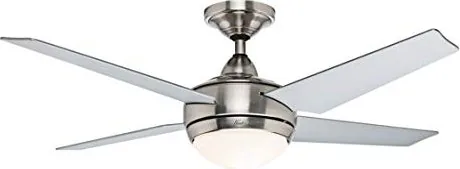
Hunter Sonic 52 Inch Manual
PDF manual · 44 Pages
English



Quick check
Incorrect answer, please try again.
Chat with your Hunter Sonic 52 Inch manual using AI
Get instant AI answers from your Hunter Sonic 52 Inch manual
Ask anything about the Hunter Sonic 52 Inch. Answers come from this manual, with the pages they are based on.
Sonic 52 Inch Maintenance Schedule
Use a soft brush or lint-free cloth. For heavy dust, use a vacuum cleaner nozzle. Remove smudges with mild detergent and damp cloth. Do not use abrasive agents.
Clean wood finish blades with a furniture polish cloth. Apply a light coat of furniture polish occasionally for added protection and beauty.
Ask a Question
Do you recommend Sonic 52 Inch?
Yes NoFrequently Asked Questions
The fan supports standard, angled (vaulted), concrete, and non-concrete ceilings. The manual provides distinct anchor and pilot‑hole instructions for concrete versus wood support structures and orientation guidance for angled mounts.
Is this answer helpful?
Yes. The hanger bracket includes an additional "L" terminal intended for a separate switched line to control the light kit independently if you provide a dedicated supply for that function.
Is this answer helpful?
Follow the manual labeling: earth/ground is green/yellow to the terminal marked with ground, neutral is blue to the terminal marked "N", and line is brown to the terminal marked "L". Always disconnect power before wiring and follow local electrical codes.
Is this answer helpful?
Install compact fluorescent (CFL) bulbs up to 20 watts maximum per socket as specified. Observe the warning to disconnect power and let bulbs cool before replacing; avoid touching the glass with bare fingers.
Is this answer helpful?
The Sonic series is designed for quiet operation and reduced vibration; rubber isolators, secure mounting, and correct blade installation help minimize noise. Ensure all hardware is tightened and blades are installed per instructions for best balance.
Is this answer helpful?
Key precautions: turn off circuit breakers to the outlet box and wall switch before wiring, do not lift the fan by its wires, prevent exposed bare wires after making connections, and use a qualified electrician if unfamiliar with wiring.
Is this answer helpful?
Typical tools noted include flat and Phillips screwdrivers, drill with 3.5 mm or masonry bit, wrench or pliers, hammer, tape measure, and SAE 7/16" socket or Allen wrench (included). Anchors, wood screws, washers, and supplied hangers are part of the kit.
Is this answer helpful?
Advantages and Disadvantages
Advantages

- 52" blade span delivers effective airflow for medium to large rooms.
- Trilobular™ ball-and-wedge mounting provides secure, vibration‑resistant support.
- Comprehensive installation guidance for concrete, angled, and standard ceilings.
- Wiring terminal block and plug connector simplify electrical connections.
- Extra "L" terminal enables independent light kit control when a separate line is present.
Disadvantages

- Light kit limited to CFL bulbs up to 20W, restricting choices for brighter LED options.
- Installation still requires careful wiring and may need a qualified electrician.
- Some steps require precise alignment and multiple small hardware pieces—can be time consuming.
- Pipe coating must not be removed; this can complicate adjustments after assembly.
- Manual is multi-language and dense—finding specific steps may take time for novices.
Product Specification
Operating Mode
Mains Operation (60W)
Blade Color
gray
Body Color
chrome
Speed Levels
3
Blade Diameter
51.97in
Number of Blades
4
Special Features
Lighting
Dimensions
51.97x16.10in (ØxH)
Product Description
Hunter Sonic 52" BE Ceiling Fan — Quiet Power and Easy Installation
The Hunter Sonic 52" BE Ceiling Fan combines a sleek 52-inch blade span with Hunter's reputation for reliable performance and whisper-quiet operation. Designed for residential living spaces, this fan balances airflow, energy efficiency, and refined styling. It includes features to simplify installation—clear multi-language instructions, canopy and hanger hardware, a Trilobular™ ball-and-wedge mounting system, and a light kit interface—so both standard and angled ceilings are supported.
What to expect from the Hunter Sonic 52" BE
This fan offers robust airflow from a 52" sweep, suitable for medium to large rooms. The motor and blade design are tuned to deliver strong circulation while minimizing noise and vibration. Installer-friendly details—rubber isolators, a guided ceiling plate, and keyed mounting slots—help align and stabilize the fan. The included wiring harness and terminal block speed electrical connections, and an extra "L" terminal allows separate light kit control if a dedicated supply is available.
Installation highlights
The manual walks the installer through preparation, mounting options (standard, angled, concrete vs. non-concrete ceilings), and step-by-step assembly: feed wires through the canopy and pipe, secure the hanger bracket, use expansion anchors or wood screws depending on substrate, seat the Trilobular™ ball over the wedge and secure with the positioning screw, then attach canopies and tighten assembly screws. The guide emphasizes safety: disconnect power prior to wiring, ensure no bare wires are exposed, and use a qualified electrician if unsure.
Operation and maintenance
Once installed, the fan offers multi-speed operation and a light kit option using CFL bulbs (max 20W). Routine care includes periodically checking hardware tightness, ensuring the pipe coating remains intact, and keeping blades and the light globe clean. Warnings stress not lifting the fan by its wires, not resting the fan on hard surfaces during assembly, and avoiding touch or direct view of a hot bulb when replacing lamps.
Notes:
- Supports both concrete and non-concrete ceilings with specific anchor and pilot-hole instructions.
- Angle-mount guidance directs orientation of the ceiling plate arrows toward the ceiling peak.
- Clear labeling for earth (green/yellow), neutral (blue/N), and line (brown/L) wires eases safe wiring.
Search for 67,732 Manuals online


Type-in Brand or Model