
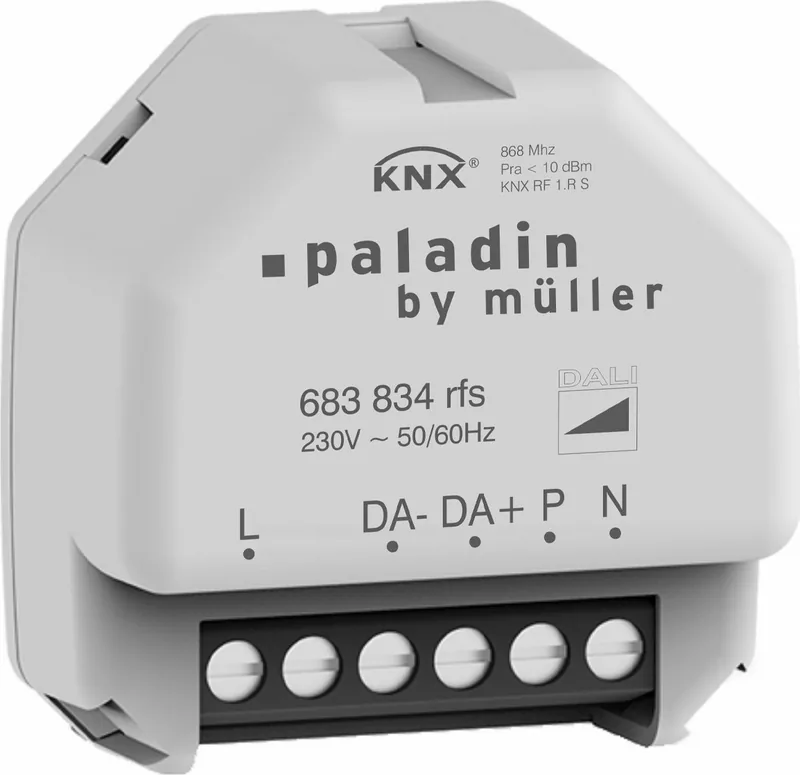
Hugo Muller Paladin 683 834 rfs KNX DALI Manual
PDF manual · 1 Pages
English


Quick check
Incorrect answer, please try again.
Chat with your Hugo Muller Paladin 683 834 rfs KNX DALI manual using AI
Get instant AI answers from your Hugo Muller Paladin 683 834 rfs KNX DALI manual
Ask anything about the Hugo Muller Paladin 683 834 rfs KNX DALI. Answers come from this manual, with the pages they are based on.
Ask a Question
Do you recommend Paladin 683 834 rfs KNX DALI?
Yes NoFrequently Asked Questions
The Hugo Muller Paladin 683 834 rfs can control up to 64 DALI drivers or ballasts on a single channel, making it highly efficient for large-scale lighting projects.
Is this answer helpful?
No, this is a wireless KNX RF solution. It is perfect for retrofitting existing setups because it does not require the installation of additional KNX bus cables.
Is this answer helpful?
Yes, you can store and recall up to five different scenes directly on the device using the ETS configuration software.
Is this answer helpful?
Absolutely. Due to hazardous voltage risks, installation must be performed only by trained electricians who follow all safety protocols regarding power disconnection.
Is this answer helpful?
Use ETS5 or newer software to download the product database and program the physical address and settings. The device uses LED indicators to show status during this process.
Is this answer helpful?
Metallic surfaces, microwave ovens, and other sources of interference can reduce range. To maximize distance, install away from these obstacles and use repeaters if necessary.
Is this answer helpful?
Advantages and Disadvantages
Advantages

- Supports up to 64 DALI drivers per channel
- No additional KNX bus cables needed for retrofits
- Configurable scenes and timing functions via ETS
- Bi-directional KNX-RF communication ensures reliability
- Compact design fits standard junction boxes
Disadvantages

- Requires a KNX to KNX RF S-Mode media coupler
- Installation restricted to qualified electricians only
- Radio range can be reduced by metallic objects
- Maximum of three repeaters allowed per installation
- Initial setup requires specific ETS software version
Product Specification
Type
Actor
Standard
KNX
Function
Dimming function, switching actor (on/off), repeater function
Topology
meshed
Dimensions
1.81x1.81x1.18 in
Features
IP20
Product Description
Hugo Muller Paladin 683 834 rfs KNX DALI Dimmer Overview
The Hugo Muller Paladin 683 834 rfs KNX DALI Dimmer represents a significant advancement in smart lighting control systems. Designed for seamless integration into modern buildings, this compact actuator allows for precise dimming of up to 64 DALI drivers or luminaires from a single channel. Its wireless KNX RF technology makes it an ideal choice for retrofitting existing installations without the need for extensive new bus cabling, saving both time and installation costs.
Key Features and Functionality
This device operates on standard 230V power and features bi-directional KNX-RF communication, ensuring reliable data exchange between the controller and the dimmer. The unit is configurable via ETS software, offering users flexibility in setting soft-on and soft-off times, defining minimum and maximum dimming levels, and storing up to five distinct scenes. Additional functionalities include a staircase lighting timer with optional pre-warning and an integrated cycle function. For larger installations, the built-in signal repeater can be activated to extend the radio range, though care must be taken to avoid interference from metal surfaces or microwaves.
Installation and Safety
Safety is paramount when installing electrical equipment. This dimmer must only be installed by qualified electricians who understand the risks of hazardous voltage. Before any work begins, the power supply must be disconnected and verified as safe. The device is designed for flush mounting in junction boxes and includes an optional external push-button input for local control. Once installed, commissioning requires connecting to the KNX bus via a media coupler and using ETS5 or higher to download the configuration. Visual indicators, such as the red and green LEDs, guide the user through the setup process, flashing during initialization and turning off upon successful programming.
Important Notes
- Always ensure the device is powered down before wiring.
- Use ETS5 or newer software for all configurations.
- Avoid placing the unit near strong electromagnetic interference sources.
- Connect the earth cable strictly according to the wiring diagram.
Search for 67,732 Manuals online


Type-in Brand or Model
optio_aut
4 months ago
Is ETS programming required for this DALI to KNX-RF converter, and what are the benefits compared to standard modes?
Manual.ly
4 months ago
Yes, using the S-Mode requires programming via ETS. The advantage is that it provides access to additional parameters that are not available in the standard E-Mode (Type 683 834 rf), offering greater flexibility for controlling DALI lights.