

Huawei Y6 (2019) Manual
PDF manual · 75 Pages
English



Quick check
Incorrect answer, please try again.
Chat with your Huawei Y6 (2019) manual using AI
Get instant AI answers from your Huawei Y6 (2019) manual
Ask anything about the Huawei Y6 (2019). Answers come from this manual, with the pages they are based on.
Ask a Question
Do you recommend Y6 (2019)?
Yes NoFrequently Asked Questions
It offers simple navigation, quick settings shortcuts, Face Unlock, and customizable home screen options. These features make basic tasks faster and help users keep the phone organized without much effort.
Is this answer helpful?
Yes. The phone includes panorama shooting, video capture, and a Pro mode with manual controls like ISO, shutter speed, focus, and white balance. This gives users more creative control over their images.
Is this answer helpful?
Yes. App Lock lets you set a password for selected apps such as messaging or payment tools. This adds an extra layer of privacy if someone else uses your phone or if the device is unlocked.
Is this answer helpful?
Use Phone Manager for cleanup, optimization, and battery management. Clearing cache, limiting background data, and checking storage regularly can help the device stay responsive over time.
Is this answer helpful?
Use battery optimization, storage cleanup, and data-saving tools in the phone manager. You can also turn off mobile data when not needed and connect to Wi‑Fi to reduce usage costs.
Is this answer helpful?
Yes. You can move files through Bluetooth, USB, Wi‑Fi Direct, or NFC on supported versions. These options make sharing photos, documents, and contacts convenient across devices.
Is this answer helpful?
It supports several transfer methods such as Bluetooth, USB, Wi-Fi Direct, and on some variants NFC. These options make it easy to move photos, contacts, and documents between devices.
Is this answer helpful?
Advantages and Disadvantages
Advantages

- Quick Face Unlock and handy shortcut toggles make daily use fast and simple.
- Camera features include panorama and Pro mode for more control over photos.
- App Lock, screen lock, and privacy tools help protect personal data.
- Home screen, widgets, and app drawer options allow flexible customization.
- Battery, storage, and data-saving tools help keep the phone running smoothly.
Disadvantages

- Some functions depend on carrier support or specific device variants.
- Advanced camera settings may feel overwhelming for casual users.
- Public Wi‑Fi use still requires caution because of possible security risks.
- Performance benefits depend on regular cleanup and good storage management.
- Factory reset and some cleanup actions can remove data permanently if misused.
Product Specification
Operating System
Android 9.0 (stock)
Display
6.09", 1560x720 pixels, 16 million colors, IPS, capacitive touchscreen, flat, notch, 282ppi
Rear Camera
13.0MP, f/1.8, Contrast AF, LED flash, Videos @1080p/30fps
Front Camera
8.0MP, LED flash
Interfaces
USB Micro-B 2.0 (OTG), 3.5mm jack, Wi-Fi 4 (WLAN 802.11b/g/n), Bluetooth 4.2
Sensors
Accelerometer, Proximity sensor, Light sensor
SoC
Mediatek MT6761 Helio A22, 64bit
CPU
4x 2.00GHz Cortex-A53
GPU
PowerVR GE8300
RAM
2GB
Storage
32GB, microSD slot (dedicated, up to 512GB)
Navigation
A-GPS, GLONASS, BeiDou
Modem
GSM (0.2Mbps/0.1Mbps), UMTS, LTE
Frequency Bands
2G (850/900/1800/1900), 3G (B1/B2/B5/B8), 4G (B1/B3/B5/B7/B8/B20)
Battery
3020mAh, non-removable
Standby Time
538h/499h/606h (GSM/UMTS/LTE)
Talk Time
35h/22h (GSM/UMTS)
SAR Value
0.29W/kg Head, 1.05W/kg Body
Form Factor
Bar
Housing Material
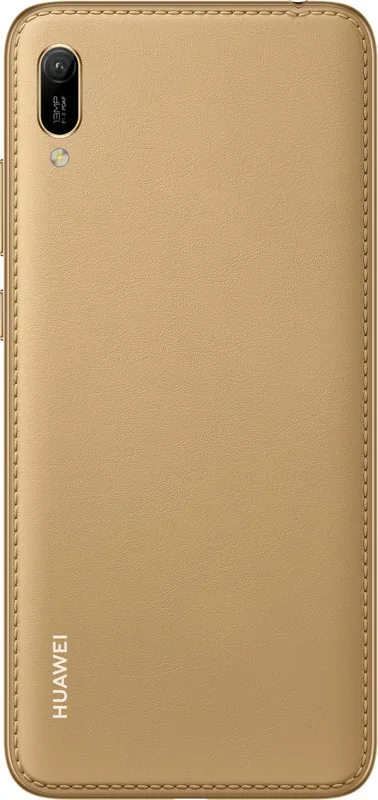
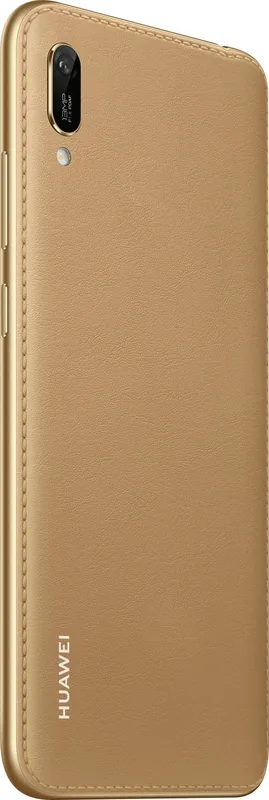
Plastic (back), Plastic (frame)
SIM Form Factor
Nano-SIM
Dimensions
6.16x2.89x0.31in
Weight
0.33 lb
Screen-to-Body Ratio
79.3%
Product Description
Huawei Y6 (2019): a Practical Everyday Smartphone with the Huawei Y6 (2019) Manual
A compact device built for daily routines
The Huawei Y6 (2019) is presented as a friendly, easy-to-use smartphone that focuses on the essentials while still offering a surprisingly broad set of smart features. Based on the Huawei Y6 (2019) Manual, it is designed for people who want a straightforward phone for calling, messaging, photos, and social apps, but also appreciate extra convenience tools that make the device feel more polished.
Smart convenience in a simple package
One of the standout ideas in this phone is effortless access. Face Unlock can be set up for quick screen access, while shortcut switches in the notification shade help users turn Wi‑Fi, mobile data, and other common functions on or off in seconds. The home screen can also be customized with widgets, app folders, wallpapers, and an App Drawer layout, making it easier to keep the interface clean and organized.
Camera tools for more creative shots
The camera section shows that the Huawei Y6 (2019) is more than a basic point-and-shoot device. It supports standard photography, panorama shots, and a Pro mode for users who want to adjust ISO, shutter speed, white balance, and focus manually. That makes it appealing for casual users who want better photos, as well as hobbyists who enjoy experimenting with image settings. Panorama is especially useful for landscapes, while Pro mode gives more control over portraits and low-light scenes.
Built-in privacy, connectivity, and productivity features
The phone also includes several practical tools for everyday life. App Lock helps protect important apps, and options like screen recording, TalkBack, notes, calendar, email, and contact management make the device useful beyond simple communication. Connectivity is equally flexible, with support for Wi‑Fi, Bluetooth, USB transfer, hotspot sharing, and in some variants NFC. For users who care about efficiency, the storage cleaner, data saver tools, and battery optimization features are valuable additions.
A balanced choice for simple and secure use
Overall, the Huawei Y6 (2019) feels like a budget-friendly phone that tries to cover a lot of ground without becoming complicated. It is most attractive to users who want dependable daily performance, clear navigation, and useful privacy controls. If you value practical features over flashy specs, this model offers a solid mix of comfort, control, and personalization.
Notes
- Some advanced functions may vary by device version or region.
- NFC is only supported on specific variants.
- Public Wi‑Fi should be used carefully for privacy reasons.
Search for 67,706 Manuals online


Type-in Brand or Model