


HPE Aruba 2615-8-PoE Manual
PDF manual · 96 Pages
English



Quick check
Incorrect answer, please try again.
Chat with your HPE Aruba 2615-8-PoE manual using AI
Get instant AI answers from your HPE Aruba 2615-8-PoE manual
Ask anything about the HPE Aruba 2615-8-PoE. Answers come from this manual, with the pages they are based on.
Ask a Question
Do you recommend Aruba 2615-8-PoE?
Yes NoFrequently Asked Questions
Simultaneously press Reset and Clear buttons until lights flash. Hold Clear while releasing Reset until Self Test LED flashes.
Is this answer helpful?
Yes, up to 16 can be connected and managed through a single Commander IP address.
Is this answer helpful?
Use Category 5e or better unshielded twisted-pair cable complying with IEEE 802.3ab standards.
Is this answer helpful?
Yes, ports 1 through 8 support IEEE 802.3af Power over Ethernet technology.
Is this answer helpful?
Use the included cable tie to secure the adapter to the switch back panel.
Is this answer helpful?
Advantages and Disadvantages
Advantages

- Supports Power over Ethernet for up to 15.4 watts per port.
- Auto-MDIX feature allows use of standard straight-through cables.
- Includes console, Web browser, and Telnet for management access.
- Flexible mounting options include rack, wall, and horizontal surfaces.
- Dual-personality uplink ports support fiber or copper connections.
Disadvantages

- Requires external AC/DC power adapter for operation.
- No fan cooling may limit performance in very hot environments.
- Fixed power budget of 67 watts may restrict many high-power devices.
Product Specification
Function
Switch
Type
Standalone, Rackmount (via mounting bracket), Wall-mounted (via mounting bracket)
Network Ports
8x RJ-45, 2x RJ-45/SFP
Speeds
8x RJ-45 (10/100Base-T), 2x RJ-45 (10/100/1000Base-T), 2x SFP (100M/1Gb/s)
PoE
8x RJ-45 PoE (8x 15.4W), total: 67W
Backplane
5.6Gb/s, 4.1Mp/s, 512kB packet buffer, 8k MAC addresses
Officially Supported Standards
802.1AX, 802.1AB, 802.1D, 802.1Q, 802.1X, 802.1p, 802.1s, 802.1w, 802.3, 802.3ab, 802.3af, 802.3u, 802.3x, IGMPv3, MLDv2
Configuration
Web interface, Console, serial (RJ-45)
Cooling
Passive
Dimensions (WxHxD)
10.00x1.77x6.30 inches, 1U
Weight
3.66 lbs
Color
black/light grey
Features
Metal housing, removable mounting brackets, firmware updates possible, external power supply
Manufacturer Warranty
lifetime (10 years in AT/DE)
Note
For this device, "link aggregation" was officially specified with the obsolete standard IEEE802.3ad. Since 2008, this function has been managed not by the IEEE "Working Group 3" (IEEE 802.3, CSMA/CD - Ethernet) but by the "Working Group 1" (IEEE 802.1, High Level Interface - Internetworking) and is technically unchanged via IEEE 802.1AX.
Product Description
Boost Your Small Office Network with the HPE Aruba 2615 Desktop Managed Switch
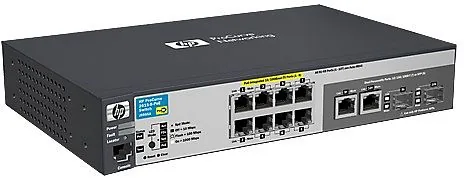
The HPE Aruba 2615 Desktop Managed Switch revolutionizes how small office networks operate. Designed for seamless integration, this device offers eight auto-sensing RJ-45 ports that support 10/100Base-TX speeds. Every port includes Power over Ethernet capability, allowing you to connect IP phones and wireless access points without additional power sources. This convenience eliminates clutter and simplifies installation significantly. Whether you are powering a VoIP phone or a surveillance camera, the internal power supply ensures stable delivery. Each port can provide up to 15.4 watts of power to connected devices effectively. Managing the network is effortless thanks to multiple interface options. Users can access settings via a console port or utilize simple web browser tools for remote configuration. The built-in management software enables quick setup of VLANs and security protocols. This flexibility ensures that both beginner and advanced administrators can maintain optimal performance without complex learning curves.
Installation is equally straightforward, supporting wall, rack, or desktop mounting. The compact design fits any space while maintaining robust airflow for cooling without fans. Network cabling flexibility is another highlight. Auto-MDIX technology removes the need for crossover cables, allowing straight-through connections for most scenarios. This reduces wiring errors during setup. Dual-personality uplink ports provide options for Gigabit fiber or copper connections, ensuring high-speed backbone capacity to connect to other networks or servers. When issues arise, LED indicators guide troubleshooting effectively. Status lights show link presence, speed, and power delivery status instantly to diagnose problems quickly. This proactive feedback allows for rapid response to potential network failures. The self-test process takes approximately 50 seconds to ensure hardware integrity upon power up.
Reliability is paramount in business environments. The switch features built-in spanning tree protocols to prevent loops and protect data flow. Safety mechanisms ensure the unit protects against electrical faults. With a total power budget, the system supports multiple powered devices simultaneously. Physical dimensions make it portable, weighing less than three pounds. You can easily move it between locations. Category 5 or better cables are recommended for optimal Gigabit speeds if utilizing the uplinks. It connects easily using standard power cords compatible with various voltage regions.
Whether placed on a desk or mounted in a cabinet, this switch delivers consistent uptime. It supports industry standard cabling like Category 5 and better. The device ensures secure communications within your enterprise. By combining power and data over existing infrastructure, you save money on electrical outlet requirements. This solution is ideal for growing businesses needing a reliable core device. The HPE Aruba 2615 Desktop Managed Switch, 8x RJ-45, PoE Manual proves to be a versatile tool for modern networking needs and reliable deployment. It allows for stacking up to sixteen switches to manage a larger infrastructure under a single IP address for simplified control and management across the entire network segment.
Search for 67,732 Manuals online


Type-in Brand or Model