

HPE Aruba ProCurve 2510G 48 Manual
PDF manual · 96 Pages
English



Quick check
Incorrect answer, please try again.
Chat with your HPE Aruba ProCurve 2510G 48 manual using AI
Get instant AI answers from your HPE Aruba ProCurve 2510G 48 manual
Ask anything about the HPE Aruba ProCurve 2510G 48. Answers come from this manual, with the pages they are based on.
Ask a Question
Do you recommend ProCurve 2510G 48?
Yes NoFrequently Asked Questions
Connect network cables to the 44 fixed RJ-45 ports or install mini-GBICs in the four dual-personality slots for fiber connections. Ensure cables meet Category 5e standards for gigabit speeds. Plug the power cord into a grounded outlet; the switch powers on automatically.
Is this answer helpful?
No, only genuine HP mini-GBICs are supported. Using third-party modules may result in product malfunction, loss of warranty coverage, or failure to establish a link. Always verify compatibility before purchasing accessories.
Is this answer helpful?
If a fan fails, the Fan Status LED will flash and the Fault LED will also blink. The switch may continue operating if ambient temperatures remain normal, but it should be replaced soon to prevent overheating and hardware damage.
Is this answer helpful?
Press and hold the Clear button on the front panel for at least one second while the switch is powered on. This action deletes all configured passwords and restores console access, allowing you to set a new manager password.
Is this answer helpful?
Yes, the switch supports stacking up to 16 units. You can manage all stacked switches through a single Commander IP address using Telnet or a web browser, simplifying network administration and reducing management overhead.
Is this answer helpful?
For 1000 Mbps operation, use Category 5e or better unshielded twisted-pair (UTP) or shielded twisted-pair (STP) cables. All four wire pairs must be connected and compliant with IEEE 802.3ab standards to ensure stable gigabit performance.
Is this answer helpful?
The self-test process takes approximately 50 seconds after the switch is powered on. During this time, the Test LED remains on. If the Fault or Test LEDs stay on longer than 60 seconds, there may be a hardware issue requiring troubleshooting.
Is this answer helpful?
Advantages and Disadvantages
Advantages

- Supports 44 fixed 10/100/1000Base-T ports plus 4 dual-personality SFP/RJ-45 ports
- Auto-MDIX feature removes need for crossover cables during installation
- Multiple management options including console, web browser, and SNMP
- Stacking support allows up to 16 switches to be managed centrally
- Universal power supply accepts 100-240V without manual configuration
Disadvantages

- Non-genuine HP mini-GBICs may cause malfunction or unsupported operation
- Fan failure triggers alerts but does not stop operation, risking overheating
- Fixed full-duplex configurations on connected devices can cause link issues
- Requires Category 5e or better cabling for reliable 1000 Mbps speeds
- Console setup requires manual IP configuration unless DHCP is used
Product Specification
Function
Switch
Type
Standalone, Rackmount (via mounting bracket)
Network ports
44x RJ-45, 4x RJ-45/SFP
Speeds
48x RJ-45 (10/100/1000Base-T), 4x SFP (100M/1Gb/s)
PoE
N/A
Backplane
96Gb/s, 71.4Mp/s, 9KB Jumboframes, 1.5MB packet buffer, 8K MAC addresses
Officially supported standards
802.1AX, 802.1AB, 802.1Q, 802.1X, 802.1p, 802.1s, 802.3, 802.3ab, 802.3u, 802.3x, IGMPv3
Configuration
Web interface, Console, Configuration software, serial (RJ-45)
Cooling
Active, 3 fans
Dimensions (WxDxH)
17.44x1.77x12.72 inches, 1U
Weight
8.60 lbs
Color
Dark gray, Light gray
Features
Metal housing, removable mounting brackets, firmware updates possible
Manufacturer warranty
Lifetime (10 years in Austria/Germany)
Note
For this device, link aggregation was officially specified with the obsolete standard IEEE802.3ad. The function has been managed since 2008 not by the IEEE Working Group 3 (IEEE 802.3, CSMA/CD - Ethernet) but by Working Group 1 (IEEE 802.1, High Level Interface - Internetworking) and is technically unchanged defined via IEEE 802.1AX.
Product Description
HPE Aruba ProCurve 2510G 48 Rackmount Gigabit Managed Switch Review
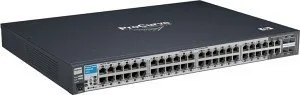
The HPE Aruba ProCurve 2510G 48 is a robust networking solution designed for small to medium-sized businesses requiring high-performance connectivity. This rackmount gigabit managed switch features 44 fixed RJ-45 ports and four dual-personality ports that can function as either additional RJ-45 connections or SFP slots for fiber optic uplinks. The device serves as an ideal wiring closet or desktop switch, providing dedicated bandwidth to connected computers, printers, and servers.
One of the standout features of this switch is its plug-and-play capability. All ports are enabled by default, allowing immediate network operation upon connection. The Auto-MDIX feature eliminates the need for crossover cables, as the switch automatically detects the cable type and configures the port accordingly. This simplifies installation significantly for IT staff managing complex networks.
Management flexibility is another key advantage. Administrators can configure the switch through multiple interfaces including a console port for direct access, a web browser interface for graphical management, or HP Manager software for SNMP-based control. The switch supports up to 64 VLANs, enabling logical segmentation of network traffic to enhance security and performance. Spanning Tree Protocol support ensures loop-free topologies in redundant network designs.
Physical installation is straightforward with included mounting brackets for standard 19-inch racks or cabinets. The unit also includes rubber feet for horizontal surface placement. Cooling is managed through internal fans with status LEDs to alert users of any potential failures. The power supply is universal, accepting voltages between 100 and 240 volts without manual adjustment.
For fiber connectivity, the four dual-personality ports accept mini-GBIC transceivers such as Gigabit-SX, Gigabit-LX, and Gigabit-LH modules. These allow for long-distance connections using single-mode or multimode fiber optics. When a mini-GBIC is installed, the corresponding RJ-45 port is automatically disabled to prevent conflicts. Hot-swapping of these modules is supported, allowing changes without powering down the system.
Key Notes
- The switch performs a self-test upon power-up that takes approximately 50 seconds.
- LED indicators provide real-time status on power, faults, activity, and speed.
- Stacking capabilities allow up to 16 switches to be managed via a single IP address.
- A Clear button allows password recovery if access is lost.
- Factory defaults can be restored using a specific Reset and Clear button sequence.
Search for 67,706 Manuals online


Type-in Brand or Model